
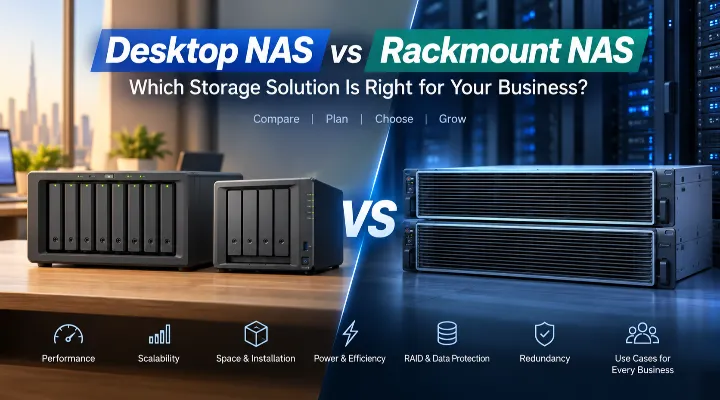
Choosing the right network-attached storage (NAS) system is an important decision for businesses that need secure file storage, centralized backups, surveillance recording, collaboration, and reliable access to data. Synology offers NAS systems in both desktop and rackmount formats, giving businesses options for everything from a small office to a large enterprise environment.
But which one should you choose?
A desktop NAS such as the Synology DS425+ or DS1825+ can provide substantial storage capacity without requiring a dedicated server rack. A rackmount system such as the RS1221RP+, RS3626xs, or RS6426xs+ is designed for organizations that need higher scalability, rack-based deployment, and, in some models, redundant power and enterprise-oriented capabilities.
This guide compares desktop and rackmount Synology NAS systems based on performance, scalability, space, power, RAID, redundancy, and practical business use cases.
What Is a Desktop NAS?
A desktop NAS is a compact storage system designed to sit on a desk, shelf, cabinet, or other suitable surface. It connects to the business network and provides centralized access to files, backups, applications, and other services.
Desktop NAS systems are particularly useful for small and medium-sized offices where there may be no dedicated server room or rack infrastructure.
Examples of Synology Desktop NAS Models
Some desktop models available in the current range include:
- Synology DS425+ – 4-bay desktop NAS
- Synology DS1825+ – 8-bay desktop NAS with 2.5GbE
- Synology DS3622xs+ – 12-bay desktop NAS with Xeon D-1531 processor
- Synology DS925+ – 4-bay desktop NAS
- Synology DS1525+ – desktop NAS
- Synology DS725+ – compact desktop NAS
- Synology DS223 and DS223j – entry-level 2-bay solutions
The number of drive bays is one of the most important differences between these systems. More bays allow a business to install more drives and create larger storage pools while also providing greater flexibility for RAID configurations.
What Is a Rackmount NAS?
A rackmount NAS is designed to be installed inside a standard server rack. Instead of sitting on a desk, the system occupies one or more rack units, depending on the model.
Rackmount NAS systems are generally better suited to organizations with dedicated IT infrastructure. They can be installed alongside servers, switches, firewalls, UPS systems, and other equipment.
Examples of Synology Rackmount NAS Models
The current range includes several rackmount options:
- RS1619xs+ – 1U, 4-bay system expandable to 16 bays
- RS1626xs+ – 1U, 4-bay system
- RS1221RP+ – 8-bay rackmount NAS with dual power supplies
- RS3621RPxs – rackmount solution
- RS3626xs – 2U, 12-bay system
- RS2825RP+ – rackmount solution
- RS6426xs+ – 3U, 16-bay system with Xeon D-1739 and 16GB RAM
Rackmount systems are especially attractive when storage needs are growing rapidly or when an organization already operates a server rack.
Desktop NAS vs Rackmount NAS: Key Differences
Both types of NAS can provide centralized storage and backup capabilities, but their physical design and intended environments are different.
1. Performance
Performance depends on much more than whether a NAS is desktop or rackmount. The processor, RAM, network interfaces, storage drives, RAID configuration, and workload all have an impact.
For example, the DS1825+ combines an 8-bay design with 2.5GbE connectivity, making it an interesting choice for businesses handling larger file transfers.
The DS3622xs+ goes further with a Xeon D-1531 processor, 16GB RAM, and 12 drive bays. It can be better suited to demanding multi-user environments where a large number of users and services need to operate simultaneously.
Rackmount systems can offer higher-end hardware and greater expansion options. The RS3626xs, for example, features a Xeon D-1726 processor and 12 bays, while the RS6426xs+ uses a Xeon D-1739 8-core processor, 16GB RAM, and 16 bays.
Which Is Better?
For basic file sharing, backup, and office applications, a desktop NAS may provide more than enough performance.
For larger organizations with demanding workloads, numerous users, multiple applications, or extensive storage requirements, a rackmount system can be the more appropriate choice.
2. Scalability
Storage requirements rarely remain the same for years.
A business may start with a few terabytes of data but eventually accumulate documents, databases, project files, surveillance recordings, media, and backups.
Desktop NAS systems with more drive bays can offer excellent scalability. An 8-bay DS1825+, for example, gives a business considerably more room to expand than a 2-bay NAS.
Synology also offers expansion units such as the DX517 and DX525, depending on compatibility with the NAS model.
Rackmount systems can be even more suitable for organizations planning large-scale storage deployments.
For example, moving from a 4-bay rackmount system to a 12- or 16-bay platform can provide significantly greater capacity without having to manage numerous separate desktop NAS units.
Best Choice for Growing Storage Needs
Choose a higher-bay desktop NAS if you want substantial capacity without rack infrastructure.
Choose rackmount if storage growth is expected to be significant and your business already has a professional server room.
3. Space and Installation
This is one of the biggest practical differences.
A desktop NAS requires a suitable surface and network connection. It can be installed in an office, IT cabinet, or secure storage area without needing a server rack.
This makes desktop systems convenient for:
- Small offices
- Retail businesses
- Professional firms
- Startups
- Branch offices
- Small media teams
Rackmount NAS systems require rack space. A 1U, 2U, or 3U system occupies dedicated space within a server cabinet.
For a Dubai business with an established server room, this may not be an issue. For a small office without rack infrastructure, however, a desktop NAS can be considerably easier to deploy.
4. Power and Cooling
Power consumption is another factor businesses should consider.
A compact desktop NAS can be an efficient solution when storage requirements are moderate. However, the actual power consumption will depend on the NAS model, installed drives, workload, network activity, and other factors.
Rackmount systems can accommodate more drives and higher-performance hardware, which can increase power and cooling requirements.
A server room should therefore have appropriate:
- Air conditioning
- Ventilation
- UPS protection
- Power distribution
- Environmental monitoring
For a small office, installing a large rackmount system without considering these requirements may be unnecessary.
RAID and Data Protection
RAID is an important consideration when choosing a NAS for business use.
RAID can provide redundancy against drive failure, depending on the configuration, but it should not be treated as a replacement for backup.
For example, a business using several drives could configure a suitable RAID level to maintain access to data if a drive fails. The appropriate configuration depends on the number of drives, required capacity, performance requirements, and acceptable level of redundancy.
Desktop NAS RAID Example
Imagine a small design company using a 4-bay DS425+.
Instead of relying on a single large drive, the company could use multiple drives in an appropriate RAID configuration. If one drive fails, the organization may be able to replace the failed drive and rebuild the storage array without losing access to the entire dataset.
Rackmount RAID Example
A larger organization using a 12-bay RS3626xs could have more flexibility when designing its storage architecture.
With more drive bays, businesses can balance usable capacity, performance, and redundancy according to their workload.
Regardless of the NAS type, businesses should maintain separate backups of important information.
Redundancy: Where Rackmount NAS Has an Advantage
Redundancy becomes increasingly important as NAS systems become critical to daily operations.
The RS1221RP+, for example, is equipped with dual power supplies. This can provide an additional layer of power redundancy for organizations where storage availability is particularly important.
A business operating a critical file server may not want a single power supply failure to take the entire storage system offline.
Rackmount deployments can also be integrated into a broader infrastructure that includes:
- UPS systems
- Backup servers
- Multiple network switches
- Redundant networking
- Server virtualization
- Off-site backup
- Disaster recovery systems
This makes rackmount NAS particularly attractive for organizations with more demanding availability requirements.
Which NAS Is Better for Surveillance?
Surveillance systems can generate large amounts of data, particularly when multiple cameras are recording continuously.
A small business with a limited number of cameras may be able to use a suitable desktop NAS, provided the model and configuration meet its surveillance requirements.
For larger installations with many cameras and long retention periods, a higher-capacity NAS can be more practical.
Practical Example
Consider a Dubai retail business with multiple branches and several security cameras.
The business may need to retain recordings for weeks or months. As video accumulates, storage requirements can grow quickly.
A higher-bay NAS can provide more capacity, while a rackmount model may make sense when surveillance storage is part of a larger server-room infrastructure.
Which NAS Is Better for Media Teams?
Video production, photography, architecture, advertising, and creative agencies often work with very large files.
A team editing high-resolution video, for example, can quickly consume several terabytes of storage.
For a small creative team, the DS1825+ can be an attractive option because its 8-bay design provides considerable storage flexibility and 2.5GbE networking can help with larger file transfers when the rest of the network is appropriately configured.
For a larger production company with extensive archives and many users, a 12- or 16-bay rackmount solution may be more suitable.
Which NAS Is Better for Offices?
For a typical office that primarily needs:
- Shared folders
- Employee file storage
- Centralized backups
- Document management
- Basic collaboration
- Business data protection
a desktop NAS is often the simplest solution.
A 4-bay system such as the DS425+ can provide a good balance between capacity and physical size.
For an office with significantly more users or data, moving to an 8- or 12-bay desktop model can provide additional capacity without requiring rack installation.
Which NAS Is Better for Enterprise Environments?
Enterprise environments often have different priorities.
Storage may need to support hundreds of users, virtualization workloads, databases, surveillance, large-scale backups, and multiple business applications.
In these environments, rackmount NAS systems have several practical advantages:
- Designed for rack-based IT infrastructure
- Greater storage capacity on larger models
- Easier integration with server-room equipment
- More suitable for centralized enterprise deployments
- Availability-focused options such as redundant power supplies on supported models
- Greater potential for expansion
Models such as the RS3626xs and RS6426xs+ are therefore worth considering for organizations with more demanding storage requirements.
Desktop NAS or Rackmount NAS: Which Should You Choose?
There is no single NAS that is perfect for every business.
Use a desktop NAS when:
- You have a small or medium-sized business.
- You do not have a server rack.
- Storage requirements are moderate.
- You want a straightforward installation.
- You need centralized file storage and backup.
- You want to minimize infrastructure complexity.
Consider a rackmount NAS when:
- Your business already has a server rack.
- Storage requirements are large or growing quickly.
- Many users need simultaneous access.
- You operate demanding applications.
- You need higher storage density.
- Redundant infrastructure is important.
- Your IT team manages a dedicated server room.
A Simple Buying Approach for UAE Businesses
Before purchasing a Synology NAS, consider these five questions:
1. How much storage do you need today?
Calculate the amount of data you currently have, including existing files and backups.
2. How fast will your data grow?
If your business adds several terabytes each year, choose a system with enough drive bays and expansion potential.
3. How many users will access it?
A NAS used by five employees has very different requirements from one serving dozens or hundreds of users.
4. Where will you install it?
If you do not have a server rack, a desktop NAS can simplify deployment. If you already operate a rack, a rackmount model may be more appropriate.
5. How important is uptime?
For business-critical storage, consider RAID, backup, UPS protection, redundant power where available, and a broader disaster recovery strategy.
Final Verdict
The choice between a desktop NAS and rackmount NAS ultimately depends on your business size, workload, storage requirements, infrastructure, and future growth.
Desktop Synology NAS systems such as the DS425+ and DS1825+ are practical choices for offices and growing businesses that want centralized storage without the complexity of a server rack. Higher-capacity desktop models such as the DS3622xs+ can also serve demanding workloads while maintaining a desktop-style form factor.
Rackmount models such as the RS1221RP+, RS3626xs, and RS6426xs+ are better suited to businesses with dedicated IT infrastructure and larger storage or availability requirements. They can provide high storage density and fit naturally into professional server-room environments.
For a small office in Dubai, a compact desktop NAS may be the smarter investment. For a growing enterprise with a dedicated server room, a rackmount solution may provide the scalability and infrastructure integration needed for the long term.
The key is to choose based on your actual workload today while allowing enough room for tomorrow's data.
Frequently Asked Questions
1. Is a desktop NAS better than a rackmount NAS?
Neither is universally better. A desktop NAS is generally easier to install and suitable for offices without server racks, while rackmount NAS systems are better suited to larger IT environments requiring greater storage density and scalability.
2. Can a desktop Synology NAS be used for business?
Yes. Suitable Synology desktop NAS systems can be used for centralized file storage, backups, collaboration, surveillance, and other business workloads, depending on the model and requirements.
3. Is RAID a backup?
No. RAID can help protect against certain drive failures, but it does not replace a proper backup strategy. Businesses should maintain additional backups, preferably following a suitable 3-2-1 backup approach.
4. When should a business choose a rackmount NAS?
A rackmount NAS is worth considering when a business already has server-rack infrastructure, requires large storage capacity, has many users or demanding workloads, or needs features such as redundant power on supported models.
5. Can Synology NAS storage be expanded?
Many Synology NAS systems support expansion options, but compatibility depends on the specific NAS and expansion unit. Synology expansion products such as the DX517 and DX525 can be considered where supported.
Conclusion
A NAS is more than just a place to store files. For modern businesses, it can become a central platform for data management, backup, collaboration, surveillance, and business continuity.
Desktop NAS systems offer simplicity and flexibility, while rackmount NAS systems provide a better fit for larger and more structured IT environments. By considering storage capacity, performance, RAID, redundancy, power, installation space, and future growth, businesses can select a Synology solution that fits their operational needs.
For organizations in Dubai and across the UAE, the right choice is ultimately the system that delivers enough capacity and performance today while leaving sufficient room for future growth.
