
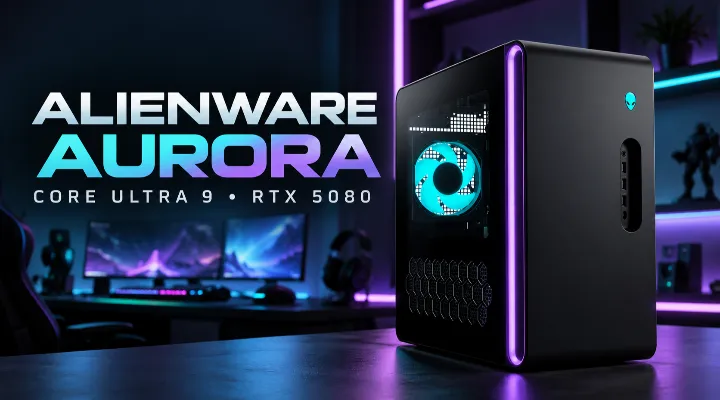
Choosing a high-performance desktop is important for gamers, content creators, streamers, and professionals who need reliable computing power for demanding applications. The Dell Alienware Aurora Gaming Desktop with Intel Core Ultra 9 285K is designed for users who want powerful processing, advanced graphics, fast storage, and a premium gaming experience in one system.
With a configuration featuring 32GB RAM, a 2TB SSD, and an NVIDIA GeForce RTX 5080 16GB graphics card, this Alienware Aurora desktop offers an impressive hardware foundation for modern gaming, creative production, and intensive multitasking. It combines Intel's latest-generation desktop processor technology with Alienware's gaming-focused design.
For customers in Dubai and across the UAE, this desktop can be a suitable option for building a powerful gaming setup, upgrading a creative workstation, or equipping a professional environment that requires high graphics performance.
In this guide, we explore the key specifications, practical benefits, gaming capabilities, and important considerations when choosing the Dell Alienware Aurora Gaming Desktop.
1. Overview of the Dell Alienware Aurora Gaming Desktop
Alienware is Dell's premium gaming brand, known for performance-focused computers and distinctive designs. The Aurora desktop series is developed for users who want powerful hardware in a dedicated desktop system.
The Core Ultra 9 285K configuration combines a high-performance processor with substantial memory, fast solid-state storage, and a powerful dedicated graphics card.
Key specifications
The configuration covered in this article includes the following components:
- Processor: Intel Core Ultra 9 285K
- Processor cores: 24 cores
- Maximum turbo frequency: Up to 5.7GHz
- Memory: 32GB RAM
- Storage: 2TB SSD
- Graphics: NVIDIA GeForce RTX 5080 with 16GB graphics memory
- Wireless connectivity: Wi-Fi 7
- Bluetooth: Supported
- Operating system: Windows 11
- Accessories: Keyboard and mouse included
- Colour: Black
Specifications and included accessories should be confirmed against the exact Dell product configuration before ordering, as features can vary between regional models.
2. Intel Core Ultra 9 285K Processor: Built for Demanding Workloads
The processor is one of the most important components in a high-performance desktop. The Intel Core Ultra 9 285K is a desktop processor designed for demanding applications, gaming, and intensive multitasking.
24-core processing architecture
The processor features 24 cores, combining Performance cores and Efficient cores to handle different types of workloads.
Performance cores are designed to deliver strong performance for demanding tasks, while Efficient cores help manage background work and parallel processing.
This architecture can benefit users who run several applications simultaneously, such as gamers streaming gameplay, developers compiling software, or content creators editing videos while managing other production tasks.
Up to 5.7GHz maximum turbo frequency
The processor can reach a maximum turbo frequency of up to 5.7GHz under supported operating conditions. Actual operating frequencies depend on workload, temperature, power settings, and system configuration.
For gaming, CPU-intensive applications, and demanding productivity tasks, this performance can help deliver a responsive computing experience.
Practical example
Consider a content creator working on a 4K video project while keeping a browser, editing software, and communication tools open. A powerful multi-core processor can help manage these simultaneous workloads more effectively, although the final performance also depends on the software, graphics card, memory, and cooling system.
3. NVIDIA GeForce RTX 5080 Graphics for Modern Gaming
The NVIDIA GeForce RTX 5080 with 16GB of dedicated graphics memory is a major feature of this Alienware Aurora configuration.
A powerful graphics card is particularly important for high-resolution gaming, ray tracing, 3D rendering, and GPU-accelerated creative applications.
High-resolution gaming
The RTX 5080 is designed for demanding gaming workloads, including modern titles with detailed environments, advanced lighting, and complex visual effects.
Depending on the game and settings, the desktop can be suitable for gaming at 1440p and 4K resolutions. Actual frame rates vary according to the title, graphics settings, resolution, drivers, and cooling performance.
Ray tracing and AI-assisted graphics
Compatible games can use ray tracing to create more realistic lighting, reflections, and shadows. Supported NVIDIA technologies, including DLSS, can also improve performance and image quality in compatible titles.
These features can help gamers achieve a more immersive experience without relying exclusively on traditional rendering techniques.
Creative applications
The RTX 5080 can also support GPU-accelerated workflows in compatible applications, including:
- 3D modelling and rendering
- Video editing and visual effects
- Animation production
- Architectural visualisation
- High-resolution image processing
- Supported AI development and creative workflows
For studios and independent creators in Dubai, a powerful graphics card can be useful when working with detailed scenes, complex visual projects, and demanding rendering tasks.
4. 32GB RAM for Multitasking and Productivity
Memory capacity affects how smoothly a computer handles multiple applications and large projects.
With 32GB RAM, this Alienware Aurora configuration provides a substantial memory capacity for modern gaming and general creative workloads.
Benefits of 32GB RAM
- Run demanding games alongside communication and streaming applications.
- Work with large design files and high-resolution images.
- Manage multiple browser tabs and productivity applications.
- Support many video editing and development workflows.
- Reduce the likelihood of memory pressure during typical multitasking.
For most gaming setups, 32GB is a strong starting point. Users working with exceptionally large 3D scenes, extensive virtual machines, or complex professional projects should evaluate their software's memory requirements before purchasing.
It is also worth checking the exact memory type, module arrangement, and upgrade options for the selected model.
5. Fast 2TB SSD Storage
Storage capacity and speed both influence the daily computing experience. The included 2TB SSD provides space for games, software, media libraries, and work files.
Why 2TB is useful
Modern PC games can require substantial storage, particularly when several large titles are installed at once. Creative projects, video footage, and application files can also consume significant space.
A 2TB SSD can help users maintain a larger collection of applications and files without immediately needing an additional drive.
Solid-state storage also generally offers faster loading and file access than traditional mechanical hard drives.
Practical example
A gaming enthusiast might keep several large games installed while storing screen recordings and editing projects on the same system. A content creator could use the available capacity for current video projects and frequently accessed media.
Actual SSD performance depends on the drive model and system configuration. Buyers who expect their storage requirements to grow should confirm the desktop's available expansion options.
6. Wi-Fi 7 and Bluetooth Connectivity
Connectivity is another important consideration for a premium desktop, particularly in modern homes, gaming rooms, and professional environments.
Wi-Fi 7
Wi-Fi 7 provides support for advanced wireless networking when used with a compatible router and suitable network conditions.
For online gaming, video streaming, and large downloads, wireless performance depends on the internet connection, router capabilities, network congestion, signal strength, and local interference.
A wired Ethernet connection can still be preferable for users who prioritise consistent network performance and low latency during competitive gaming.
Bluetooth connectivity
Bluetooth allows compatible wireless peripherals to connect without occupying additional USB ports.
Depending on device compatibility, users can connect supported headsets, controllers, keyboards, mice, and other accessories.
Before purchasing additional wireless equipment, check its compatibility and the exact Bluetooth specifications of the desktop.
7. Gaming, Streaming, and Content Creation
One of the main advantages of a high-performance desktop is its versatility. The Alienware Aurora can serve different types of users without requiring separate computers for every task.
For gaming enthusiasts
The combination of a Core Ultra 9 processor and RTX 5080 graphics makes this configuration suitable for demanding PC gaming.
Players can explore modern games with high visual settings and investigate higher-resolution displays, subject to each game's performance requirements.
For streamers
Streaming often involves running a game, broadcasting software, voice communication, and other applications simultaneously.
The processor, memory, and dedicated graphics hardware provide a strong foundation for this workload. Compatible GPU encoding features can also help with streaming and recording.
However, stable streaming still depends on upload bandwidth, software settings, and the chosen broadcast resolution.
For content creators
Video editors, 3D artists, designers, and digital content teams can benefit from the system's combination of CPU performance, GPU acceleration, and SSD storage.
A creator working with complex visual effects, for example, may benefit from GPU acceleration, while a developer compiling a large software project may rely more heavily on CPU performance and memory capacity.
The best results depend on whether the applications being used are optimised for the system's hardware.
8. Design and Everyday Usability
Alienware desktops are designed to make a distinctive statement in a gaming or workstation environment.
The black Aurora tower can suit gaming rooms, home offices, and professional creative spaces. Its desktop format also allows users to connect their preferred monitors, audio equipment, and external devices.
The included keyboard and mouse provide a starting point for setting up the computer, although users with specific gaming or ergonomic requirements may prefer dedicated peripherals.
Consider your complete setup
Before purchasing, consider the following:
- Monitor resolution and refresh rate.
- Available desk space and airflow around the tower.
- Power supply requirements and electrical compatibility.
- Headset, controller, and peripheral connectivity.
- Cooling, noise, and room temperature.
- Warranty coverage and local service arrangements.
A high-performance desktop should be paired with suitable supporting equipment to get the most from its capabilities.
9. Is the Dell Alienware Aurora Suitable for Business Users in Dubai?
Although Alienware is primarily associated with gaming, a powerful desktop can also serve specialised business and professional requirements.
Potential applications include 3D design, visualisation, product demonstrations, video production, software development, and GPU-accelerated workloads.
For businesses in Dubai, the appropriate choice depends on the intended application rather than the processor or graphics card alone.
For example, an architectural visualisation company may value GPU rendering performance, while an organisation running conventional office applications may find a more economical business desktop sufficient.
Companies purchasing several systems should also evaluate warranty terms, service arrangements, software compatibility, security requirements, and total ownership costs.
ICTECH Distribution provides IT product sourcing for businesses looking for computing hardware and related technology products. Buyers can enquire about the availability and commercial details of the Dell Alienware Aurora Gaming Desktop for their requirements.
10. What to Check Before Buying the Alienware Aurora
Before placing an order, verify the exact configuration rather than relying solely on the product family name.
Use this checklist:
- Confirm that the processor is Intel Core Ultra 9 285K.
- Verify that the graphics card is the RTX 5080 with 16GB memory.
- Confirm the installed RAM capacity and supported upgrade options.
- Check the SSD capacity and available storage expansion.
- Verify the operating system and included keyboard and mouse.
- Confirm the power supply and regional electrical compatibility.
- Review warranty coverage and service availability in the UAE.
- Request a quotation confirming the exact model and stock availability.
Pricing and availability can change according to configuration, stock, warranty, and supplier terms. Request a current quotation before making a purchasing decision.
Conclusion
The Dell Alienware Aurora Gaming Desktop with Intel Core Ultra 9 285K is a high-performance computing option for gamers, streamers, content creators, and professionals who need substantial processing and graphics capabilities.
Its 24-core processor, 32GB RAM, 2TB SSD, and NVIDIA GeForce RTX 5080 16GB graphics configuration provide a strong foundation for modern gaming and compatible GPU-accelerated workloads. Wi-Fi 7, Bluetooth, Windows 11, and included peripherals add to its everyday usability.
For buyers in Dubai and across the UAE, the most important step is to match the system's specifications with their actual requirements. Gaming enthusiasts may prioritise graphics performance and display compatibility, while creative professionals should evaluate application requirements, storage needs, and upgrade options.
ICTECH Distribution can help business buyers enquire about this Alienware desktop and explore suitable IT hardware for their computing requirements. Confirm the exact configuration, availability, and quotation before ordering.
Frequently Asked Questions
1. What processor does the Dell Alienware Aurora Gaming Desktop use?
The configuration covered in this article uses the Intel Core Ultra 9 285K desktop processor, featuring 24 cores and a maximum turbo frequency of up to 5.7GHz.
2. Is the Dell Alienware Aurora suitable for 4K gaming?
Yes, the RTX 5080 16GB configuration is designed for demanding gaming and can be suitable for 4K gaming. Actual frame rates depend on the game, graphics settings, display, and other system conditions.
3. Is 32GB RAM sufficient for gaming and content creation?
For many modern games, streaming setups, and creative applications, 32GB RAM is a strong starting point. Users handling very large projects or specialised workloads should check their software's recommended memory requirements.
4. Can the Alienware Aurora be used for professional work?
Yes. Depending on software compatibility, it can support video editing, 3D modelling, rendering, software development, and other demanding workloads. Businesses should confirm that the system meets their application and support requirements.
5. Where can businesses enquire about the Dell Alienware Aurora in Dubai?
Businesses can contact ICTECH Distribution to enquire about the Dell Alienware Aurora Gaming Desktop, request a quotation, and confirm the availability of the required configuration. Pricing, stock, and warranty details should be verified before ordering.
