
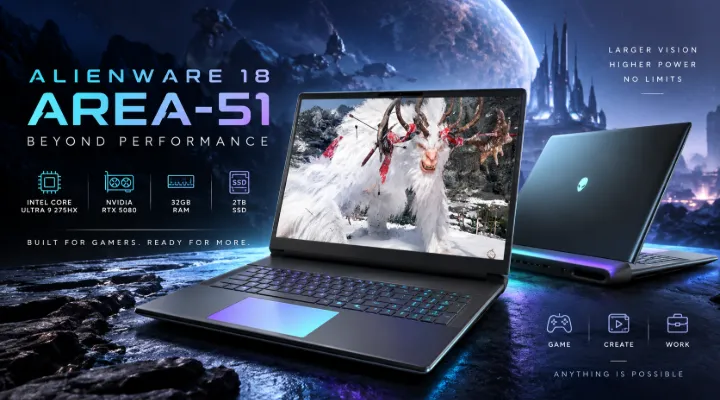
Modern gaming laptops are no longer limited to basic portability. For gamers, content creators, 3D professionals, and power users, a premium laptop can now deliver the processing power, graphics performance, storage, and display quality needed for demanding workloads.
The Dell Alienware 18 Area-51 with Intel Core Ultra 9 275HX, 32GB RAM, 2TB SSD, and NVIDIA GeForce RTX 5080 is designed for users who want a powerful desktop-class experience in a laptop form factor. Its large 18-inch QHD display, high-end processor, dedicated graphics, and substantial storage make it particularly suitable for demanding gaming and professional applications.
For users in Dubai and across the UAE, this type of high-performance system can be useful for competitive gaming, game development, video production, 3D rendering, engineering applications, and other workloads where sustained performance matters.
What Makes the Alienware 18 Area-51 Different?
The Alienware 18 Area-51 is positioned as a premium performance laptop rather than a conventional everyday notebook. Its hardware is designed around demanding workloads where processor and GPU performance are important.
The configuration highlighted here includes:
- Intel Core Ultra 9 275HX processor
- 32GB RAM
- 2TB SSD
- NVIDIA GeForce RTX 5080 Laptop GPU
- 18-inch QHD display
- Windows 11
- Premium Alienware design and cooling
- High-performance gaming-oriented hardware
The combination is particularly interesting because each major component complements the others. A powerful CPU can handle complex calculations and multitasking, while the RTX 5080 provides substantial graphics processing capability. Meanwhile, 32GB memory and a 2TB SSD provide room for large applications, games, and creative projects.
Intel Core Ultra 9 275HX for Demanding Workloads
At the heart of the Alienware 18 Area-51 is the Intel Core Ultra 9 275HX processor.
High-end laptop processors are important for more than just gaming. Modern applications increasingly use multiple CPU cores for tasks such as compiling software, rendering, video encoding, simulation, and multitasking.
For example, a content creator could potentially run a video editing application while simultaneously using a browser, file management tools, communication software, and other background applications.
Suitable for Gaming and Productivity
The processor can be useful for workloads such as:
- High-end PC gaming
- Video editing
- 3D modelling
- Software development
- Game development
- Photo editing
- CAD and engineering applications
- Multitasking across demanding applications
The high-end CPU also helps complement the dedicated graphics processor, particularly in games and applications where CPU performance contributes significantly to overall system performance.
NVIDIA GeForce RTX 5080 Laptop GPU
Graphics performance is one of the most important considerations for a premium gaming laptop.
The Alienware 18 Area-51 configuration uses an NVIDIA GeForce RTX 5080 Laptop GPU. This class of GPU is designed for demanding gaming and GPU-accelerated professional workloads.
For gamers, a powerful GPU can help support high-resolution gaming, advanced graphics settings, ray-traced effects, and modern rendering technologies.
More Than Just Gaming
The RTX 5080 is also relevant to professional users.
Applications that can benefit from GPU acceleration include:
- 3D rendering
- Video production
- Motion graphics
- AI-related workloads
- Architectural visualization
- Game development
- Computer-aided design applications that support GPU acceleration
For example, a 3D artist working with complex scenes can benefit from having a powerful dedicated GPU available for viewport rendering and supported rendering workloads.
18-Inch QHD Display for an Immersive Experience
One of the defining characteristics of this Alienware laptop is its large 18-inch QHD display.
A larger screen can make a noticeable difference when gaming or working with professional applications. It provides more physical screen space than the smaller displays found on many conventional gaming notebooks.
QHD resolution also provides more detail than Full HD, making it useful for games, multimedia, and creative work.
Why a Large Display Matters
An 18-inch screen can be particularly useful for:
- Gaming
- Video editing timelines
- 3D modelling
- Photo editing
- Programming
- Multitasking
- Watching high-resolution content
For example, a video editor can have a timeline, preview window, media browser, and editing controls visible simultaneously without relying as heavily on an external monitor.
32GB RAM for Heavy Multitasking
The laptop comes with 32GB of RAM, which provides a substantial memory capacity for demanding applications.
For gaming, 32GB gives users additional headroom when running modern games alongside browsers, voice communication software, recording tools, or streaming applications.
For professionals, the benefit can be even more noticeable.
A user working with large Photoshop projects, high-resolution video files, development environments, and multiple browser tabs can keep more applications active without relying as heavily on slower storage for memory management.
Who Benefits From 32GB RAM?
This capacity is well suited to:
- High-end gamers
- Streamers
- Video editors
- 3D designers
- Developers
- Engineers
- Content creators
- Power users
Users with particularly demanding professional workflows should still consider their specific application requirements before choosing a configuration.
2TB SSD for Games and Professional Files
Storage is another major strength of this configuration.
The 2TB SSD provides substantial capacity for games, applications, project files, media libraries, and documents.
Modern PC games can occupy significant amounts of storage, particularly when multiple large titles are installed. A 2TB drive gives gamers considerably more flexibility than smaller configurations.
Fast Storage for Everyday Work
An SSD can also improve the overall responsiveness of the computer.
Typical benefits include:
- Faster operating system startup
- Faster application loading
- Reduced game loading times
- Quicker file access
- Faster project loading
- More responsive general usage
For a professional video editor, for example, having a large internal SSD can make it easier to keep active project files and applications readily available.
Alienware Design and Cooling
High-performance hardware generates more heat than the components found in ordinary laptops. Effective thermal management is therefore an important part of a premium gaming notebook.
The Alienware 18 Area-51 is designed as a performance-focused system with a robust cooling solution intended to help manage demanding workloads.
Cooling becomes especially important during extended gaming or rendering sessions.
Why Cooling Matters
Consider a gamer playing a demanding title for several hours. The processor and graphics processor may remain under significant load throughout the session.
Similarly, a 3D artist rendering a complex scene or a video editor exporting a large project may place substantial load on the system.
A capable thermal design helps the system manage these workloads while maintaining appropriate operating conditions.
Actual performance and temperatures can vary depending on the application, ambient temperature, power settings, workload, and system configuration.
Gaming Performance
The combination of a Core Ultra 9 processor, RTX 5080 Laptop GPU, 32GB RAM, and QHD display makes this configuration targeted at serious gaming.
Modern gaming increasingly demands powerful hardware. High-resolution textures, advanced lighting, ray tracing, large game environments, and sophisticated physics can place substantial demands on both the CPU and GPU.
Competitive Gaming
For competitive gamers, system responsiveness and consistent performance are important.
Games such as competitive shooters, racing titles, strategy games, and multiplayer action games can benefit from a powerful CPU/GPU combination.
The large display can also provide an immersive gaming environment, although users should select game settings according to the desired balance between image quality, resolution, and frame rate.
AAA Gaming
For visually demanding AAA games, the RTX 5080 provides the graphics capability expected from a premium gaming system.
Depending on the specific game and settings, users can adjust:
- Resolution
- Texture quality
- Ray tracing
- Shadow quality
- Anti-aliasing
- Other graphical effects
Using these settings intelligently allows users to balance visual quality and performance.
A Useful Laptop for Content Creators
Gaming hardware often overlaps significantly with creative workloads.
Video editors, photographers, 3D artists, and content creators can benefit from the same processor and GPU capabilities that make the laptop suitable for gaming.
Video Editing
For example, a creator producing 4K video may work with large source files, multiple video tracks, effects, transitions, and audio layers.
The combination of powerful processing hardware, dedicated graphics, 32GB memory, and 2TB storage provides a strong foundation for this type of workflow.
3D Design and Rendering
3D applications can also benefit from powerful GPUs.
Architects, designers, and visualization professionals may use applications involving:
- 3D modelling
- Architectural visualization
- Product design
- Animation
- Rendering
- Simulation
The large QHD display can also provide a useful working area when dealing with detailed models and complex interfaces.
Windows 11 for Modern Computing
The laptop runs Windows 11, providing a modern operating environment for gaming and productivity.
Windows 11 supports a broad range of professional and consumer applications, making the laptop suitable for users who need one machine for both work and entertainment.
A professional user could use the laptop during the day for development, design, or business applications and then use the same system for gaming or multimedia in their personal time.
Is the Alienware 18 Area-51 Suitable for Business Users?
Although the laptop is primarily associated with premium gaming, its hardware can also be relevant to specialized business users.
It may be useful for professionals who need significant local computing performance for applications such as:
- Engineering software
- 3D visualization
- Architecture
- Video production
- Software development
- Data-intensive applications
- Digital content creation
However, businesses should consider factors beyond raw performance, including portability, battery requirements, warranty coverage, service availability, and compatibility with their existing IT environment.
Why the 18-Inch Form Factor Matters
An 18-inch performance laptop is not designed to compete with ultraportable notebooks.
Its larger size allows manufacturers to build a system around powerful components and a larger display. This makes it particularly suitable for users who prioritize performance and screen space over minimal weight.
For someone who frequently travels between meetings, a smaller business laptop may be more practical. But for a user who primarily works from a desk and occasionally moves the system between locations, an 18-inch performance laptop can provide a useful combination of portability and desktop-style capability.
Practical Example: Gaming and Streaming
Imagine a gamer in Dubai who wants to play demanding games while streaming gameplay.
The workload could involve:
- Running the game.
- Capturing gameplay.
- Encoding the stream.
- Running a web browser.
- Using voice communication.
- Managing streaming software.
A high-performance processor, dedicated GPU, and 32GB RAM provide the hardware foundation for this type of multitasking.
The actual streaming performance will depend on the software, game, resolution, encoder settings, network connection, and other factors.
Practical Example: Professional Video Editing
Consider a content creator working on a large video project.
The creator may need to:
- Import high-resolution footage.
- Edit multiple video tracks.
- Apply visual effects.
- Preview footage.
- Export the final video.
- Store project assets locally.
The 2TB SSD provides useful local storage capacity, while the processor and dedicated GPU can support applications that use CPU and GPU acceleration.
For particularly large projects, external storage or network storage may still be useful.
Things to Consider Before Buying
The Alienware 18 Area-51 is a specialized high-performance laptop, so buyers should consider their actual requirements.
Consider the Laptop If You Need
- High-end gaming performance
- A large QHD display
- Powerful CPU and GPU hardware
- Large internal storage
- A workstation-style laptop for creative applications
- A premium gaming-focused design
Consider a Different Form Factor If You Prioritize
- Very low weight
- Maximum portability
- Long battery-focused usage
- Compact dimensions
- Frequent travel
The best configuration ultimately depends on the user's workload and priorities.
Buying a High-End Gaming Laptop in the UAE
For buyers in Dubai and elsewhere in the UAE, purchasing a premium laptop involves more than comparing processor and GPU specifications.
It is useful to check:
- Exact model number
- Regional configuration
- Warranty terms
- Keyboard layout
- Included operating system
- Power adapter specifications
- RAM and storage configuration
- Availability of the model
- Seller or supplier support
For business purchases, organizations may also need quotations, bulk pricing, delivery arrangements, and after-sales support.
ICTECH Distribution provides access to a wide range of IT products for businesses and professional buyers, including high-performance computing hardware and laptops.
Final Thoughts
The Dell Alienware 18 Area-51 with Intel Core Ultra 9 275HX, 32GB RAM, 2TB SSD, and NVIDIA GeForce RTX 5080 is designed for users who place performance at the top of their requirements.
Its combination of a high-end processor, dedicated RTX graphics, large memory capacity, fast SSD storage, and 18-inch QHD display makes it suitable for demanding gaming as well as many creative and professional workloads.
For serious gamers, content creators, 3D professionals, and power users in Dubai and the wider UAE, the configuration offers a performance-focused laptop platform that can handle substantially more demanding workloads than a typical everyday notebook.
As with any premium computer, buyers should evaluate the exact configuration, software requirements, warranty, portability needs, and budget before making a purchase.
Frequently Asked Questions
1. What processor does the Dell Alienware 18 Area-51 use?
This configuration features the Intel Core Ultra 9 275HX processor, designed for demanding gaming, multitasking, and professional workloads.
2. How much RAM does the Alienware 18 Area-51 have?
The configuration discussed in this article comes with 32GB of RAM, providing substantial capacity for gaming, content creation, development, and multitasking.
3. Does the Alienware 18 Area-51 have an RTX 5080?
Yes. This configuration features an NVIDIA GeForce RTX 5080 Laptop GPU for demanding gaming and supported GPU-accelerated professional applications.
4. How much storage does the laptop have?
The laptop configuration includes a 2TB SSD, providing space for games, applications, media, and professional projects while offering fast storage access.
5. Is the Alienware 18 Area-51 suitable for content creation?
Yes. Its high-end processor, RTX 5080 graphics, 32GB RAM, 2TB SSD, and large QHD display make it suitable for many video editing, 3D design, rendering, and other creative workloads.
