
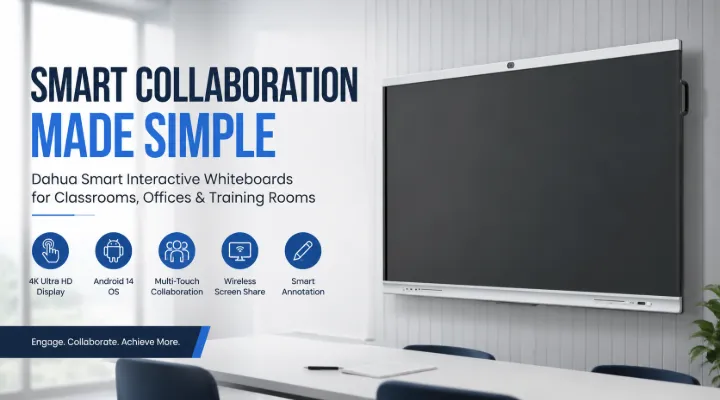
Dahua Smart Interactive Whiteboards: Transforming Classrooms and Meeting Rooms with 4K Collaboration
Traditional whiteboards and projectors have served classrooms and meeting rooms for decades, but today's workplaces and educational institutions require smarter collaboration tools. Whether it's a business presentation, an online training session, or an interactive classroom lesson, users expect crystal-clear visuals, seamless connectivity, and effortless collaboration.
This is where Dahua Smart Interactive Whiteboards stand out. Designed with powerful Android operating systems, ultra-high-definition 4K displays, responsive touch technology, and wireless collaboration features, these interactive displays help teams and educators work more efficiently.
Models such as the Dahua MC420-C 75-inch, LPH75-ST420, ST420 65-inch, MC470-P 75-inch, and MC470-P 65-inch provide solutions for different room sizes and collaboration requirements.
In this guide, we'll explore the features, benefits, practical applications, and how to choose the right Dahua interactive whiteboard for your organization.
Why Interactive Whiteboards Are Replacing Traditional Displays
Businesses and educational institutions are moving away from projectors because modern interactive displays offer significantly better performance.
Instead of requiring multiple devices, an interactive whiteboard combines:
- Large 4K display
- Digital whiteboard
- Wireless presentation system
- Android computer
- Video conferencing display
- Annotation tools
- Multi-touch collaboration
Everything is built into a single professional display.
Dahua Smart Interactive Whiteboard Series Overview
Some of the popular models include:
Dahua MC420-C 75-inch Smart Interactive Whiteboard
Key highlights:
- 75-inch display
- Android 14
- 8GB RAM
- 128GB storage
- Ultra HD 4K resolution
- Multi-touch support
- Wireless collaboration
Ideal for:
- Medium to large classrooms
- Corporate boardrooms
- Conference halls
- Training centers
Dahua LPH75-ST420 75-inch Interactive Whiteboard
This model offers:
- 75-inch display
- 4K Ultra HD
- Intelligent collaboration tools
- Interactive writing
- Screen sharing
- Meeting applications
Best suited for:
- Business presentations
- University lecture halls
- Corporate collaboration
Dahua ST420 65-inch Interactive Whiteboard
The 65-inch version is ideal where space is limited while still offering a premium interactive experience.
Perfect for:
- Small meeting rooms
- School classrooms
- Huddle spaces
- Office collaboration rooms
Dahua MC470-P 75-inch Interactive Whiteboard
The MC470-P series is designed for demanding professional environments.
Specifications include:
- 75-inch display
- 20GB RAM
- 128GB storage
- 4K Ultra HD
- Fast multitasking
- Smooth application performance
Ideal for organizations running multiple collaboration applications simultaneously.
Dahua MC470-P 65-inch Interactive Whiteboard
This compact version delivers enterprise-level performance while fitting comfortably into smaller collaboration spaces.
Suitable for:
- Executive offices
- Small conference rooms
- Educational labs
- Training rooms
Stunning 4K Ultra HD Display
One of the biggest advantages of Dahua interactive whiteboards is their sharp visual quality.
The 4K Ultra HD display provides:
- Crisp text
- Sharp diagrams
- Bright presentations
- Detailed engineering drawings
- Clear educational content
Whether displaying spreadsheets or architectural plans, every detail remains easy to read.
Practical example:
An engineering company reviewing CAD drawings can zoom in without losing image quality.
Android 14 Makes Everything Faster
The Dahua MC420-C includes Android 14, providing users with a modern operating environment.
Benefits include:
- Faster boot times
- Better security
- Improved app compatibility
- Smooth multitasking
- Better memory management
Users can access applications directly without needing an external PC for everyday tasks.
Powerful Hardware for Professional Performance
Performance matters during meetings and classes.
Depending on the model, Dahua provides:
- Up to 20GB RAM
- 128GB internal storage
- High-performance processors
- Fast graphics rendering
This allows users to:
- Open multiple files
- Run presentations
- Annotate documents
- Switch between applications
- Join video conferences smoothly
Multi-Touch Collaboration
Unlike traditional displays, Dahua interactive whiteboards allow multiple users to write simultaneously.
This is useful for:
- Brainstorming sessions
- Classroom activities
- Team workshops
- Design discussions
- Project planning
Everyone can participate without waiting for their turn.
Wireless Screen Sharing
Modern meetings should not involve searching for HDMI cables.
Dahua supports wireless presentation capabilities, enabling participants to share content directly from:
- Windows laptops
- MacBooks
- Android devices
- iPhones
- Tablets
This saves valuable meeting time and encourages faster collaboration.
Digital Whiteboard Experience
One of the strongest features is the built-in digital whiteboard.
Users can:
- Draw diagrams
- Write notes
- Highlight important points
- Save annotations
- Export meeting notes
Instead of erasing everything after a meeting, notes can be stored digitally for future reference.
Video Conferencing Made Simple
Hybrid work has become standard across many organizations.
Dahua interactive displays integrate well with video conferencing environments.
Common use cases include:
- Client meetings
- Remote education
- International collaboration
- Employee training
- Team discussions
Participants both inside and outside the room can collaborate effectively.
Applications in Education
Interactive whiteboards make learning more engaging.
Teachers can:
- Display videos
- Solve equations
- Annotate presentations
- Conduct quizzes
- Save lesson notes
- Encourage student participation
Example:
A science teacher can display the human anatomy in 4K while students label organs directly on the screen.
Applications in Corporate Offices
Businesses benefit from faster decision-making and more productive meetings.
Teams can:
- Present reports
- Edit documents live
- Brainstorm ideas
- Review project plans
- Conduct remote meetings
- Save meeting outcomes instantly
The result is more efficient collaboration with fewer interruptions.
Perfect for Training Centers
Training organizations frequently conduct sessions involving presentations, videos, and interactive discussions.
A Dahua whiteboard allows trainers to:
- Display learning materials
- Write explanations
- Annotate PDFs
- Record discussions
- Share files
This creates a more engaging learning experience.
Choosing Between 65-inch and 75-inch Models
Choose a 65-inch model if:
- Room capacity is under 15 people
- Limited wall space
- Small conference rooms
- Individual departments
Choose a 75-inch model if:
- Large classrooms
- Boardrooms
- Training halls
- Executive meeting spaces
- Groups of 15–40 participants
Selecting the correct display size improves visibility and user experience.
Benefits of Dahua Smart Interactive Whiteboards
Some major advantages include:
- 4K Ultra HD display
- Android operating system
- Fast hardware
- Multi-touch interaction
- Wireless screen sharing
- Digital whiteboard tools
- Professional meeting support
- Classroom-friendly interface
- Easy file sharing
- Long-term reliability
Why Buy Dahua Interactive Whiteboards from ICTECH Distribution?
Choosing the right supplier is just as important as choosing the right product.
ICTECH Distribution supplies genuine Dahua interactive whiteboards for businesses, educational institutions, government organizations, and system integrators across the UAE and international markets.
Customers benefit from:
- Genuine Dahua products
- Competitive pricing
- Expert product guidance
- Fast quotation support
- Business-focused solutions
- Wide range of IT products from leading global brands
Whether you're upgrading a single meeting room or deploying interactive displays across multiple locations, ICTECH Distribution can help you select the most suitable Dahua model for your requirements.
Conclusion
Interactive collaboration has become an essential part of modern education and business. Dahua Smart Interactive Whiteboards combine advanced hardware, Android-powered performance, 4K visuals, and intuitive collaboration tools into one professional solution.
Whether you choose the MC420-C, ST420, or the high-performance MC470-P series, these displays are designed to improve communication, simplify presentations, and enhance teamwork. From classrooms and training centers to boardrooms and executive offices, Dahua interactive whiteboards help organizations collaborate more effectively and create engaging experiences for every participant.
Frequently Asked Questions
1. What is the difference between the Dahua MC420-C and MC470-P series?
The MC470-P series offers higher hardware performance, including up to 20GB RAM, making it better suited for demanding business environments, while the MC420-C provides excellent performance for everyday collaboration and education.
2. Can Dahua interactive whiteboards be used without a computer?
Yes. These whiteboards include Android operating systems, allowing users to browse files, annotate documents, present content, and use applications without connecting an external PC.
3. Which screen size should I choose: 65-inch or 75-inch?
A 65-inch model is ideal for smaller classrooms and meeting rooms, while a 75-inch display is recommended for larger spaces with more participants.
4. Can multiple users write on the screen simultaneously?
Yes. Dahua interactive whiteboards support multi-touch functionality, allowing several users to write, draw, or interact with content at the same time.
5. Are Dahua interactive whiteboards suitable for video conferencing?
Yes. They work well for hybrid meetings, online training sessions, and remote collaboration by providing large 4K displays, annotation tools, and compatibility with common conferencing platforms.
