
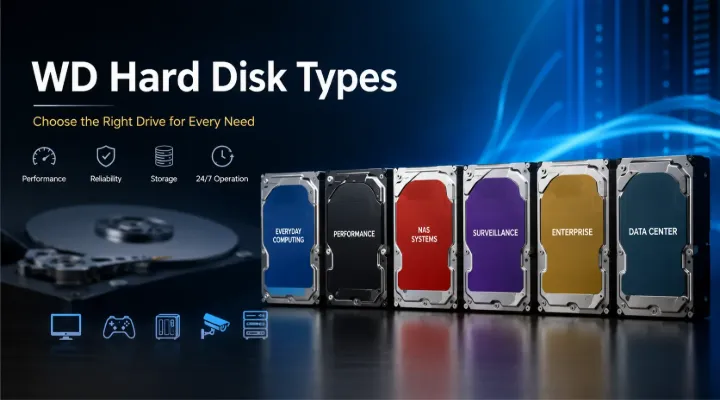
Data storage is one of the most important components of modern computing. Whether you are managing business files, running a data center, storing surveillance footage, backing up personal documents, or building a high-performance workstation, selecting the right hard drive is essential. Western Digital (WD) is one of the world's leading storage manufacturers, offering a wide range of hard disk drives designed for different applications.
Understanding the various WD hard disk types can help businesses and individuals make informed purchasing decisions. Each WD product family is designed for a specific workload, environment, and performance requirement. Choosing the wrong drive can result in reduced performance, shorter lifespan, or unnecessary costs.
This guide explores the major WD hard disk types, their features, ideal use cases, and how to select the best option for your requirements.
Who Should Read This Guide?
This article is useful for:
- IT managers
- System integrators
- Businesses purchasing storage solutions
- Data center administrators
- CCTV installers
- Gamers
- Creative professionals
- Home users
- Resellers and distributors
Organizations sourcing WD storage products can also work with ICTECH Distribution, a trusted distributor serving customers across the UAE and international markets.
Understanding WD Hard Drive Color Categories
Western Digital uses a color-based branding system to identify the purpose of each drive family. These colors make it easier to select the right storage solution for a specific workload.
The primary WD hard disk categories include:
- WD Blue
- WD Black
- WD Red
- WD Purple
- WD Gold
- WD Ultrastar
- WD Green (legacy)
Let's examine each category in detail.
WD Blue Hard Drives
Overview
WD Blue drives are designed for everyday computing tasks. They provide a balance between performance, reliability, and affordability.
These drives are commonly used in:
- Home computers
- Office desktops
- Entry-level workstations
- General-purpose storage systems
Key Features
- Cost-effective storage
- Reliable everyday performance
- Multiple capacity options
- Suitable for daily workloads
Ideal Applications
A small business using desktop computers for email, spreadsheets, presentations, and document management would find WD Blue drives more than sufficient.
Advantages
- Affordable pricing
- Good reliability
- Easy availability
- Suitable for most office users
Limitations
- Not designed for heavy workloads
- Limited optimization for gaming or enterprise environments
WD Black Hard Drives
Overview
WD Black drives are designed for performance-oriented users who need faster access speeds and higher responsiveness.
They are popular among:
- Gamers
- Content creators
- Video editors
- Graphic designers
- Engineering professionals
Key Features
- Higher performance
- Enhanced cache sizes
- Optimized firmware
- Improved durability
Ideal Applications
A video editing studio working with large 4K video files can benefit from WD Black drives because of their faster performance and efficient data handling.
Advantages
- Excellent speed
- Better performance for demanding applications
- Suitable for workstations
Limitations
- Higher cost
- Increased power consumption compared to standard drives
WD Red Hard Drives
Overview
WD Red drives are specifically designed for NAS (Network Attached Storage) systems.
NAS environments require drives that operate continuously while supporting multiple users accessing files simultaneously.
Key Features
- NASware technology
- 24/7 operation support
- RAID compatibility
- Reduced vibration
WD Red Product Variants
WD Red
Suitable for:
- Home NAS systems
- Small office NAS deployments
WD Red Plus
Designed for:
- Small and medium businesses
- Higher workload requirements
WD Red Pro
Built for:
- Enterprise NAS systems
- Larger storage arrays
- Heavy multi-user workloads
Practical Example
A company with 50 employees sharing files through a central NAS server would benefit from WD Red Plus or WD Red Pro drives.
Advantages
- Reliable continuous operation
- RAID-friendly design
- Optimized for NAS environments
Limitations
- Not ideal for gaming PCs
- More expensive than standard desktop drives
WD Purple Hard Drives
Overview
WD Purple drives are developed specifically for surveillance systems.
Unlike traditional desktop drives, surveillance drives must continuously record video from multiple cameras.
Key Features
- 24/7 recording capability
- Support for multiple camera streams
- Enhanced workload ratings
- Reduced frame loss
Ideal Applications
- CCTV systems
- Security monitoring
- Video recording servers
- Smart surveillance installations
Practical Example
A shopping mall operating 64 surveillance cameras requires storage that can continuously record video without interruptions. WD Purple drives are specifically designed for this purpose.
Advantages
- Optimized for surveillance workloads
- Reliable continuous recording
- Reduced video loss
Limitations
- Not optimized for general desktop use
- Lower performance for traditional computing tasks
WD Gold Hard Drives
Overview
WD Gold drives target enterprise environments that require maximum reliability and high workload capabilities.
These drives are commonly deployed in:
- Data centers
- Enterprise servers
- Large storage arrays
- Corporate backup systems
Key Features
- Enterprise-grade reliability
- High workload ratings
- Advanced vibration protection
- Long operational lifespan
Ideal Applications
Large organizations storing critical business data often choose WD Gold drives due to their enterprise-level reliability.
Advantages
- High durability
- Excellent reliability
- Enterprise-focused features
Limitations
- Higher acquisition cost
- Overkill for standard desktop users
WD Ultrastar Hard Drives
Overview
Ultrastar is Western Digital's premium enterprise storage family.
These drives are designed for the most demanding environments where downtime is not acceptable.
Key Features
- Data center optimization
- Massive storage capacities
- Enterprise reliability
- High performance
Common Use Cases
- Cloud service providers
- Enterprise storage infrastructure
- Hyperscale data centers
- AI and analytics platforms
Practical Example
A cloud hosting company managing thousands of virtual machines may deploy hundreds of WD Ultrastar drives within its storage infrastructure.
Advantages
- Exceptional reliability
- High capacity options
- Designed for mission-critical workloads
Limitations
- Premium pricing
- Intended primarily for enterprise use
WD Green Hard Drives
Overview
WD Green drives were designed with energy efficiency in mind.
Although many WD Green HDD products have been phased out or replaced, the brand remains recognized for low-power storage solutions.
Key Features
- Reduced power consumption
- Quiet operation
- Lower heat generation
Suitable Applications
- Secondary storage
- Backup systems
- Low-demand computing environments
Advantages
- Energy efficient
- Quiet performance
Limitations
- Lower performance compared to other WD series
- Not suitable for intensive workloads
Comparing WD Hard Drive Types
| Drive Type | Primary Use | Performance | Reliability | Best For |
|---|---|---|---|---|
| WD Blue | Everyday Computing | Moderate | Good | Home & Office |
| WD Black | High Performance | High | Very Good | Gaming & Workstations |
| WD Red | NAS Storage | Moderate | Excellent | NAS Systems |
| WD Purple | Surveillance | Specialized | Excellent | CCTV Systems |
| WD Gold | Enterprise Servers | High | Exceptional | Business Infrastructure |
| Ultrastar | Data Centers | Very High | Exceptional | Enterprise Storage |
| WD Green | Energy Saving | Basic | Good | Backup Storage |
How to Choose the Right WD Hard Drive
Consider Your Workload
Different workloads require different drive technologies.
Ask yourself:
- How many hours per day will the drive operate?
- How much data will be written daily?
- How many users will access the storage?
Determine Capacity Requirements
Storage capacity should be planned based on future growth.
Typical Recommendations
- 1TB–2TB: Home users
- 4TB–8TB: Small businesses
- 10TB–22TB: Enterprise and surveillance environments
Evaluate Performance Needs
Choose:
- WD Black for speed
- WD Blue for balanced performance
- WD Gold or Ultrastar for enterprise applications
Consider Continuous Operation
For 24/7 environments:
- WD Red
- WD Purple
- WD Gold
- WD Ultrastar
are significantly better choices than standard desktop drives.
Why Businesses Choose WD Storage Solutions
Western Digital has built a strong reputation through decades of innovation in storage technology.
Businesses choose WD because of:
- Proven reliability
- Wide product portfolio
- Enterprise-grade options
- Global support network
- Advanced storage technologies
- Scalability
Whether the requirement is a desktop PC, surveillance solution, NAS appliance, or enterprise server, WD offers a suitable storage option.
Organizations looking to source genuine WD hard drives can work with ICTECH Distribution, which supplies storage solutions for businesses, system integrators, resellers, and IT infrastructure projects.
Future Trends in WD Storage
The storage industry continues to evolve rapidly.
Key developments include:
- Higher-capacity HDDs exceeding 30TB.
- Improved energy efficiency.
- AI-driven storage optimization.
- Enhanced data protection technologies.
- Hybrid storage environments combining HDDs and SSDs.
While SSDs continue to gain popularity, HDDs remain essential for large-scale storage because they offer a lower cost per terabyte.
Conclusion
Western Digital offers a comprehensive range of hard drives designed for different workloads and environments. WD Blue serves everyday users, WD Black focuses on performance, WD Red powers NAS systems, WD Purple supports surveillance applications, and WD Gold and Ultrastar deliver enterprise-grade reliability.
Selecting the correct drive depends on your storage requirements, workload intensity, performance expectations, and budget. Understanding these WD hard disk types ensures better performance, improved reliability, and a longer lifespan for your storage investment.
For businesses, resellers, and IT professionals seeking genuine WD storage products, ICTECH Distribution provides access to a wide range of Western Digital storage solutions suitable for modern business environments.
Frequently Asked Questions
1. What is the difference between WD Blue and WD Black?
WD Blue drives are designed for everyday computing, while WD Black drives offer higher performance for gaming, content creation, and demanding workloads.
2. Which WD hard drive is best for NAS systems?
WD Red, WD Red Plus, and WD Red Pro are specifically designed for NAS environments and continuous operation.
3. Can WD Purple drives be used in regular PCs?
Yes, but they are optimized for surveillance recording rather than desktop performance, so other WD series may be better for everyday computing.
4. What is the best WD drive for enterprise servers?
WD Gold and WD Ultrastar drives are the preferred choices for enterprise servers and data center environments.
5. Are HDDs still relevant when SSDs are available?
Yes. HDDs remain the most cost-effective solution for large-capacity storage, backups, surveillance systems, and enterprise archives.
