
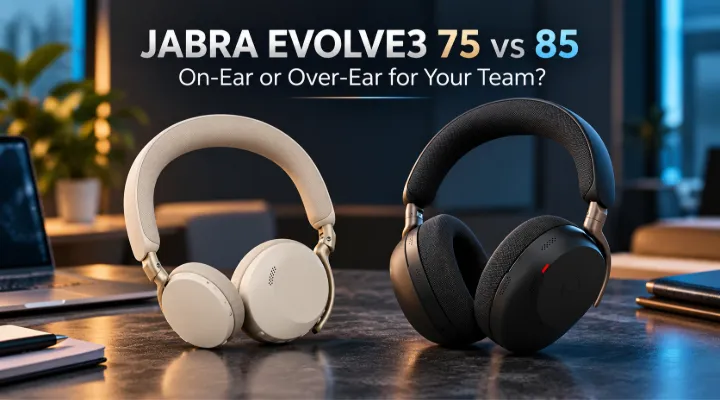
Choosing a professional headset is a decision about how people work throughout the day. Calls, concentrated tasks, movement between devices and comfort all matter. ICTECH Distribution's recent additions include Jabra Evolve3 75 MS USB-A, identified as 37599-999-999, and Evolve3 85, identified as 38599-999-999. These related models create a useful comparison for organisations equipping hybrid workers without assuming every employee needs the same wearing style.
Jabra positions the Evolve3 75 as an on-ear model and the Evolve3 85 as an over-ear model. That distinction is a practical starting point, but a successful rollout also depends on the exact variant, adapter, meeting platform and user preferences. Evaluate a small pilot group using normal working conditions before selecting a standard configuration for a larger team.
Start with the user's working day
List the activities the headset must support. An employee who spends most of the day in scheduled calls has different priorities from someone who answers occasional calls between focused tasks. Consider whether users move between a laptop and phone, travel frequently or work in a shared office. These details help identify which features deserve testing and which are less relevant to the purchase.
Also consider how the headset is stored and charged. A device used across several locations needs a practical carrying and charging routine. A desk-based user may prefer a consistent place to leave it between calls. The best configuration fits the person's actual habits, reducing the chance that a capable headset remains unused because its everyday routine feels inconvenient.
Compare on-ear and over-ear fit directly
The Evolve3 75's on-ear design rests on the ears, while the Evolve3 85's over-ear design surrounds them. Neither description establishes universal comfort. Head shape, glasses, hairstyle, temperature and personal preference can all influence the experience. Ask pilot users to wear each candidate for a realistic period rather than judging from a brief demonstration at a sales desk.
The catalogue lists the Evolve3 75 at 180 g and the Evolve3 85 at 220 g. Weight is useful context, but contact pressure and fit can matter as much as the number. Gather feedback on stability, heat and ease of adjustment. The aim is to choose a wearing style that staff can use comfortably through their own pattern of calls and focused work.
Separate microphone clarity from listening isolation
A headset can address two different noise problems: what the wearer hears and what other participants hear from the wearer's environment. These are related but distinct. Jabra describes adaptive noise cancellation and ClearVoice technology for the Evolve3 range. Evaluate their practical effect through a call test, rather than assuming that a quiet listening experience proves the microphone is sending clean speech.
Have a colleague listen from another location while the user speaks at normal volume. Include realistic office sounds and the actual meeting application. Then ask the wearer to assess listening comfort and awareness of surrounding activity. This two-sided test produces more useful evidence than playing music in a quiet room, particularly for users whose main requirement is reliable professional communication.
Order the exact collaboration variant
The supplied 75 listing is explicitly an MS USB-A variant, while the 85 listing includes its own full product code. Preserve those identifiers when requesting a quotation. Ask which collaboration certification, adapter type and package contents apply to each quoted unit. A family name alone may not distinguish every accessory or variant available in the wider range.
Check the organisation's standard meeting platforms and computer ports. A USB-A adapter may need a supported connection arrangement on a laptop with only USB-C ports. Confirm whether any adapter or charging accessory must be ordered separately. A clear bill of materials prevents a rollout from being delayed by a small connection detail that was overlooked while comparing headline headset features.
Test connections through normal device changes
Hybrid workers often alternate between computer meetings and phone calls. Demonstrate the intended pairing and switching workflow with the actual devices. Check how incoming calls behave while another application is active and how audio returns to the computer afterwards. Supported multipoint features can be useful, but the relevant outcome is whether users understand and can repeat the connection process reliably.
Also test reconnecting after the laptop sleeps, after the headset is powered off and after moving between work locations. Record the recommended use of the supplied Bluetooth adapter where applicable. A repeatable setup procedure reduces support time and helps users distinguish a pairing problem from an application that has selected a different microphone or speaker.
Evaluate controls and meeting behaviour
Users need to join calls, adjust volume and manage mute without uncertainty. Try the controls while the headset is worn and the user is engaged in a realistic task. Confirm what the meeting application displays when mute changes and whether the chosen variant supports the expected integration. A control that feels clear during training should remain understandable during a busy call.
Include accessibility and individual preference in the evaluation. Some users rely on tactile feedback, while others prefer application controls. Provide short guidance for the supported workflow and explain how to check the active audio device. This is especially valuable in environments where docking stations, monitors and room equipment introduce several possible microphones and speakers to the same computer.
Plan charging around calls rather than marketing numbers
Battery specifications are normally measured under defined conditions and can vary by activity and settings. A talk-heavy day is different from listening to music between short calls. Ask for the model-specific battery and charging information, then test a routine that resembles the user's working day. Avoid choosing a device solely from the largest advertised playback number.
Identify the charging connection and accessories included in the package. Decide whether employees need a second cable or charging location for home and office use. Establish a simple routine that keeps the headset ready for scheduled work. The practical goal is sufficient availability for the user's call pattern, with a clear response when charging has been forgotten.
Include management in a fleet decision
For multiple users, firmware updates and consistent configuration become part of the support requirement. Jabra describes management tools for the range, but confirm the specific software and supported functions relevant to the selected devices. Ask the IT team how updates will be deployed and how users obtain assistance when a headset behaves differently after a system or application change.
Keep asset records that include product codes and supplied adapters. A small spare pool can be easier to manage when packages and settings are consistent. Define the process for reassignment, cleaning and replacement according to organisational practice. These details help preserve the value of a headset rollout after the original purchase and avoid confusion between user preference, connection issues and actual hardware faults.
Run a structured pilot
Select users with different roles and wearing preferences. Give them the same test activities and ask for concrete feedback on comfort, call clarity, switching and controls. Include remote listeners in the assessment. Record the devices, operating systems and meeting applications used so the results have a clear context. A pilot should reveal which model suits which role, rather than force a single winner for everyone.
Review any recurring setup problems before ordering in volume. Some can be resolved through a standard adapter choice or clearer instructions. Others may indicate that a particular workflow needs a different configuration. Use the results to define one or two approved packages, giving procurement a manageable range while allowing meaningful differences in fit and working style.
Prepare a Jabra headset enquiry
Send ICTECH Distribution the user count, computer port types, meeting platforms and typical call pattern. Include the exact Evolve3 product codes and ask for package contents, certification, charging accessories and service coverage to be itemised. If possible, arrange a practical comparison of the on-ear and over-ear designs with representative users.
The Evolve3 75 and 85 should be selected around communication quality and daily usability. A documented pilot provides evidence about those outcomes in the organisation's own environment. It also creates a clear setup procedure for IT and a straightforward starting experience for employees, helping the headset become a dependable work tool rather than another device that users must troubleshoot themselves.
Frequently asked questions
What is the main fit difference between Evolve3 75 and 85?
Jabra positions the 75 as on-ear and the 85 as over-ear. Comfort remains individual, so test each style over a realistic working period.
Does noise cancellation prove microphone quality?
No. Listening isolation and the speech heard by remote participants are different outcomes. Evaluate both sides of a normal call.
Why preserve the complete product code?
It helps identify the intended variant and package. Confirm collaboration certification, adapter type and accessories for the exact quoted code.
Should battery comparisons use music playback alone?
No. Call activity, settings and charging habits matter. Review model-specific conditions and test the expected working routine.
Can one headset model suit an entire team?
It may, but a pilot can reveal different fit and workflow needs. One or two clearly defined approved packages can simplify support while accommodating those differences.
Products covered and enquiries
Jabra Evolve3 75 MS USB-A Wireless Headset 37599-999-999 | Jabra Evolve3 85 38599-999-999 Wireless Over-Ear Headset Black
Contact ICTECH Distribution with the exact model codes, intended use and required configuration for an itemised enquiry.
Product configuration reference: ICTECH Distribution catalogue entries supplied for this article. Confirm the exact regional configuration and package in the final quotation.
Manufacturer reference: Model information 1 | Model information 2.
