
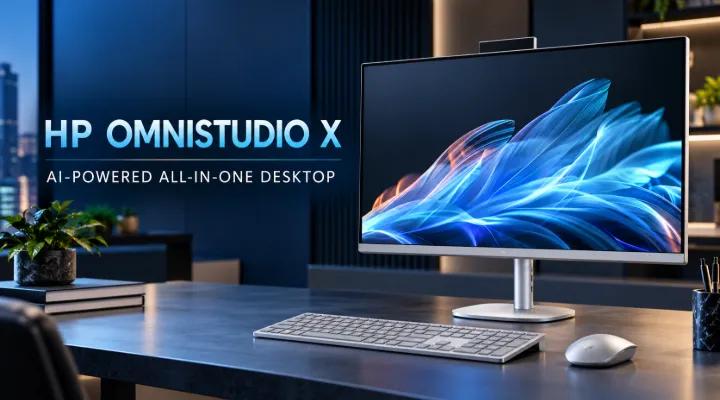
Modern workplaces need computers that combine performance, convenience, and intelligent features without taking up too much desk space. Whether you are managing daily office operations, attending online meetings, working with business applications, or creating presentations, choosing the right desktop computer can make a noticeable difference to productivity.
The HP OmniStudio X A31U4AV-1 All-in-One AI Desktop PC is designed for users who want a modern computing experience in a clean and compact setup. It combines an Intel Core Ultra 7 256V processor, 16GB RAM, a 1TB SSD, integrated Intel Arc Graphics, and a 27-inch Full HD touchscreen display in a single system.
Its AI-focused hardware, touchscreen functionality, and space-saving design make it an interesting option for offices, home workspaces, reception areas, and other professional environments.
In this guide, ICTECH Distribution explores the HP OmniStudio X's key specifications, practical applications, display features, and benefits for businesses and professionals in Dubai and across the UAE.
What Is the HP OmniStudio X A31U4AV-1?
The HP OmniStudio X is an all-in-one desktop computer that integrates the main computing components and display into a single unit. Unlike a traditional desktop setup, which requires a separate monitor and computer tower, this design helps create a cleaner and more organised workspace.
The A31U4AV-1 configuration combines modern Intel processing technology with AI acceleration and a touchscreen display. It is intended for users who need a versatile computer for everyday productivity, communication, multitasking, and selected creative applications.
Key Specifications
The following table summarises the main specifications of this configuration.
| Specification | Details |
|---|---|
| Product model | HP OmniStudio X A31U4AV-1 |
| Processor | Intel Core Ultra 7 256V |
| Memory | 16GB LPDDR5X RAM |
| Storage | 1TB SSD |
| Graphics | Integrated Intel Arc Graphics |
| Display size | 27 inches |
| Display resolution | Full HD, 1920 × 1080 |
| Display type | IPS touchscreen |
| Brightness | 350 nits |
| Colour coverage | 99% sRGB |
| AI capability | Intel AI Boost NPU |
| Operating system experience | Windows AI features, subject to configuration and availability |
These specifications make the HP OmniStudio X suitable for a broad range of everyday business and professional computing tasks.
Intel Core Ultra 7 256V: Performance for Modern Workplaces
The processor is one of the most important components to consider when purchasing a desktop computer. It affects application responsiveness, multitasking, and the ability to handle demanding workloads.
The Intel Core Ultra 7 256V is part of Intel's Core Ultra processor family, designed to combine CPU performance, integrated graphics, and dedicated AI acceleration.
Efficient Everyday Computing
For office employees, managers, and business owners, the processor provides a modern platform for routine computing activities, including:
- Working with spreadsheets, documents, and presentations.
- Managing email and business communication.
- Using web-based ERP, CRM, and accounting systems.
- Attending video conferences while accessing other applications.
- Managing multiple browser tabs and online business tools.
For example, an office manager in Dubai could use the HP OmniStudio X to review sales reports, update inventory records, attend a Microsoft Teams meeting, and prepare a presentation without needing separate computers for each task.
Actual performance will depend on the software being used, the complexity of the workload, and the system configuration.
Integrated Intel Arc Graphics
The system uses integrated Intel Arc Graphics, which supports everyday visual computing, multimedia playback, and compatible creative applications.
It is suitable for office presentations, high-resolution media, web design previews, and light image editing. However, users who regularly work with demanding 3D applications, advanced video production, or high-end gaming should assess whether a desktop with a dedicated graphics card would be more appropriate.
AI Computing with Intel AI Boost
Artificial intelligence is becoming an increasingly important part of workplace software. Applications now use AI for writing assistance, meeting summaries, image processing, document analysis, and other productivity tasks.
The HP OmniStudio X includes Intel AI Boost technology, a dedicated neural processing unit (NPU) designed to accelerate supported AI workloads.
What Does an NPU Do?
An NPU is a processor specialised for certain AI calculations. By handling compatible tasks, it can help reduce the workload on the main CPU and improve efficiency for supported applications.
The Intel Core Ultra 7 256V platform provides up to 47 TOPS of NPU performance. TOPS means trillions of operations per second, a measure of AI processing capability.
The computer is marketed as a Copilot+ PC, a category associated with Microsoft's hardware and performance requirements for supported Windows AI experiences. Availability of individual features depends on Windows version, regional availability, software updates, and other requirements.
Practical AI Applications
Businesses may benefit from AI-enabled features in several ways:
- Writing assistance: Help draft emails, reports, and business documents using compatible applications.
- Meetings: Use supported tools for transcription, captions, and meeting productivity.
- Content creation: Accelerate selected AI-assisted image and content workflows.
- Communication: Use compatible features to improve accessibility and communication.
- Workflow support: Work with AI tools integrated into business software.
For example, a sales representative could use compatible AI tools to help prepare a customer proposal after a meeting, then review the document and personalise it before sending it to the client.
AI features are not automatically available in every application, and some may require an internet connection, an account, or a separate subscription.
27-Inch Full HD Touchscreen Display
The 27-inch touchscreen is one of the most noticeable features of the HP OmniStudio X. A large display gives users more room to work with documents, dashboards, presentations, and communication applications.
Full HD Resolution and IPS Technology
The display has a resolution of 1920 × 1080 pixels. This Full HD resolution is suitable for general office productivity, browsing, presentations, and video conferencing.
The IPS panel helps provide consistent viewing angles, which can be useful when colleagues need to review information together.
The three-sided micro-edge design gives the screen a modern appearance while helping keep the focus on the content.
Touchscreen Convenience
Touch functionality provides an additional way to interact with applications. Instead of relying exclusively on a mouse and keyboard, users can tap, scroll, select, and navigate compatible on-screen elements directly.
This can be useful in reception areas, customer-facing workspaces, interactive demonstrations, and presentations.
For example, a sales team could use the touchscreen to navigate a product catalogue or show a presentation to a customer seated across the desk.
Comfort for Extended Working Hours
The display offers 350-nit brightness, 99% sRGB colour coverage, anti-glare technology, Low Blue Light features, and flicker-free technology.
These features are useful for everyday office work and visual content. However, brightness and viewing comfort also depend on room lighting, screen positioning, and individual preferences.
For professional work involving colour-critical photography or video production, buyers should evaluate whether Full HD resolution and the display's colour characteristics meet their specific requirements.
16GB RAM and 1TB SSD: A Practical Storage Combination
Memory and storage influence how smoothly a computer runs applications and how much information it can keep readily accessible.
16GB LPDDR5X RAM
The HP OmniStudio X includes 16GB of LPDDR5X memory. This provides a practical capacity for typical business multitasking, office applications, web browsing, and video meetings.
It can suit employees who regularly switch between spreadsheets, documents, communication tools, and business applications.
One important purchasing consideration is memory expandability. LPDDR memory in this processor platform is typically integrated into the package, so buyers should confirm the upgrade limitations of this exact model before ordering. Choosing the right configuration at purchase is particularly important for long-term deployment.
1TB Solid-State Drive
The 1TB SSD provides storage for business documents, application installations, presentations, local files, and other work-related content.
Compared with traditional mechanical hard drives, SSD storage generally offers faster access to files and quicker application loading.
For a small business, this capacity can accommodate a substantial collection of working documents and applications. Organisations with larger data requirements can also use network storage or approved cloud storage solutions.
Businesses should consider their backup policies, data security requirements, and expected storage growth when planning desktop deployments.
Where Can Businesses Use the HP OmniStudio X?
The combination of a large touchscreen, integrated design, and AI-capable hardware makes this desktop suitable for several workplace scenarios.
1. Corporate Offices
Employees can use the system for documentation, spreadsheets, business communication, reporting, and online collaboration.
Its all-in-one construction helps reduce the number of separate devices on a desk, making it useful for modern offices where workspace organisation matters.
2. Reception and Customer Service Areas
Reception staff often need a computer that can handle appointment systems, visitor records, communication tools, and customer information.
The large touchscreen can make selected interactions more convenient, depending on the software being used.
For shared or public-facing installations, businesses should also consider account permissions, screen privacy, and physical security.
3. Sales and Marketing Teams
Sales professionals can use the HP OmniStudio X to prepare quotations, manage CRM records, review customer requirements, and deliver presentations.
Marketing teams can work with content management systems, social media tools, presentations, and compatible image-editing applications.
The integrated graphics are appropriate for many routine creative tasks, although specialist design workflows may require more powerful graphics hardware.
4. Home Offices and Hybrid Work
For professionals working from home, the all-in-one format provides a relatively simple desktop setup without a separate computer tower.
The 27-inch display is useful for reviewing documents, managing meetings, and organising multiple windows. Buyers should verify the webcam, audio, connectivity, and included accessories in the exact regional configuration before purchasing.
5. Education and Training Environments
Training departments and educational institutions can use an all-in-one computer for presentations, online learning, administrative work, and interactive demonstrations.
The touchscreen can support compatible learning applications, while the AI-capable processor provides a platform for supported productivity tools.
Why Choose an All-in-One Desktop Instead of a Traditional PC?
Both all-in-one desktops and conventional desktop computers have advantages. The right choice depends on the user's workload, available space, and future upgrade requirements.
The HP OmniStudio X offers several practical benefits:
- Space efficiency: The computer and display are integrated into one unit.
- Simplified setup: Fewer separate components are required than in a conventional tower-and-monitor arrangement.
- Interactive display: Touch functionality supports compatible workflows.
- Modern processing: The Intel Core Ultra 7 platform combines CPU, graphics, and AI acceleration.
- Everyday storage capacity: The 1TB SSD offers room for applications and business files.
- Professional appearance: The streamlined design suits offices, meeting areas, and home workspaces.
A traditional tower desktop may be a better choice for businesses that require extensive internal upgrades, dedicated high-performance graphics, or specialised expansion cards.
Before placing a bulk order, IT teams should also verify network connectivity, ports, mounting or placement requirements, warranty coverage, and the precise regional model specification.
Buying the HP OmniStudio X in Dubai and Across the UAE
When purchasing desktop computers for a business, the decision involves more than comparing processor specifications. Organisations should consider supplier reliability, product availability, configuration accuracy, delivery arrangements, and after-sales support.
ICTECH Distribution is a Dubai-headquartered IT distribution company serving business customers with a range of computing and technology products.
Businesses interested in the HP OmniStudio X A31U4AV-1 can contact ICTECH Distribution to enquire about current pricing, stock availability, order quantities, and delivery arrangements.
For larger deployments, it is useful to prepare a list of requirements before requesting a quotation. Include the number of systems required, intended applications, preferred delivery schedule, and any additional accessories or support requirements.
This approach helps purchasing teams compare suitable configurations and plan their technology budgets more effectively.
Conclusion
The HP OmniStudio X A31U4AV-1 All-in-One AI Desktop PC combines an Intel Core Ultra 7 256V processor, 16GB LPDDR5X RAM, a 1TB SSD, integrated Intel Arc Graphics, and a 27-inch Full HD touchscreen in a streamlined desktop design.
Its AI acceleration, touchscreen convenience, and integrated construction make it a practical option for office productivity, customer-facing workspaces, sales teams, and home offices.
However, businesses should evaluate their specific needs before making a purchase, particularly regarding memory upgrade limitations, graphics performance, display resolution, and the availability of required AI features.
For businesses in Dubai and across the UAE looking to equip their teams with modern desktop computers, ICTECH Distribution can be contacted to discuss the HP OmniStudio X configuration, pricing, and availability.
Frequently Asked Questions
1. What processor does the HP OmniStudio X A31U4AV-1 use?
The HP OmniStudio X A31U4AV-1 uses the Intel Core Ultra 7 256V processor. It combines CPU performance, integrated Intel Arc Graphics, and Intel AI Boost technology for supported computing and AI workloads.
2. Does the HP OmniStudio X have a touchscreen?
Yes. This configuration features a 27-inch Full HD IPS touchscreen with a resolution of 1920 × 1080 pixels. It supports touch interaction with compatible operating system features and applications.
3. Is the HP OmniStudio X suitable for office work?
Yes. Its processor, 16GB RAM, 1TB SSD, and large display make it suitable for common office tasks, including document editing, spreadsheets, online meetings, CRM applications, presentations, and business communication.
4. Can the HP OmniStudio X run AI applications?
The computer includes an Intel AI Boost NPU designed to accelerate supported AI workloads. Compatible applications and Windows features may use this hardware for tasks such as productivity assistance, content processing, and selected AI-enabled experiences. Specific features depend on software and system requirements.
5. Where can businesses enquire about the HP OmniStudio X in the UAE?
Businesses can contact ICTECH Distribution to enquire about the HP OmniStudio X A31U4AV-1, including current pricing, availability, bulk purchasing, and delivery arrangements in the UAE.
