
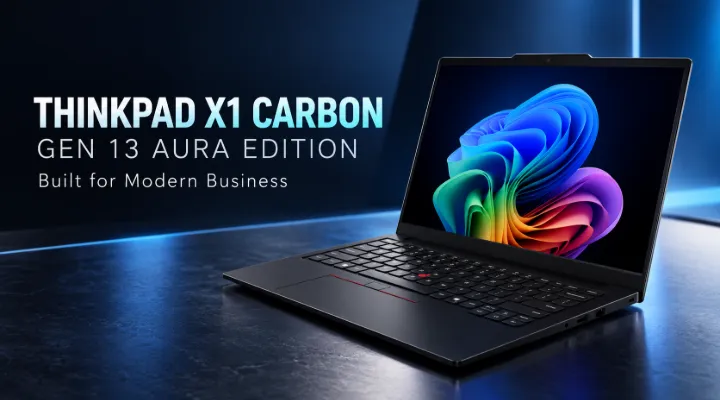
Modern businesses need laptops that combine reliable performance, portability, security, and efficient multitasking. For executives, IT managers, consultants, and corporate professionals, a laptop is more than a device for sending emails. It is an essential tool for managing projects, attending meetings, analysing data, and staying productive while travelling.
The Lenovo ThinkPad X1 Carbon Gen 13 Aura Edition 21NYSDS200 is designed for professionals who need premium computing capabilities in a lightweight business laptop. Part of Lenovo's flagship ThinkPad X1 Carbon family, this model combines a sophisticated design with Intel Core Ultra processing technology and features designed for modern workplace requirements.
For businesses in Dubai and across the UAE, where professionals frequently work between offices, client locations, airports, and home offices, a portable laptop can make a meaningful difference to everyday productivity.
In this article, we explore the key features, business benefits, practical applications, and purchasing considerations of the Lenovo ThinkPad X1 Carbon Gen 13 Aura Edition.
What Is the Lenovo ThinkPad X1 Carbon Gen 13 Aura Edition?
The Lenovo ThinkPad X1 Carbon Gen 13 Aura Edition is a premium laptop developed for professionals who value mobility, performance, and a professional working experience.
The model number 21NYSDS200 identifies a specific configuration. Buyers should confirm the processor, memory, storage, display, keyboard layout, operating system, and warranty included with the exact unit before placing an order.
The laptop features a 14-inch display, an Intel Core Ultra processor configuration, and a compact design suited to demanding professional environments. Selected configurations in the ThinkPad X1 Carbon Gen 13 family also offer advanced display options and integrated graphics capabilities.
The Aura Edition designation is associated with Lenovo's premium computing experience, including intelligent features designed to enhance everyday laptop use.
Who Should Consider This Laptop?
This laptop is particularly suitable for:
- Business executives who travel frequently.
- Corporate employees working with documents, presentations, and spreadsheets.
- IT consultants and technology professionals.
- Managers who regularly participate in online meetings.
- Sales teams visiting customers across Dubai and the wider UAE.
- Organisations looking for premium laptops for senior employees.
It is best suited to professional productivity rather than specialised workloads that require a powerful dedicated graphics card.
Key Features of the Lenovo ThinkPad X1 Carbon Gen 13 Aura Edition
1. Compact 14-Inch Display
The 14-inch display offers a practical balance between screen space and portability. It provides enough room for working with business documents, spreadsheets, presentations, and browser-based applications without making the laptop unnecessarily large.
The ThinkPad X1 Carbon Gen 13 family offers different display configurations, including WUXGA IPS and higher-resolution 2.8K OLED options, depending on the model.
An IPS display can be a practical choice for everyday office work, while an OLED option may appeal to professionals who prioritise deeper contrast and richer visual presentation.
For example, a financial analyst working in Dubai can use the display to review spreadsheets, prepare reports, and join virtual meetings while travelling between client offices.
Always verify the actual display specification of the 21NYSDS200 configuration before purchasing.
2. Intel Core Ultra Processing Technology
The ThinkPad X1 Carbon Gen 13 is built around Intel Core Ultra processor technology, designed to support modern business applications and multitasking.
Depending on the exact configuration, processor capabilities may support:
- Microsoft Office applications and business productivity tools.
- Multiple browser tabs and web-based applications.
- Video conferencing and collaborative platforms.
- Data analysis and reporting.
- Enterprise software and compatible AI-assisted workflows.
Consider a procurement manager who needs to compare supplier quotations, maintain inventory reports, attend a Microsoft Teams meeting, and prepare a presentation at the same time. A suitable Core Ultra configuration can help manage these everyday workloads efficiently.
Performance will depend on the processor variant, memory configuration, software requirements, and workload.
3. Lightweight Design for Mobile Professionals
Portability is one of the main attractions of the ThinkPad X1 Carbon range.
Professionals who regularly travel between Dubai, Abu Dhabi, Sharjah, and international business destinations benefit from a laptop that is easier to carry than many conventional business notebooks.
A lightweight laptop can fit comfortably into a professional backpack or laptop bag, making it practical for:
- Airport and hotel working.
- Customer presentations.
- Business conferences and exhibitions.
- Meetings across multiple office locations.
- Hybrid and remote working arrangements.
For consultants and executives, reducing the amount of equipment carried throughout the day can make business travel more convenient.
4. Integrated Intel Graphics and AI Capabilities
Selected ThinkPad X1 Carbon Gen 13 configurations feature integrated Intel Arc graphics and an Intel AI Boost neural processing unit (NPU).
Integrated graphics can support everyday visual tasks, including presentations, high-resolution displays, video playback, and compatible creative applications.
The NPU is designed to accelerate supported AI workloads. Depending on software compatibility, these capabilities may assist with selected video conferencing effects, local AI features, and other supported applications.
Businesses should distinguish between AI-capable hardware and software functionality. Not every AI application uses the NPU, and access to particular features may depend on the operating system, application, subscription, and configuration.
For most office users, the key benefit is having a modern platform designed to support evolving business software.
5. A Professional ThinkPad Design
ThinkPad laptops are widely associated with their business-focused design, practical keyboards, and professional appearance.
The X1 Carbon Gen 13 continues this approach with a premium construction intended for mobile business use.
For employees who spend hours typing reports, responding to emails, or preparing proposals, keyboard comfort and usability are important considerations.
Before purchasing for a team, organisations should check the keyboard layout, available ports, docking requirements, and compatibility with existing monitors and accessories.
6. Business-Oriented Security and Manageability
Security is a major consideration when purchasing laptops for corporate environments.
The ThinkPad X1 Carbon family offers business-focused security features, although the precise capabilities available depend on the configuration.
When evaluating this model, IT departments should review:
- Biometric authentication options, where included.
- Firmware and platform security capabilities.
- Compatibility with the organisation's device management policies.
- Support for operating system security updates.
- Encryption and endpoint protection requirements.
- Warranty coverage and technical support arrangements.
For a Dubai-based company handling customer records, financial documents, or confidential proposals, these measures should form part of a wider IT security policy.
A secure laptop alone cannot protect an organisation from every threat. Proper configuration, regular updates, employee awareness, and access controls remain essential.
Practical Business Applications in Dubai and the UAE
Corporate Offices and Enterprise Teams
The ThinkPad X1 Carbon Gen 13 Aura Edition can serve as a premium productivity device for managers, department heads, and employees who work with business applications throughout the day.
Its combination of portability and modern processing capabilities makes it suitable for document creation, collaboration, reporting, and routine administrative work.
Business Travel and Client Meetings
Dubai is a major centre for international trade, consulting, finance, logistics, and technology services. Professionals often need to work while moving between meetings and business locations.
A portable laptop makes it easier to review contracts, prepare presentations, access cloud-based applications, and communicate with colleagues while travelling.
IT Consultants and Technology Teams
IT consultants frequently work with documentation, remote support tools, project management platforms, and multiple browser-based systems.
The ThinkPad X1 Carbon Gen 13 can be appropriate for these activities when its processor, memory, and software compatibility meet the workload requirements.
However, professionals running multiple virtual machines, intensive development environments, or demanding engineering applications should carefully assess memory capacity and performance requirements before selecting a configuration.
Hybrid and Remote Working
Many organisations support employees who divide their time between the office, home, and customer locations.
A portable business laptop allows employees to continue working across these environments. When combined with compatible docking stations, external monitors, a reliable network connection, and suitable collaboration software, it can form part of a flexible workstation setup.
What Should Buyers Check Before Purchasing?
Selecting the right laptop configuration is just as important as choosing the model family.
1. Processor and Memory
Confirm the exact Intel Core Ultra processor included with model 21NYSDS200.
Check the installed memory against the user's workload. Office applications may have different requirements from virtual machines, data analysis tools, and specialised business software.
2. Storage Capacity
Review the installed SSD capacity and expected storage requirements.
Employees working mainly with cloud applications may require less local storage than professionals managing large presentations, project files, databases, or offline documents.
3. Display Configuration
Confirm whether the supplied unit has a WUXGA IPS display or another supported panel option. Resolution, brightness, touch functionality, and other display characteristics can vary by configuration.
4. Connectivity and Accessories
Check the available USB-C, Thunderbolt, USB-A, HDMI, audio, and other connections against the exact product specification.
Businesses using external monitors or shared workstations should also confirm docking station compatibility and power requirements.
5. Operating System and Warranty
Verify the operating system edition, licensing requirements, warranty duration, and regional support arrangements.
For corporate purchases, warranty and service terms are especially important because unexpected downtime can affect employee productivity.
6. Total Cost of Ownership
The purchase price is only one part of the overall investment.
Consider the cost of accessories, endpoint security, software licences, warranty extensions, and potential support requirements. A well-matched configuration can help avoid paying for capabilities that employees do not need while ensuring that essential workloads run comfortably.
Why Consider ICTECH Distribution for Business Laptop Requirements?
ICTECH Distribution is a Dubai-headquartered B2B IT products distributor serving businesses and customers across international markets.
Organisations sourcing laptops for employees, management teams, or wider corporate deployments need more than a product name. They also need accurate configuration details, pricing information, availability confirmation, and suitable purchasing support.
ICTECH Distribution provides a channel for businesses to enquire about IT products and discuss their requirements.
When requesting a quotation for the Lenovo ThinkPad X1 Carbon Gen 13 Aura Edition 21NYSDS200, buyers can prepare the following information:
- Required quantity.
- Preferred processor, memory, and storage configuration.
- Intended use and any specialist software requirements.
- Delivery location and expected purchasing timeline.
- Warranty and support expectations.
Providing these details helps clarify the requirements and supports a more informed purchasing decision.
Availability, pricing, lead times, and warranty terms should be confirmed directly before an order is placed.
Conclusion
The Lenovo ThinkPad X1 Carbon Gen 13 Aura Edition 21NYSDS200 is worth considering for professionals who need a premium, portable business laptop with modern processing capabilities and a professional design.
Its 14-inch display, Intel Core Ultra platform, and mobile-friendly form factor make it relevant for executives, consultants, corporate employees, and hybrid workers. Selected configurations also offer advanced display options, integrated Intel Arc graphics, and AI acceleration capabilities.
For businesses in Dubai and across the UAE, the right configuration should be selected according to employee responsibilities, software requirements, security policies, and budget.
Before purchasing, verify the exact specifications, warranty, availability, and total cost. ICTECH Distribution can be contacted to enquire about this model and discuss business IT purchasing requirements.
Frequently Asked Questions
1. What is the Lenovo ThinkPad X1 Carbon Gen 13 Aura Edition 21NYSDS200?
It is a specific model identifier within Lenovo's premium ThinkPad X1 Carbon Gen 13 Aura Edition laptop range. Buyers should confirm the exact processor, memory, storage, display, operating system, and warranty associated with this SKU.
2. Is the Lenovo ThinkPad X1 Carbon Gen 13 suitable for business use?
Yes. It is designed for professional productivity, including document creation, spreadsheets, presentations, online meetings, and business applications. Suitability for specialised workloads depends on the exact configuration.
3. What display options are available for the ThinkPad X1 Carbon Gen 13?
The product family includes different 14-inch display configurations, including WUXGA IPS and 2.8K OLED options. The display supplied with 21NYSDS200 should be verified before purchasing.
4. Does the ThinkPad X1 Carbon Gen 13 support AI applications?
Selected configurations include an Intel Core Ultra processor and Intel AI Boost NPU for supported AI workloads. Actual functionality depends on the hardware configuration, software, and application requirements.
5. Where can businesses enquire about the Lenovo ThinkPad X1 Carbon Gen 13 Aura Edition in Dubai?
Businesses can contact ICTECH Distribution through its official website at https://www.ictechdistribution.com/ to enquire about the product, request pricing, and confirm availability and purchasing terms.
