
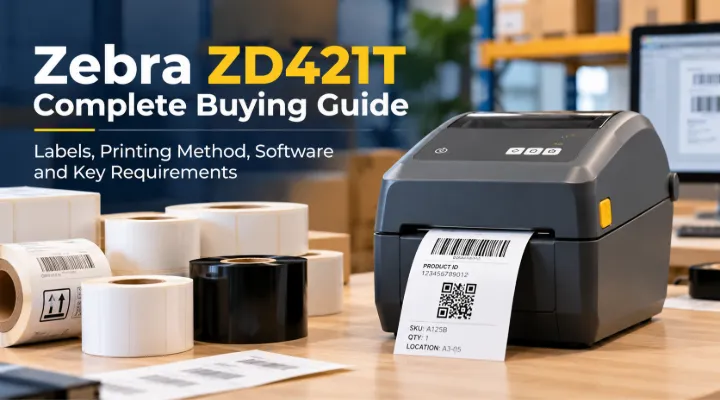
A label printer purchase is incomplete until the buyer has identified the labels, printing method and software that will be used with it. The Zebra ZD421T, recently added to ICTECH's catalogue, is a desktop thermal transfer printer candidate for product, inventory and business identification workflows. Choosing the hardware by family name alone can leave important decisions unresolved, particularly around resolution, connectivity and supplies. This guide explains how to prepare a complete requirement. It focuses on selecting and testing a usable printing setup, rather than assuming that every label roll or ribbon will work equally well with every configuration sold under the ZD421 name.
Identify the printing task
List what the business will label and where the labels will be used. A product identifier, shipping label and asset label can have different durability, size and readability requirements. Record whether labels are used indoors, exposed to handling or retained for a longer period. Ask the departments involved to provide sample content and typical quantities. Keep the intended application visible while reviewing printer options. A clearly defined task helps your supplier discuss suitable configurations and consumables. It also gives the team a basis for testing whether the output meets the requirement instead of approving a printer because a demonstration label looked sharp.
Confirm the exact ZD421 configuration
Zebra's documentation distinguishes models and options within the ZD421 family. ICTECH's listing identifies a thermal transfer ZD421T, while the quotation should state the exact supplied configuration and connections. Zebra documents 203dpi resolution and an optional 300dpi configuration for the family. Keep the selected resolution on the purchase order. Ask what accessories and setup components are included. Do not infer every available option from a general series description. This matters when ordering several printers, because consistent configurations make application setup and spare supplies easier to manage. The product reference should describe the machine the business will receive, not merely the broader product family.
Match the printing method to the label
Thermal transfer printing uses a ribbon and suitable label media. Direct thermal workflows use appropriate heat sensitive media without the same ribbon arrangement. Check the intended printing method against Zebra's documentation and the exact model. Ask a supplies specialist to recommend a compatible label and ribbon combination for the conditions you described. Avoid buying consumables only by roll size or general appearance. The material, adhesive and print arrangement should support the task. Testing an actual sample is useful because durability and readability need to be assessed in the environment where the label will be used, not only immediately after it leaves the printer.
Define label dimensions and content
Provide the required width and height, plus the text, barcode and other elements that need to fit. Identify how the label will be applied and read. Small labels may create different layout demands from larger shipping formats. Check the supported media and print dimensions in the documentation for the chosen configuration. Ask the application team to prepare a representative template before purchase. This makes resolution and supplies discussions more specific. It also prevents the business from selecting an attractive printer package and discovering later that its existing templates or label sizes need unplanned changes before production can begin.
Choose resolution using a real sample
Compare the available resolution configurations using the actual label content. Small text or dense barcode layouts may justify a different configuration from a simpler large format label. Ask for a sample print and test it with the scanners that will read the result. Zebra's specifications distinguish print speeds for the resolution options, so review the selected configuration rather than assuming one maximum applies to every unit. The useful decision is whether the printer can produce readable output at the required working rate. Keep the sample and approval record so the chosen configuration has evidence attached to it when the full order is placed.
Select ribbons and media together
Ask the supplies provider to confirm ribbon type, width and compatible media for the application. Check the supported roll and core arrangements against the printer documentation. Record the approved references in the procurement schedule. Estimate the initial consumable quantity from the planned label volume and establish who will reorder it. Do not treat the ribbon and label as unrelated purchases. A suitable printer can produce disappointing results with an inappropriate combination, and an office may struggle to reproduce an approved label if future supplies are selected inconsistently. A documented combination gives the business a repeatable starting point for everyday operation.
Confirm the application connection
Identify the system that generates the labels, such as inventory software or a dedicated label design application. Ask its provider how the printer should connect and which output arrangements it supports. Zebra documents printer language support within the family, but your application still needs a tested integration. Include operating system, required interface and deployment location in the brief. Avoid assuming that every connection option is fitted to the quoted unit. Test the complete path from business record to printed label. The hardware is only one part of that path, and a clear integration plan helps prevent the printer from becoming a separate manual process beside the actual business system.
Evaluate the daily print volume
Record typical and peak label quantities, batch sizes and the number of people who will use the printer. Describe whether printing occurs steadily or in concentrated periods. Ask whether the proposed desktop configuration suits that pattern and whether supplies can be changed conveniently. Identify the person responsible for loading media and responding to print problems. A nominal speed figure does not describe the entire workflow when staff also need to select jobs, handle labels and replenish supplies. Evaluating the task end to end gives your team a more useful view of capacity than simply choosing the printer with the highest number in a product table.
Prepare the operator's workspace
Choose a position with suitable access for media loading, printed output and the required connections. Confirm space and placement guidance in the manufacturer's documentation. Keep approved supplies available near the working area without creating confusion between different label types. Provide a simple method for identifying the loaded media and template. If several departments share the printer, agree who can change its settings and how those changes are recorded. A clear workspace supports repeatable printing and helps users avoid sending a job designed for one label format to a printer currently loaded with another format.
Build a useful acceptance test
Print a representative batch using the intended application, labels and ribbons. Check text, barcode reading and adhesion under the expected conditions. Ask the people who will use the labels to review the result. Confirm that the correct information appears and that repeated jobs maintain the required layout. Include a media reload in the trial so operators can practise the procedure. Record the configuration, template and supplies used. This produces an approval record your business can repeat later and provides better evidence than evaluating the hardware with a generic demonstration job that does not reflect the application or label material.
Request a complete ZD421T printing package
Send ICTECH the ZD421T requirement, quantity, label samples, dimensions and intended business application. Include preferred resolution, connection needs, daily volume and delivery destination. Ask for the exact configuration and appropriate initial supplies to be itemised. Confirm software and integration responsibilities separately from the printer hardware. The Zebra ZD421T is a useful candidate when evaluated as part of a complete label workflow. A prepared brief helps the buyer, application provider and supplies specialist agree what should be delivered and gives operators a setup they can use consistently after the quotation becomes an approved order.
Keep an approved supplies sample
Retain a clearly labelled reference sample of the approved print with the media and ribbon references used to produce it. Include the template version and selected printer configuration. When the business changes supplies, compare the result with that record and repeat the important barcode readability checks. This helps staff distinguish a template problem from a consumable change. It also provides a useful reference when different departments order supplies independently or when a new operator takes responsibility for the printer without having participated in the original procurement and testing process.
Frequently asked questions
Does thermal transfer printing require a ribbon?
Yes. It uses a ribbon with suitable media. Ask for a compatible combination based on the label's application and the selected printer configuration.
Are all ZD421 printers supplied with the same options?
No. Confirm the exact resolution, interfaces and package contents in the quotation. A family specification includes options that may not be fitted to every unit.
Should we choose 203dpi or 300dpi?
Test your actual label content and scanner requirements. The right choice depends on the layout and readability needed, rather than the assumption that one resolution is always necessary.
Can we reuse existing label templates?
Have the application provider review the template, printer language, dimensions and configuration. Test a representative batch before treating the existing layout as approved.
What should a ZD421T quotation include?
Request the printer configuration, connections and required accessories, plus approved initial labels and ribbons where needed. Define software integration and support responsibilities separately.
Related products
Technical references
Request a quotation from ICTECH with your product requirements, quantity and delivery country.
