
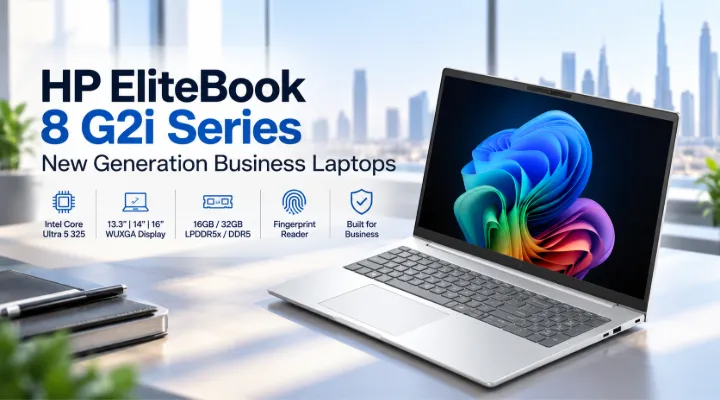
Business laptops need to do more than run everyday applications. Professionals increasingly work across cloud platforms, video meetings, business software, spreadsheets, presentations, and large numbers of browser tabs throughout the day. At the same time, many employees need a laptop that is easy to carry between offices, meeting rooms, and home.
The HP EliteBook 8 G2i Series offers several configurations built around the Intel Core Ultra 5 325 processor. The range includes compact 13.3-inch models, balanced 14-inch options, and larger 16-inch versions. Depending on the configuration, users can also choose between 16GB and 32GB memory, with LPDDR5x or DDR5 technology.
For businesses in Dubai and across the UAE, this variety makes the EliteBook 8 G2i range useful for different employee roles and working environments. This guide looks at all five configurations, compares their specifications, and explains the practical differences between them.
What Is the HP EliteBook 8 G2i Series?
The HP EliteBook 8 G2i is a business-focused laptop series designed for professional productivity. The five configurations covered in this article share several core characteristics, including:
- Intel Core Ultra 5 325 processor
- Integrated Intel Graphics
- Windows 11 Pro
- PCIe NVMe SSD storage
- WUXGA 1920 x 1200 displays
- IPS panels
- Anti-glare displays
- Backlit keyboard
- Fingerprint reader
- 1-year warranty
The main differences are screen size, memory type and capacity, keyboard configuration, and storage capacity.
This allows businesses to select a configuration based on how employees actually use their computers rather than providing exactly the same specification to everyone.
HP EliteBook 8 G2i Configurations at a Glance
The five available configurations are:
| Part Number | Processor | Memory | Storage | Display | Keyboard / Security |
|---|---|---|---|---|---|
| DG1N2ET#BH5 | Core Ultra 5 325 | 16GB LPDDR5x-8533 | 512GB NVMe | 13.3-inch WUXGA IPS | English backlit, fingerprint |
| DN6U8ET#BH5 | Core Ultra 5 325 | 16GB LPDDR5x-8533 | 512GB NVMe | 14-inch WUXGA IPS | English backlit, fingerprint |
| DG0W8ET#BH5 | Core Ultra 5 325 | 32GB LPDDR5x-8533 | 512GB NVMe | 14-inch WUXGA IPS | English backlit, fingerprint |
| DG1M5ET#BH5 | Core Ultra 5 325 | 16GB DDR5-5600 | 512GB NVMe | 16-inch WUXGA IPS | English backlit, fingerprint |
| DG1M5ET#ABV | Core Ultra 5 325 | 16GB DDR5-5600 | 512GB NVMe | 16-inch WUXGA IPS | English/Arabic backlit, fingerprint |
This gives businesses three screen-size choices: 13.3-inch, 14-inch, and 16-inch.
Intel Core Ultra 5 325 for Business Computing
All five configurations use the Intel Core Ultra 5 325 processor, creating a consistent performance platform across the range.
For typical professional workloads, a business laptop needs to handle several applications at once. An employee may have Microsoft Word open alongside a browser, Excel, email, a messaging application, and a video meeting.
The EliteBook 8 G2i configurations are designed around this type of productivity.
Typical applications can include:
- Microsoft Office applications
- Web-based business platforms
- CRM applications
- Accounting software
- Video conferencing
- Email and communication tools
- Document management
- Presentations
- Cloud applications
- General business multitasking
The processor is paired with integrated Intel Graphics, making these configurations focused on business productivity rather than dedicated-GPU workloads such as high-end gaming or professional 3D rendering.
13.3-Inch HP EliteBook 8 G2i: Compact Business Computing
The 13.3-inch configuration is the smallest option in the listed range.
HP EliteBook 8 G2i DG1N2ET#BH5
This model includes:
- Intel Core Ultra 5 325
- 16GB LPDDR5x-8533 MT/s onboard memory
- 512GB PCIe NVMe M.2 SSD
- 13.3-inch WUXGA display
- 1920 x 1200 resolution
- IPS panel
- Anti-glare finish
- Integrated Intel Graphics
- Windows 11 Pro
- Fingerprint reader
- English backlit keyboard
- 1-year warranty
The smaller display is particularly useful for employees who move around frequently.
For example, a consultant may work from a client office in the morning, attend a meeting in another location in the afternoon, and finish work from home. A compact business laptop can be more convenient in this type of environment.
The 1920 x 1200 resolution also provides more vertical workspace than a conventional 1920 x 1080 display.
14-Inch HP EliteBook 8 G2i: A Balanced Option
The 14-inch models sit between portability and screen space.
HP EliteBook 8 G2i DN6U8ET#BH5
This configuration features:
- Intel Core Ultra 5 325
- 16GB LPDDR5x-8533 MT/s onboard memory
- 512GB PCIe NVMe M.2 SSD
- 14-inch WUXGA IPS display
- 1920 x 1200 resolution
- Anti-glare screen
- Integrated Intel Graphics
- Windows 11 Pro
- Fingerprint reader
- English backlit keyboard
- 1-year warranty
The 14-inch format is suitable for employees who need to balance mobility with a comfortable workspace.
It can work well for:
- Managers
- Sales teams
- Consultants
- Office professionals
- Hybrid workers
- Project coordinators
- IT professionals
The 14-inch display provides additional physical screen area compared with the 13.3-inch model while remaining more compact than the 16-inch versions.
14-Inch Model with 32GB LPDDR5x Memory
For users who regularly multitask, memory capacity becomes particularly important.
HP EliteBook 8 G2i DG0W8ET#BH5
This configuration includes:
- Intel Core Ultra 5 325
- 32GB LPDDR5x-8533 MT/s onboard memory
- 512GB PCIe NVMe M.2 SSD
- 14-inch WUXGA IPS display
- 1920 x 1200 resolution
- Anti-glare finish
- Integrated Intel Graphics
- Windows 11 Pro
- Fingerprint reader
- English backlit keyboard
- 1-year warranty
The key difference compared with the other 14-inch configuration is the 32GB memory capacity.
Who can benefit from 32GB RAM?
A 32GB configuration can be useful when a user frequently works with multiple demanding applications simultaneously.
For example, a project manager may have a browser with numerous tabs, Microsoft Excel, Teams, PowerPoint, a project management platform, PDF documents, and other applications open throughout the day.
Having more system memory can provide additional headroom for this type of multitasking.
For companies, this configuration can also be considered for employees who are likely to keep the same laptop for several years and want additional memory capacity from the start.
16-Inch HP EliteBook 8 G2i Models
The 16-inch configurations are designed for users who prefer a larger working area.
Both listed 16-inch models use:
- Intel Core Ultra 5 325
- 16GB DDR5-5600 MT/s memory
- 512GB PCIe NVMe M.2 SSD
- 16-inch WUXGA display
- 1920 x 1200 resolution
- IPS technology
- Anti-glare finish
- Integrated Intel Graphics
- Windows 11 Pro
- Fingerprint reader
- Backlit keyboard
- 1-year warranty
The main difference between the two configurations is the keyboard layout.
DG1M5ET#BH5 – English Keyboard
This version includes an English backlit keyboard.
It can be suitable for organizations that standardize on an English keyboard layout.
DG1M5ET#ABV – English/Arabic Keyboard
The English/Arabic version provides an additional keyboard-layout option that can be particularly useful for organizations operating in the UAE and serving users who work with both languages.
For companies purchasing laptops for multiple employees, choosing the correct keyboard layout at the time of procurement can help avoid the need for external keyboards or keyboard stickers.
16GB vs 32GB: Which Should You Choose?
One of the most important differences in the G2i range is memory capacity.
Four of the listed configurations use 16GB RAM, while one 14-inch model offers 32GB.
16GB RAM
16GB can be appropriate for many standard business users.
It is suitable for activities such as:
- Office applications
- Web browsing
- Video conferencing
- CRM applications
- Business software
- Presentations
- General multitasking
For a typical office employee, 16GB provides a practical starting point.
32GB RAM
The 32GB configuration provides additional memory capacity for users with heavier multitasking requirements.
It can be considered for:
- Data-heavy workflows
- Large spreadsheets
- Extensive browser multitasking
- Multiple professional applications
- Users who regularly work with large files
- Employees expected to keep their laptops for longer periods
The 32GB model is available with the 14-inch display and LPDDR5x memory.
LPDDR5x vs DDR5 Memory
The G2i range provides an interesting comparison because the 13.3-inch and 14-inch configurations use LPDDR5x-8533 memory, while the 16-inch configurations use DDR5-5600 memory.
LPDDR5x-8533
The 13.3-inch and 14-inch models use LPDDR5x-8533 memory.
The available configurations include both 16GB and 32GB options.
The 32GB LPDDR5x configuration gives businesses the option to combine the compact 14-inch form factor with a higher memory capacity.
DDR5-5600
The 16-inch configurations use 16GB DDR5-5600 memory.
This provides a different memory configuration while pairing with the larger 16-inch display.
For buyers, it is important to look beyond the memory type and consider the complete system configuration, including processor, capacity, display size, storage, and intended workload.
Fingerprint Reader and Business Security
Business laptops often contain company documents, customer information, emails, financial data, and other sensitive files.
The listed HP EliteBook 8 G2i configurations include a fingerprint reader, providing users with a convenient biometric authentication option.
Windows 11 Pro also makes the laptops suitable for professional environments that require business-oriented Windows capabilities.
For corporate deployments, organizations should still implement broader security practices, including strong authentication policies, regular updates, data backups, endpoint protection, and appropriate access controls.
Why the WUXGA Display Is Useful for Office Work
All five configurations use a 1920 x 1200 WUXGA resolution.
The additional vertical resolution compared with Full HD can be useful for productivity.
For example, when working in Excel, a user can see more rows on the screen. When reading a document, more content can be visible at once. Developers can also see more lines of code without constantly scrolling.
The IPS and anti-glare characteristics are also suited to typical office environments.
Choosing the Right Screen Size
The choice between 13.3-inch, 14-inch, and 16-inch largely depends on the employee's working style.
13.3-inch
Consider the 13.3-inch model when portability is a priority.
It can be suitable for:
- Frequent travelers
- Consultants
- Sales representatives
- Executives who attend many meetings
- Hybrid employees
14-inch
The 14-inch models provide a middle ground.
They can suit employees who need to travel but also spend substantial time working at a desk.
The 14-inch range also provides the choice between 16GB and 32GB memory.
16-inch
The 16-inch models are more suitable for users who value a larger workspace.
They can be particularly useful for:
- Finance teams
- Analysts
- Project managers
- Administrative professionals
- Employees working extensively with spreadsheets
- Users who prefer a larger display
HP EliteBook 8 G2i for Businesses in Dubai and the UAE
Businesses in Dubai often operate in fast-moving environments where employees may work from offices, customer locations, shared workspaces, and home offices.
This makes flexibility an important part of laptop selection.
The G2i range allows businesses to choose different screen sizes while maintaining the same Core Ultra 5 325 processor family.
For example, a company could provide 13.3-inch models to its traveling sales team, 14-inch models to managers and consultants, and 16-inch configurations to finance or administrative employees.
This approach can help create a more role-based IT procurement strategy rather than assigning one configuration to every employee.
The availability of an English/Arabic keyboard option is also relevant for UAE organizations.
Practical Business Configuration Examples
A company purchasing laptops for several departments could consider a structure such as:
- Mobile sales employee: 13.3-inch, 16GB RAM, 512GB SSD
- Manager or consultant: 14-inch, 16GB RAM, 512GB SSD
- Heavy multitasking professional: 14-inch, 32GB RAM, 512GB SSD
- Finance or administrative employee: 16-inch, 16GB RAM, 512GB SSD
- UAE user requiring bilingual keyboard: 16-inch English/Arabic model
These are examples rather than fixed requirements. Actual selection should be based on the applications and working conditions of each employee.
Why the HP EliteBook 8 G2i Range Makes Sense for Corporate Procurement
One advantage of having several configurations within the same series is consistency.
An IT department can deploy different screen sizes and memory configurations while keeping employees within the same general product family.
This can simplify:
- Laptop procurement
- Employee deployment
- Standardization
- Technical support
- Accessory planning
- Warranty management
- Replacement planning
Businesses can therefore match specifications to job roles without introducing numerous unrelated laptop models.
Conclusion
The HP EliteBook 8 G2i Series provides five configurations built around the Intel Core Ultra 5 325 processor, with options covering three display sizes and two memory technologies.
The 13.3-inch model focuses on portability, while the 14-inch configurations provide a balance between mobility and workspace. The 32GB 14-inch model is designed for users who need greater memory capacity. The 16-inch versions provide a larger display and use DDR5-5600 memory, with both English and English/Arabic keyboard options available.
With 512GB NVMe SSD storage, WUXGA IPS displays, Windows 11 Pro, integrated Intel Graphics, backlit keyboards, fingerprint readers, and a 1-year warranty across the listed configurations, the series provides several practical choices for professional users.
For businesses in Dubai and across the UAE, selecting the right configuration should come down to the employee's mobility, screen-size preference, multitasking requirements, keyboard layout, and overall workload.
ICTECH Distribution provides a range of business laptops and IT products for organizations looking to equip their teams with suitable computing solutions.
Frequently Asked Questions
1. What processor does the HP EliteBook 8 G2i use?
All five configurations covered in this guide use the Intel Core Ultra 5 325 processor with integrated Intel Graphics.
2. How much RAM is available in the HP EliteBook 8 G2i?
The listed models are available with either 16GB or 32GB memory. The 13.3-inch and 14-inch configurations use LPDDR5x-8533, while the 16-inch models use DDR5-5600.
3. What screen sizes are available?
The HP EliteBook 8 G2i configurations covered here are available with 13.3-inch, 14-inch, and 16-inch WUXGA displays, all using a 1920 x 1200 resolution.
4. Does the HP EliteBook 8 G2i have a fingerprint reader?
Yes. The five configurations listed in this article include a fingerprint reader.
5. Is there an English/Arabic keyboard option?
Yes. The DG1M5ET#ABV 16-inch configuration includes an English/Arabic backlit keyboard. Other listed configurations use an English backlit keyboard.
