
Choosing a laptop for work, study, entertainment, and everyday computing can be challenging when there are so many models available. Users often want a large, comfortable display without moving to a bulky desktop replacement, while also expecting modern performance, fast storage, good connectivity, and a responsive operating system.
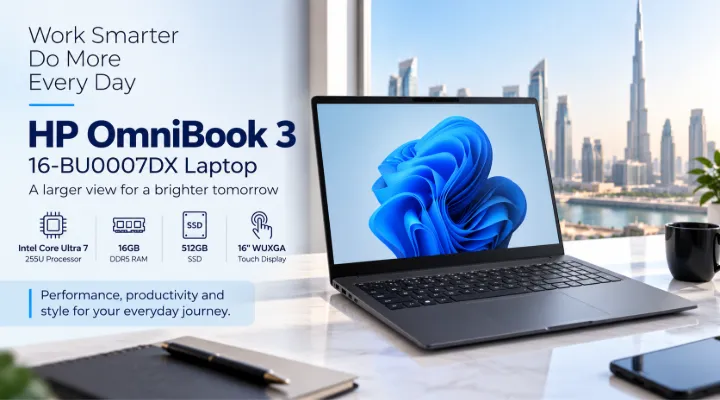
The HP OmniBook 3 16-BU0007DX is designed around this balance. Equipped with an Intel Core Ultra 7-255U processor, 16GB DDR5 memory, a 512GB SSD, integrated graphics, and a 16-inch WUXGA IPS touchscreen, it offers a versatile setup for professionals, students, home users, and business environments.
For users in Dubai and across the UAE, a 16-inch laptop can be particularly useful for office work, remote meetings, document management, browsing, entertainment, and multitasking. This article explores the key features of the HP OmniBook 3 16-BU0007DX and explains where it fits into everyday computing.
Introduction to the HP OmniBook 3 16-BU0007DX
The HP OmniBook 3 16-BU0007DX combines a modern Intel Core Ultra processor with a relatively large 16-inch touchscreen display. Its configuration includes 16GB of DDR5 RAM and a 512GB SSD, providing a practical foundation for productivity applications.
The laptop comes with Windows 11 Home and features a Mica Silver finish with an English keyboard. The supplied configuration also includes a one-year warranty.
Its main specifications include:
- Intel Core Ultra 7-255U processor
- 16GB DDR5 RAM
- 512GB SSD
- Integrated graphics
- 16-inch WUXGA IPS touchscreen
- 1920 × 1200 resolution
- Windows 11 Home
- Mica Silver finish
- English keyboard
- 1-year warranty
Rather than focusing on one specialised workload, the OmniBook 3 is positioned as a flexible laptop for a broad range of users.
Intel Core Ultra 7-255U Processor for Everyday Performance
One of the most important components of the HP OmniBook 3 is its Intel Core Ultra 7-255U processor.
The Core Ultra family is designed for modern laptops and combines CPU performance with platform features intended for contemporary computing workloads. For everyday users, the processor provides a strong foundation for office applications, web browsing, video calls, content consumption, and multitasking.
Suitable for Office and Business Applications
Business users commonly work with several applications simultaneously. For example, a user might have Microsoft Word open while working with an Excel spreadsheet, browsing a supplier website, and participating in a Microsoft Teams meeting.
The Core Ultra 7-255U provides the processing capability needed for these types of workloads without requiring a dedicated workstation-class system.
Typical applications can include:
- Microsoft Word and Excel
- PowerPoint presentations
- Web browsers with multiple tabs
- Email applications
- Video conferencing
- Accounting and business software
- Cloud-based productivity applications
- Document management
For Dubai-based professionals who regularly move between office, home, and meetings, this makes the laptop a practical general-purpose work computer.
16GB DDR5 RAM for Multitasking
The HP OmniBook 3 16-BU0007DX comes with 16GB of DDR5 RAM.
Memory capacity has a significant impact on how comfortably a laptop handles multiple applications. While basic tasks may require considerably less memory, 16GB provides useful headroom for users who frequently keep several applications and browser tabs open.
Practical Multitasking Example
Imagine a sales employee preparing a quotation. They may have:
- A browser open for checking product specifications.
- Excel running for pricing calculations.
- Word or another application for preparing documents.
- Email open for communicating with customers.
- A video meeting application running in the background.
A 16GB configuration is well suited to this type of multitasking environment.
Students can similarly use the laptop for research, online classes, presentations, PDFs, and productivity applications without needing to constantly close programs.
512GB SSD for Fast Everyday Storage
The laptop includes a 512GB SSD, providing a combination of responsive storage and useful capacity for everyday users.
Compared with traditional mechanical hard drives, SSD storage can provide faster system responsiveness. This is noticeable when starting Windows, launching applications, opening documents, or accessing stored files.
Who Can Benefit from 512GB?
A 512GB SSD can be suitable for:
- Office documents
- Academic files
- Business presentations
- Photos
- Applications
- PDFs and reports
- Local project files
- General media
For users who maintain large video libraries, extensive photo collections, or very large professional datasets, external storage or cloud storage can supplement the internal drive.
16-Inch WUXGA IPS Touchscreen
The 16-inch display is one of the defining characteristics of the HP OmniBook 3.
It uses a WUXGA resolution of 1920 × 1200 and IPS technology, while also supporting touch input.
Why the 16:10 Aspect Ratio Matters
A 1920 × 1200 resolution provides a 16:10 aspect ratio rather than the traditional 16:9 format.
That additional vertical space can be useful when working with documents, spreadsheets, websites, and long emails.
For example, when viewing a spreadsheet, the extra vertical pixels can allow more rows to be visible at once. Similarly, users working with documents may find the taller display useful for viewing more content without scrolling.
Touchscreen Convenience
The touchscreen provides another way to interact with Windows 11.
Touch input can be convenient when:
- Scrolling through websites
- Navigating presentations
- Viewing documents
- Interacting with compatible applications
- Browsing photos
- Using the laptop casually
The touchscreen does not replace the keyboard and touchpad for traditional productivity, but it gives users another interaction option.
Integrated Graphics for General Computing
The HP OmniBook 3 configuration uses integrated graphics rather than a dedicated gaming GPU.
This is an important distinction when considering what the laptop is designed to do.
Integrated graphics are well suited to everyday activities such as:
- Web browsing
- Office applications
- Video playback
- Presentations
- Streaming
- General multimedia
- Standard productivity software
Users looking for a laptop specifically for demanding 3D gaming, professional GPU rendering, or advanced graphics production should instead consider a model equipped with a dedicated graphics processor.
For business and everyday productivity, however, integrated graphics can help maintain a balanced laptop configuration.
Windows 11 Home Experience
The HP OmniBook 3 16-BU0007DX comes with Windows 11 Home.
Windows 11 provides the familiar desktop environment used by millions of PC users and supports a wide selection of productivity, communication, entertainment, and business applications.
For a new laptop, having Windows 11 preinstalled also means users can configure their system without having to purchase and install an operating system separately.
Businesses with specific licensing requirements should verify whether Windows 11 Home meets their organisation's software and management requirements before purchasing.
A Practical Laptop for Dubai Professionals
Dubai's business environment includes professionals working across finance, retail, real estate, logistics, consulting, hospitality, technology, and many other sectors.
A laptop such as the HP OmniBook 3 can serve a range of everyday professional requirements.
For Office Employees
An employee may use the laptop for:
- Email communication
- Microsoft Office
- Customer management systems
- Online meetings
- Presentations
- Reports
- Web-based business platforms
The 16-inch screen can also be helpful for employees who spend considerable time working with documents and spreadsheets.
For Students
Students can use the OmniBook 3 for:
- Online learning
- Research
- Assignments
- Presentations
- PDF textbooks
- Web browsing
- Video calls
The touchscreen and 16-inch display can also make casual content consumption more comfortable.
For Home Users
At home, the laptop can handle common activities such as:
- Streaming video
- Web browsing
- Online shopping
- Personal documents
- Video calls
- Social media
- Photo viewing
Its larger screen gives it an advantage over smaller ultraportable laptops for users who prefer more display space.
Everyday Productivity and Entertainment
A modern laptop is often expected to do more than run office software.
The OmniBook 3 can be used as a general entertainment and productivity device. Users can stream movies, browse social media, participate in video calls, listen to music, and manage personal files alongside their regular work.
The 16-inch display offers a larger viewing area than many compact 13-inch or 14-inch laptops.
For someone who spends several hours a day reading documents or working with spreadsheets, that additional screen real estate can be particularly useful.
What Makes This Configuration Practical?
Several elements of the HP OmniBook 3 work together to create a balanced everyday laptop.
Processor
The Intel Core Ultra 7-255U provides the processing foundation for general productivity and multitasking.
Memory
16GB DDR5 RAM provides useful capacity for running multiple applications.
Storage
The 512GB SSD provides responsive storage for applications and everyday files.
Display
The 16-inch 1920 × 1200 IPS touchscreen offers a larger 16:10 workspace.
Operating System
Windows 11 Home provides a current Windows environment for everyday computing.
This combination makes the configuration particularly relevant to users who want one laptop for several different activities rather than a device built around one specialised task.
Considerations Before Buying
Although the HP OmniBook 3 is versatile, buyers should consider their intended workload before making a purchase.
For General Productivity
The configuration is well matched to common office, education, browsing, communication, and entertainment requirements.
For Heavy Graphics Work
The integrated graphics should be taken into consideration if your workload involves advanced 3D rendering, professional video production, CAD, or demanding graphics applications.
A dedicated GPU laptop may be more appropriate for these requirements.
For Large Data Collections
The 512GB SSD is suitable for many users, but professionals handling large video projects, extensive datasets, or sizeable media libraries may require external storage or a higher-capacity system.
Why Choose a 16-Inch Laptop?
Laptop size is often a compromise between portability and workspace.
A 16-inch model gives users more screen area while still retaining the convenience of a laptop.
For example, a person who spends most of the day working with spreadsheets may prefer a 16-inch display over a smaller 13-inch screen. Similarly, someone who frequently reviews contracts, presentations, or lengthy documents may appreciate the additional vertical workspace offered by the 1920 × 1200 resolution.
For users who mostly work at a desk but occasionally need to move between rooms, offices, or meeting locations, a 16-inch laptop can provide a useful middle ground.
HP OmniBook 3 16-BU0007DX: Who Should Consider It?
The HP OmniBook 3 16-BU0007DX can be considered by users looking for a modern Windows laptop for broad everyday workloads.
It is particularly relevant for:
- Business professionals
- Office employees
- Students
- Home users
- Remote workers
- Small business owners
- Users who prefer larger laptop displays
- Users who need regular multitasking
- Users looking for a touchscreen Windows laptop
It is less focused on users whose primary requirement is high-end gaming or professional GPU-intensive workloads.
Buying from ICTECH Distribution
For businesses and customers sourcing IT equipment in Dubai and the UAE, ICTECH Distribution provides access to a wide selection of laptops, desktops, servers, networking products, storage devices, monitors, printers, and other technology products.
The HP OmniBook 3 16-BU0007DX is one example of a modern productivity laptop that can serve different types of users and business requirements.
Before purchasing, it is useful to compare the exact processor, memory, storage, display, operating system, keyboard layout, warranty, and availability of the specific configuration. Product specifications and availability can vary between regional configurations, so buyers should verify the model number before placing an order.
Conclusion
The HP OmniBook 3 16-BU0007DX is built as a versatile everyday laptop, combining an Intel Core Ultra 7-255U processor with 16GB DDR5 RAM, a 512GB SSD, integrated graphics, and a 16-inch WUXGA IPS touchscreen.
Its larger 16:10 display makes it particularly interesting for users who work with documents, spreadsheets, presentations, and web applications, while the touchscreen adds another convenient way to interact with Windows 11.
For professionals, students, home users, and businesses in Dubai and the UAE, this configuration provides a balanced platform for everyday productivity, communication, browsing, and entertainment. Users with highly specialised graphics or gaming requirements should consider systems with dedicated graphics, but for general computing, the OmniBook 3 offers a well-rounded specification.
Frequently Asked Questions
1. What processor does the HP OmniBook 3 16-BU0007DX use?
The laptop is equipped with an Intel Core Ultra 7-255U processor, designed for modern laptop productivity and multitasking workloads.
2. How much RAM does the HP OmniBook 3 have?
This configuration comes with 16GB of DDR5 RAM, providing a practical memory capacity for everyday applications and multitasking.
3. Does the HP OmniBook 3 have a touchscreen?
Yes. The 16-inch display is an IPS touchscreen with a 1920 × 1200 WUXGA resolution.
4. Is the HP OmniBook 3 suitable for business use?
Yes. Its Core Ultra processor, 16GB RAM, 512GB SSD, large display, and Windows 11 Home make it suitable for many everyday business and office workloads. Businesses should verify their specific operating-system and software requirements.
5. Is the HP OmniBook 3 suitable for gaming?
The configuration uses integrated graphics, so it is better suited to everyday computing and lighter graphical workloads than demanding modern gaming. Users seeking high-performance gaming should consider a laptop with a dedicated GPU.
