
Choosing the right desktop computer for a modern workspace is not always about getting the most powerful specifications. For many homes, offices, reception desks, classrooms, and small businesses in Dubai, a computer needs to be reliable, compact, easy to use, and capable of handling everyday workloads without taking up unnecessary space.
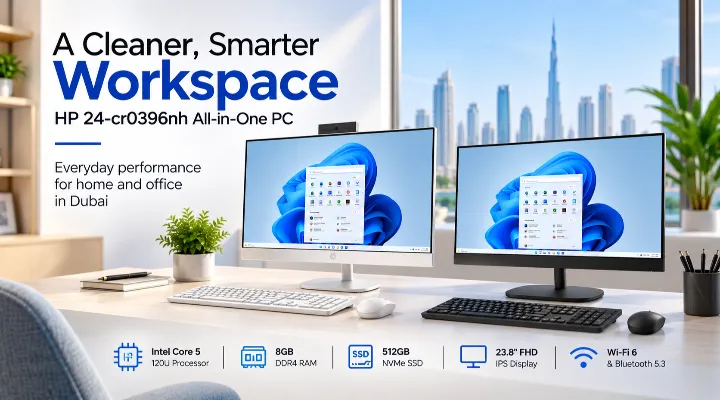
The HP 24-cr0396nh All-in-One PC E09HWEA is designed around exactly this idea. It combines the computer hardware and a 23.8-inch Full HD display into a single, streamlined unit. With an Intel Core 5 120U processor, 8GB DDR4 RAM, 512GB PCIe NVMe SSD, Wi-Fi 6, and a three-sided micro-edge display, it provides a balanced setup for productivity and general computing.
Its FreeDOS operating system also gives users the flexibility to install the operating system of their choice.
For businesses and home users in the UAE, where clean workspaces and efficient technology are increasingly important, the HP 24-cr0396nh offers a practical alternative to a traditional desktop tower and separate monitor.
What Makes an All-in-One PC Different?
A traditional desktop normally consists of a computer tower, monitor, keyboard, mouse, and several cables connecting everything together. An All-in-One PC integrates the main computer components behind the display.
This approach offers several advantages:
- Less desk clutter
- Fewer cables
- A cleaner appearance
- Easier installation
- Reduced space requirements
- A convenient solution for offices and reception areas
The HP 24-cr0396nh takes this concept further with a slim design and three-sided micro-edge display. Instead of dedicating valuable desk space to a separate computer tower, users can keep their entire setup focused around the screen.
For example, a small Dubai consultancy with limited desk space can place the All-in-One on an employee's workstation without needing to accommodate a large desktop tower underneath or beside the desk.
HP 24-cr0396nh Key Specifications
Before looking at practical performance, it is useful to understand what the hardware offers.
| Specification | HP 24-cr0396nh |
|---|---|
| Processor | Intel Core 5 120U |
| CPU Cores / Threads | 10 cores / 12 threads |
| Memory | 8GB DDR4-3200 |
| Storage | 512GB PCIe NVMe M.2 SSD |
| Display | 23.8-inch Full HD IPS |
| Resolution | 1920 × 1080 |
| Brightness | 250 nits |
| Colour Coverage | 99% sRGB |
| Display Design | Three-sided micro-edge |
| Operating System | FreeDOS |
| Wireless | Wi-Fi 6 |
| Bluetooth | Bluetooth 5.3 |
| Networking | Gigabit Ethernet |
| Video Output | HDMI-out |
| USB Connectivity | USB Type-C and USB Type-A |
This combination is aimed primarily at everyday productivity rather than specialist workstation or high-end gaming workloads.
Intel Core 5 120U for Everyday Productivity
At the heart of the HP 24-cr0396nh is the Intel Core 5 120U processor. It features 10 cores and 12 threads, giving the system enough processing capability for a wide range of common business and home applications.
Office Applications and Multitasking
The processor is well suited to tasks such as:
- Microsoft Word
- Excel
- PowerPoint
- Web browsing
- Accounting applications
- Document management
- Online meetings
- Cloud-based business applications
A typical office employee might have an Excel spreadsheet open alongside a web browser, email application, PDF documents, and a communication platform. The processor is designed to handle this type of everyday multitasking.
The actual experience will also depend on the applications being used and the amount of available memory.
Suitable for Business Environments
For many small and medium-sized businesses, the computer does not need workstation-class hardware. What matters more is dependable performance for daily operations.
An administrative employee working with invoices, spreadsheets and customer records, for example, can benefit from the combination of the Core 5 processor and fast NVMe storage without needing a large tower PC.
8GB RAM and 512GB SSD: A Balanced Configuration
The HP 24-cr0396nh comes with 8GB of DDR4-3200 memory and a 512GB PCIe NVMe M.2 SSD.
8GB DDR4 Memory
8GB RAM is a practical starting point for general office computing, web browsing, document creation and routine multitasking.
For users who primarily work with:
- Office documents
- Web applications
- PDFs
- Business software
- Video calls
8GB can provide a suitable everyday experience.
However, users who regularly work with very large spreadsheets, demanding creative applications, virtual machines or numerous memory-intensive applications may want to consider a system with more RAM.
Fast 512GB NVMe Storage
The 512GB PCIe NVMe SSD is another important component.
Compared with traditional mechanical hard drives, an NVMe SSD provides much faster data access. This helps with everyday activities such as:
- Starting the computer
- Launching applications
- Opening documents
- Searching files
- Transferring data
For a home user, this can mean less waiting when opening frequently used programs. In an office, faster storage can make routine workflows feel more responsive.
The 512GB capacity also provides reasonable room for applications and everyday files, although businesses working with large media libraries or extensive databases may require additional storage.
23.8-Inch Full HD IPS Display
One of the biggest attractions of an All-in-One PC is that the computer and display are designed as one product. HP equips this model with a 23.8-inch Full HD IPS screen.
Full HD Resolution
The 1920 × 1080 resolution provides enough workspace for everyday office tasks while keeping text and interface elements clear.
A 23.8-inch screen is also a useful size for desktop productivity. It provides more working space than a typical laptop screen without requiring the desk space of a very large monitor.
For example, an accountant could keep a spreadsheet visible while using another application alongside it, while a customer-service employee could work with a browser and business software during customer interactions.
99% sRGB Coverage
The display offers 99% sRGB colour coverage, which helps produce more vibrant and accurate colours for everyday visual work.
This can be useful for:
- Presentations
- Website content
- Marketing materials
- Product images
- General photo viewing
It should not, however, be confused with a specialised professional colour-grading monitor. Users working in demanding photography, video production or colour-critical design should consider a dedicated professional display.
Anti-Glare and Micro-Edge Design
The anti-glare display is particularly useful in office environments where overhead lighting or windows can create reflections.
The three-sided micro-edge design also gives the screen a modern appearance while reducing the amount of bezel surrounding the display.
This makes the system suitable for customer-facing environments such as reception desks, clinics, educational spaces and retail offices.
Connectivity for Modern Workspaces
A modern desktop needs more than processing power. It needs to connect easily to networks, accessories and external displays.
The HP 24-cr0396nh provides a combination of wired and wireless connectivity.
Wi-Fi 6 and Bluetooth 5.3
Wi-Fi 6 provides modern wireless networking capability, while Bluetooth 5.3 allows compatible wireless accessories to be connected.
For an office, this can help reduce the number of cables required around the desk.
For example, employees can use compatible wireless keyboards, mice and other peripherals while keeping the workspace cleaner.
USB and HDMI Connectivity
The system includes USB Type-C and USB Type-A connectivity for connecting peripherals and accessories.
The HDMI-out port can also be useful when a second display or compatible external screen is required.
This is particularly practical for employees who need additional screen space for spreadsheets, dashboards or reference documents.
Gigabit Ethernet
For environments where a wired network is preferred, Gigabit Ethernet provides a direct network connection.
In business settings, a wired connection can be useful where network stability is a priority or where IT departments prefer wired desktop systems.
FreeDOS: Flexibility for the User
The HP 24-cr0396nh comes with FreeDOS rather than a pre-installed Windows operating system.
This is an important consideration when purchasing the computer.
FreeDOS provides a DOS-compatible operating environment, but users who want a modern graphical operating system such as Windows will need to install it separately and ensure they have the appropriate licence.
Who Can Benefit from FreeDOS?
FreeDOS can be useful for:
- Businesses with existing operating-system licensing
- IT departments managing their own deployments
- Users who want to choose their operating system
- Organisations purchasing computers in larger quantities
For example, a Dubai business with an existing Windows licensing agreement may prefer to purchase hardware without an included Windows licence and deploy its standard operating environment internally.
Before purchasing, organisations should confirm their software licensing, installation and IT requirements.
Practical Uses in Dubai and the UAE
The HP 24-cr0396nh can fit into several different environments.
Small and Medium-Sized Offices
For administrative work, sales operations, HR, accounting and customer service, the system provides a clean desktop setup without requiring a separate monitor and tower.
Reception Areas
The compact All-in-One format is particularly attractive for reception desks.
Reception staff can use it for:
- Visitor management
- Appointment scheduling
- Web-based systems
- Document access
Its integrated design helps maintain a professional-looking reception area.
Education and Training Centres
Training centres and educational institutions often need multiple computers while making efficient use of available space.
A 23.8-inch Full HD display gives students a comfortable screen for documents, web applications and educational software.
Home Offices
For remote workers and home users, an All-in-One can provide a more permanent workstation than a laptop.
Instead of connecting a laptop to an external monitor, keyboard and other accessories, the HP system provides a dedicated desktop setup.
Advantages of the HP 24-cr0396nh
There are several reasons this model may appeal to users looking for a straightforward desktop.
1. Space-Saving Design
The integrated form factor reduces the footprint of a traditional desktop setup.
2. Large Full HD Display
The 23.8-inch IPS screen provides a comfortable workspace for everyday productivity.
3. Fast NVMe Storage
The 512GB PCIe NVMe SSD contributes to responsive system performance.
4. Modern Wireless Connectivity
Wi-Fi 6 and Bluetooth 5.3 make it suitable for contemporary connected workspaces.
5. Flexible Operating-System Choice
FreeDOS allows organisations to install their preferred operating environment.
6. Professional Appearance
The slim design and micro-edge display can complement modern office interiors.
Things to Consider Before Buying
Although the HP 24-cr0396nh is designed for everyday productivity, buyers should consider their requirements before choosing it.
8GB RAM May Not Suit Heavy Workloads
Users running demanding professional software or many applications simultaneously may benefit from more memory.
FreeDOS Requires an OS Decision
If you expect the computer to arrive ready with Windows, remember that this configuration comes with FreeDOS. Factor the operating system licence and installation into the purchasing decision.
Not Designed as a High-End Gaming PC
This All-in-One is primarily a productivity computer. Users looking for demanding gaming performance, advanced 3D rendering or professional workstation capabilities should consider hardware designed specifically for those workloads.
Is the HP 24-cr0396nh Right for Your Business?
The answer depends on what you expect from your desktop.
It is a strong candidate if your priorities are:
- Everyday office productivity
- A clean and organised workspace
- A large Full HD display
- Fast SSD storage
- Wireless connectivity
- A compact desktop design
- Flexible operating-system deployment
For a typical Dubai office employee handling email, spreadsheets, documents, web applications and video meetings, the configuration offers a sensible balance.
If your workload involves advanced video editing, 3D design, engineering applications or intensive data processing, a more powerful workstation would be more appropriate.
Conclusion
The HP 24-cr0396nh All-in-One PC combines a practical productivity platform with a large 23.8-inch Full HD IPS display in a space-efficient design. Its Intel Core 5 120U processor, 8GB DDR4 memory and 512GB NVMe SSD make it well suited to everyday office and home computing.
Features such as Wi-Fi 6, Bluetooth 5.3, USB connectivity and Gigabit Ethernet add flexibility, while the three-sided micro-edge display gives the system a modern appearance.
For businesses, educational institutions and home users in Dubai and across the UAE, it can be a practical choice when the goal is a tidy, capable desktop rather than a high-end workstation. The main points to consider are the 8GB memory configuration and the fact that FreeDOS requires the user or IT department to install a preferred operating system.
Frequently Asked Questions
1. Is the HP 24-cr0396nh suitable for office work?
Yes. Its Intel Core 5 120U processor, 8GB RAM and 512GB NVMe SSD are suitable for common office activities such as documents, spreadsheets, email, web applications and multitasking.
2. Does the HP 24-cr0396nh come with Windows?
No. This configuration comes with FreeDOS. Users or businesses will need to install their preferred operating system and provide the necessary licence.
3. Is the 23.8-inch display good for productivity?
Yes. The 23.8-inch Full HD IPS display provides a comfortable workspace for documents, spreadsheets, web browsing and general office applications.
4. Can I connect a second monitor?
The PC includes HDMI-out, which can be used to connect a compatible external display, subject to the capabilities of the installed system and display.
5. Is this HP All-in-One suitable for a small business in Dubai?
Yes. Its compact design, integrated display, business-friendly connectivity and everyday performance make it suitable for many small and medium-sized office environments.
