
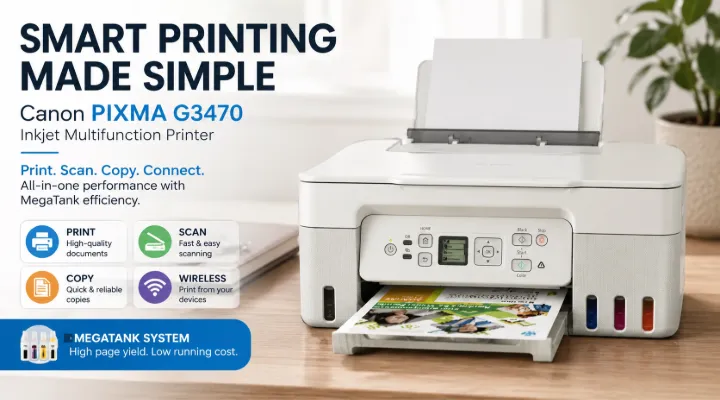
Printing at home, in a classroom, or in a small office can become expensive when a printer requires frequent cartridge replacements. For users who print documents regularly, a refillable ink-tank printer can offer a more practical alternative. The Canon PIXMA G3470 5805C029 is designed around this idea, combining printing, scanning, and copying with a high-yield MegaTank ink system.
The Canon PIXMA G3470 is an A4 multifunction inkjet printer aimed at users who want convenient wireless printing and economical everyday operation. Its refillable ink tanks, wireless connectivity, smartphone support, and compact all-in-one design make it suitable for a wide range of everyday tasks.
For students, families, home users, and small businesses, the printer can handle everything from school assignments and business documents to colour graphics and borderless photo-style prints.
This guide looks at the key features of the Canon PIXMA G3470, its practical benefits, connectivity options, and the types of users who can get the most value from it.
What Is the Canon PIXMA G3470?
The Canon PIXMA G3470 5805C029 is a multifunction inkjet printer that combines three essential functions:
- Printing
- Scanning
- Copying
Unlike traditional cartridge-based printers, the G3470 uses Canon's MegaTank refillable ink system. Instead of replacing a complete cartridge when ink runs out, users can refill the integrated ink tanks using compatible ink bottles.
This approach is particularly useful for people who print regularly. The front-facing ink tanks also make it easier to see the remaining ink levels, helping users determine when a refill may be required.
The printer supports A4 printing and is designed for everyday document and colour printing. Wireless connectivity allows users to print from compatible computers, smartphones, and tablets without having to connect every device directly to the printer.
Key Features of the Canon PIXMA G3470
The PIXMA G3470 brings several useful features together in one compact multifunction device.
1. Refillable MegaTank Ink System
One of the main attractions of the G3470 is its refillable ink system.
Traditional inkjet printers often use cartridges that need to be replaced individually. A MegaTank printer instead stores ink in built-in tanks that can be refilled using bottles.
This can be particularly useful for households and offices with regular printing requirements. Rather than keeping multiple replacement cartridges on hand, users can monitor the tanks and refill them when necessary.
The system is designed to make high-volume printing more economical and convenient.
2. Print, Scan and Copy Functions
The Canon PIXMA G3470 is more than a standard printer.
Its multifunction design provides:
- Document printing
- Document scanning
- Document copying
For a small office, this means one device can handle several common document tasks without requiring separate equipment.
For example, a small business could use the printer to produce invoices, scan signed documents, and make copies of paperwork from the same workstation.
3. Wireless Connectivity
The G3470 supports Wi-Fi connectivity, making it easier to position the printer without running a USB cable between the printer and every computer.
Wireless printing is especially useful in homes and small offices where multiple people may need access to the same printer.
A user working from a laptop in another room, for example, can send a document to the printer over the wireless network instead of moving the laptop next to the printer.
USB connectivity is also available for users who prefer a direct connection.
4. Mobile Printing Support
Modern printing often starts on a smartphone or tablet rather than a desktop computer. The PIXMA G3470 supports mobile printing through Canon PRINT Inkjet/SELPHY, Apple AirPrint, and Mopria Print Service.
This gives users several ways to work with documents and images from compatible mobile devices.
For example, a student could receive a document on a smartphone and send it to the printer without first transferring the file to a computer.
5. Colour and Borderless Printing
The printer is designed for both everyday documents and colour output. This makes it useful when users need more than plain black-and-white text.
Colour printing can be useful for:
- School projects
- Charts and presentations
- Business documents
- Flyers
- Graphics
- Personal photographs and images
Borderless printing can also help when producing certain graphics or image-based documents where a white margin is not desirable.
Why Choose a MegaTank Printer?
The biggest difference between the PIXMA G3470 and many conventional inkjet printers is the refillable tank design.
For occasional users, the difference may not be particularly important. However, for users who print frequently, the ability to refill the ink tanks can be a major practical advantage.
Lower Running-Cost Potential
Ink costs can become a significant part of the total cost of ownership of a printer. With a refillable tank system, users purchase ink bottles rather than complete cartridges.
The actual savings will depend on printing volume, document types, ink usage, and the cost of replacement ink. However, the MegaTank concept is specifically intended to make frequent printing more economical.
Easy Ink Monitoring
The front-facing tank design makes checking ink levels straightforward.
Instead of waiting for a cartridge warning or opening the printer to inspect a cartridge, users can visually monitor the tanks and plan refills.
This can be particularly useful in an office where printing is part of the daily workflow.
Canon PIXMA G3470 for Home Users
The G3470 can be a practical option for families that need a printer for different purposes.
A single household might use it for:
- School assignments
- Homework
- Forms and applications
- Scanned documents
- Colour projects
- Personal copies
- Occasional photo and image printing
The wireless functionality is particularly convenient when family members use different laptops, smartphones, or tablets.
For example, parents can print a form from a laptop while children can print schoolwork from another device on the same network.
Canon PIXMA G3470 for Students
Students often need to print assignments, research material, diagrams, project work, and presentations.
A refillable ink printer can be attractive for students who print regularly because it is designed around high-volume, economical printing rather than frequent cartridge replacement.
The mobile printing features can also be convenient. Students increasingly work across smartphones, tablets, and laptops, so having multiple ways to send documents to the printer can simplify their workflow.
A Practical Student Example
Consider a student preparing a school or university project.
The student may need to:
- Print research notes.
- Produce colour charts or diagrams.
- Scan reference material.
- Copy supporting documents.
- Print the final project.
Instead of using separate devices for these tasks, the PIXMA G3470 provides the core print, scan, and copy functions in one unit.
Canon PIXMA G3470 for Small Businesses
Small businesses often need a printer that can handle different types of paperwork without requiring a large office printer.
The G3470 can be suitable for everyday administrative tasks such as:
- Invoices
- Quotations
- Internal documents
- Forms
- Reports
- Scanned paperwork
- Colour presentations
- Customer documents
Its multifunction design can help reduce the need for separate printing and scanning equipment.
For a small office with moderate printing requirements, this can make the workspace simpler and more efficient.
Wireless Printing in Everyday Use
Wireless connectivity can make a noticeable difference to the way a printer is used.
With a wired-only printer, the computer may need to remain connected directly to the printer. A wireless printer can instead be shared across compatible devices connected to the same network.
Imagine a small office with three employees. One employee may need to print a quotation from a laptop while another needs to scan paperwork and a third needs to print a report.
A network-connected multifunction printer allows them to share the same device rather than maintaining separate printers.
Mobile Printing with Canon PIXMA G3470
The inclusion of mobile printing support is another practical advantage.
Canon PRINT Inkjet/SELPHY provides a way to interact with the printer using supported mobile devices. Apple AirPrint and Mopria Print Service provide additional printing options for compatible devices.
This is useful because documents are increasingly created and received on mobile devices.
For example:
- A manager can print a document received on a smartphone.
- A student can print a PDF from a tablet.
- A home user can print an image without transferring it to a desktop computer.
The exact workflow depends on the device, operating system, and network configuration.
Scan and Copy Functions: Why They Matter
A printer's scanning and copying functions can be just as important as its printing capabilities.
A scanner allows users to convert physical documents into digital files. Copying, meanwhile, provides a quick way to reproduce documents without first creating a digital file.
For a small business, common examples include scanning signed paperwork, copying identification documents where appropriate, or digitising old records.
For home users, scanning can be useful for storing certificates, school documents, receipts, and other paperwork digitally.
Print Quality for Everyday Documents and Colour Work
The PIXMA G3470 is designed to produce sharp text documents as well as colour output.
For office work, clear text is important for readability. For educational and creative tasks, colour can make charts, graphics, diagrams, and presentations easier to understand.
A practical example is a business presentation containing graphs and highlighted information. Colour printing can make different data categories easier to distinguish than a plain monochrome print.
Similarly, students creating project posters or diagrams can benefit from colour output.
Is the Canon PIXMA G3470 Suitable for You?
The G3470 is particularly worth considering if you meet several of the following requirements:
- You print regularly.
- You want a refillable ink system.
- You need print, scan, and copy functions.
- You want wireless connectivity.
- You print from smartphones or tablets.
- You need both black-and-white and colour documents.
- You want a printer for home or small-office use.
- You prefer monitoring and refilling ink rather than frequently replacing cartridges.
It may be less suitable if your primary requirement is very high-speed business printing at the scale of a large corporate print room. In such environments, a dedicated business-class printer or multifunction copier may be more appropriate.
Tips for Getting the Best Results
To keep the printer operating reliably, users should follow the manufacturer's recommendations for ink, paper, cleaning, and maintenance.
A few practical habits can also help:
Use Appropriate Paper
Different documents can benefit from different paper types. Standard office paper is suitable for everyday documents, while specialised paper may be preferable for certain colour or image applications.
Monitor Ink Levels
Check the visible ink tanks regularly, particularly if the printer is used heavily. Refilling before the ink supply becomes critically low can help avoid interruptions.
Keep the Printer Clean
Dust and paper debris can affect printer operation over time. Keeping the surrounding area clean can contribute to reliable use.
Use Genuine or Compatible Recommended Supplies
Using appropriate Canon ink and supplies helps maintain expected performance and reduces the risk of problems caused by unsuitable consumables.
Canon PIXMA G3470: A Balanced Choice for Everyday Printing
The Canon PIXMA G3470 5805C029 brings together the features that many home and small-office users need in a single device.
Its key strengths include the refillable MegaTank ink system, multifunction capabilities, wireless connectivity, mobile printing support, and colour printing.
Rather than focusing only on maximum print speed or advanced business features, the G3470 is designed around practical everyday printing. This makes it particularly appealing to families, students, home offices, and small businesses that want convenient printing without constantly replacing traditional ink cartridges.
For users who regularly print documents, scan paperwork, make copies, and occasionally produce colour graphics, having all these functions in one machine can simplify daily tasks.
Conclusion
The Canon PIXMA G3470 5805C029 is a versatile A4 multifunction printer built for users who want economical and convenient everyday printing. Its Canon MegaTank refillable ink system is a major attraction for regular printers, while Wi-Fi and mobile printing support make it easier to share the printer across modern devices.
For homes, students, and small businesses, the combination of printing, scanning, copying, colour output, and refillable ink offers a practical balance between functionality and running-cost considerations.
If you are looking for a multifunction printer that can handle regular documents while also providing convenient wireless and mobile printing, the Canon PIXMA G3470 is a model worth considering.
ICTECH Distribution provides a wide range of Canon printing solutions and IT products for businesses and users looking for reliable technology solutions. Contact the team to check current availability and suitable options for your printing requirements.
Frequently Asked Questions
1. What type of printer is the Canon PIXMA G3470?
The Canon PIXMA G3470 is an A4 wireless multifunction inkjet printer with print, scan, and copy functionality. It uses Canon's refillable MegaTank ink system.
2. Does the Canon PIXMA G3470 support Wi-Fi printing?
Yes. The PIXMA G3470 supports Wi-Fi connectivity, allowing compatible computers and mobile devices to print without requiring a direct USB connection.
3. Can I print from a smartphone with the PIXMA G3470?
Yes. The printer supports Canon PRINT Inkjet/SELPHY, Apple AirPrint, and Mopria Print Service for compatible devices.
4. Is the Canon PIXMA G3470 suitable for small businesses?
Yes. Its print, scan, and copy functions, refillable ink system, and wireless connectivity make it suitable for many home-office and small-business environments.
5. Why is the MegaTank system useful?
The MegaTank system uses refillable ink tanks rather than conventional disposable cartridges. This can make frequent printing more convenient and economical, depending on usage and ink costs.
