
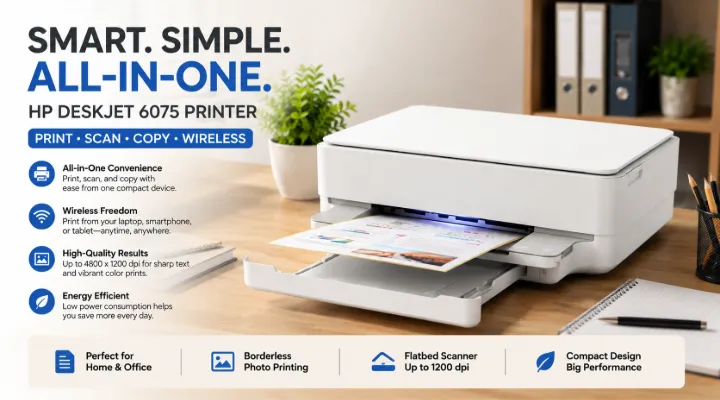
Whether you're printing school assignments, scanning important documents, or creating colorful photos, having a reliable all-in-one printer can make everyday tasks much easier. The HP DeskJet 6075 All-in-One Printer (Model: 5SE22C) is designed to deliver convenience, quality, and wireless functionality in a compact package.
Built for home users, students, remote workers, and small businesses, the HP DeskJet 6075 combines printing, scanning, and copying into one device. With high-resolution printing, borderless photo support, wireless connectivity, and energy-efficient operation, it provides excellent value for users who need dependable everyday printing.
In this article, we'll explore the features, benefits, applications, and reasons why the HP DeskJet 6075 is an excellent choice for modern printing needs.
Who Is the HP DeskJet 6075 Designed For?
The HP DeskJet 6075 is ideal for:
- Home users
- Students
- Teachers
- Small offices
- Remote workers
- Freelancers
- Home-based businesses
- Families
Its compact design and wireless capabilities make it suitable for spaces where convenience and flexibility are important.
HP DeskJet 6075 at a Glance
The HP DeskJet 6075 is an all-in-one inkjet printer capable of:
- Printing
- Scanning
- Copying
It offers wireless printing, high-resolution output, and borderless photo printing, making it suitable for both documents and creative projects.
Key Specifications
| Specification | Details |
|---|---|
| Brand | HP |
| Model | 5SE22C |
| Product | HP DeskJet 6075 All-in-One Printer |
| Print Resolution | Up to 4800 × 1200 dpi |
| Scanner Type | Flatbed |
| Optical Scan Resolution | Up to 1200 dpi |
| Borderless Printing | Yes (Up to A4 / 8.5 × 11 in) |
| Input Voltage | 220–240 VAC |
| Frequency | 50/60 Hz |
| Weight | 5.22 kg |
| Power Consumption | 0.10W Off, 1.70W Sleep, 4.0W Ready |
High-Quality Printing for Everyday Needs
One of the biggest strengths of the HP DeskJet 6075 is its excellent print quality.
With a maximum print resolution of 4800 × 1200 dpi, users can produce:
- Professional documents
- School assignments
- Business reports
- Marketing materials
- Color graphics
- Family photos
Text appears crisp while images maintain vibrant colors and fine details.
Practical Example
A home business owner can print invoices and customer quotations during the day and create promotional flyers in the evening using the same printer.
Borderless Printing for Creative Projects
The HP DeskJet 6075 supports borderless printing up to standard A4 size.
This feature is useful for:
- Family photographs
- Greeting cards
- Invitations
- Certificates
- School projects
- Marketing brochures
Borderless printing gives documents and images a polished, professional appearance without unwanted white edges.
Flatbed Scanner for Easy Document Digitization
The integrated flatbed scanner provides an optical resolution of up to 1200 dpi, making it suitable for digitizing a variety of documents.
You can scan:
- Identity documents
- Contracts
- Photos
- Certificates
- Artwork
- Receipts
- Handwritten notes
High-resolution scanning helps preserve important details for digital storage or sharing.
Copy Documents Without a Computer
The HP DeskJet 6075 also functions as a copier.
Users can quickly duplicate:
- Office documents
- School worksheets
- Application forms
- Bills
- Personal records
This eliminates the need to visit a photocopy shop for routine copying tasks.
Wireless Printing Makes Work Easier
Modern homes and offices increasingly rely on wireless connectivity.
The HP DeskJet 6075 supports wireless printing, allowing users to print without connecting a cable every time.
Benefits include:
- Print from laptops
- Print from desktops
- Print from smartphones
- Print from tablets
- Reduced cable clutter
- Flexible printer placement
Wireless printing improves convenience, especially in shared environments.
Compact Design Saves Space
Many users have limited desk space.
The HP DeskJet 6075 features a compact footprint, making it suitable for:
- Apartments
- Home offices
- Student rooms
- Small businesses
- Reception desks
Its lightweight design (approximately 5.22 kg) also makes it easy to move when needed.
Energy-Efficient Operation
Energy efficiency is another advantage of the HP DeskJet 6075.
Power Consumption
- Off Mode: 0.10 Watts
- Sleep Mode: 1.70 Watts
- Ready Mode: 4.0 Watts
These low power requirements help reduce electricity consumption during everyday use.
For users who print occasionally, the energy-saving modes help lower long-term operating costs.
Everyday Applications
1. Home Printing
Families can use the printer for:
- Homework
- Bills
- Recipes
- Travel documents
- Photos
- Greeting cards
2. Student Assignments
Students can print:
- Essays
- Presentations
- Charts
- Research papers
- Project reports
The high print quality helps create professional-looking assignments.
3. Remote Work
Work-from-home professionals frequently need to print:
- Contracts
- Reports
- Meeting notes
- Client proposals
- Forms
The HP DeskJet 6075 handles these everyday tasks efficiently.
4. Small Business Operations
Small businesses benefit from:
- Invoice printing
- Quotations
- Product labels
- Marketing flyers
- Customer forms
Its multifunction capabilities reduce the need for separate devices.
5. Personal Creative Projects
Creative users can print:
- Invitations
- Scrapbook pages
- Certificates
- Family albums
- Art projects
Borderless printing enhances the final appearance.
Advantages of the HP DeskJet 6075
Some of the key benefits include:
- High-resolution printing
- All-in-one functionality
- Borderless printing support
- Flatbed scanner
- Copy functionality
- Wireless printing
- Compact design
- Energy-efficient operation
- Easy setup
- Trusted HP reliability
Tips for Getting the Best Results
To maximize print quality and printer life:
- Use genuine HP ink cartridges.
- Print regularly to prevent ink from drying.
- Keep the scanner glass clean.
- Store paper in a dry environment.
- Use the correct paper type for photos and documents.
- Enable sleep mode to save power.
- Perform printhead maintenance when required.
These simple practices help ensure consistent performance over time.
Why Buy from ICTECH Distribution?
Choosing the right supplier is just as important as selecting the right printer.
ICTECH Distribution offers a wide range of genuine HP printers and IT products, including laptops, desktops, servers, networking equipment, storage devices, and accessories. Businesses and individual buyers benefit from competitive pricing, professional assistance, and reliable customer service.
Whether you need a single printer for your home office or multiple devices for a growing business, ICTECH Distribution can help you find the right solution.
Conclusion
The HP DeskJet 6075 All-in-One Printer (5SE22C) is an excellent choice for users seeking an affordable, reliable, and versatile printing solution. Its combination of high-resolution printing, flatbed scanning, copying capabilities, borderless photo printing, and wireless convenience makes it suitable for homes, students, remote workers, and small businesses alike.
With its energy-efficient design, compact size, and trusted HP quality, the DeskJet 6075 delivers dependable everyday performance while keeping operating costs under control. When purchased from ICTECH Distribution, customers also benefit from expert guidance and genuine HP products backed by professional support.
Frequently Asked Questions
1. Is the HP DeskJet 6075 suitable for home use?
Yes. It is designed for home users, students, remote workers, and families who need printing, scanning, and copying in one compact device.
2. Does the HP DeskJet 6075 support borderless photo printing?
Yes. It supports borderless printing up to A4 (8.5 × 11 inches), making it ideal for photos, invitations, and creative projects.
3. What is the maximum print resolution of the HP DeskJet 6075?
The printer delivers a maximum print resolution of up to 4800 × 1200 dpi, producing sharp text and vibrant color prints.
4. What scanning resolution does the HP DeskJet 6075 offer?
It features a flatbed scanner with an optical scan resolution of up to 1200 dpi, suitable for documents, photos, and certificates.
5. Where can I buy the HP DeskJet 6075?
You can purchase the genuine HP DeskJet 6075 All-in-One Printer from ICTECH Distribution, offering competitive pricing and expert support for home and business customers.
