
Choosing the right desktop computer for a business involves more than simply looking at processor speed. Companies need a system that can handle everyday workloads, provide sufficient memory and storage, support modern software, and fit comfortably into a professional working environment.
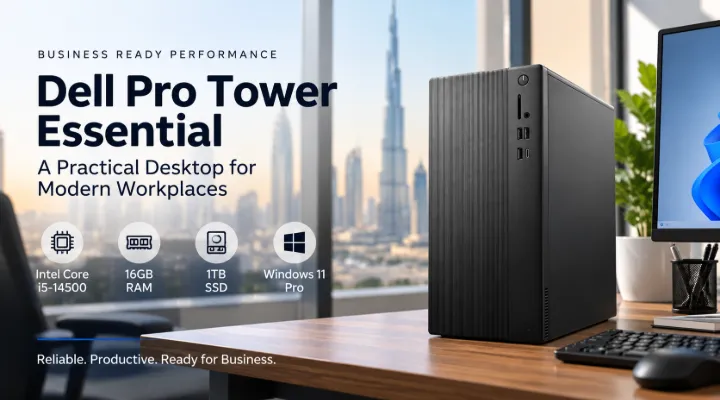
The Dell Pro Tower Essential Desktop Computer, model BTO004B.QVT1260.EMEA.UBU, is designed around these practical business requirements. It combines an Intel Core i5-14500 processor, 16GB of memory, a 1TB SSD, Intel UHD Graphics 770 and Windows 11 Pro in a traditional tower desktop form factor.
For businesses in Dubai and across the UAE, a tower desktop can be a practical choice for offices, administration departments, reception areas, accounting teams and other professional environments where reliable everyday computing is important.
What Is the Dell Pro Tower Essential Desktop?
The Dell Pro Tower Essential is a business-oriented desktop computer built for organizations and professional users who prefer the flexibility of a conventional tower PC.
Unlike compact mini PCs or laptops, a tower desktop provides a larger chassis that can be more suitable for organizations looking for a traditional workstation setup.
The BTO004B.QVT1260.EMEA.UBU configuration includes:
- Intel Core i5-14500 processor
- 16GB RAM
- 1TB SSD
- Intel UHD Graphics 770 integrated graphics
- Windows 11 Pro
- Traditional tower desktop form factor
This combination makes the system particularly relevant for general business productivity, office applications, web-based systems, document management and multitasking.
Intel Core i5-14500 for Everyday Business Productivity
At the heart of this Dell desktop is the Intel Core i5-14500 processor.
For typical office environments, processor performance affects how quickly employees can open applications, work with documents, switch between tasks and manage multiple programs.
Handling Multiple Applications
Consider a typical office employee working in Dubai. During a normal workday, they might have Microsoft Excel, Word, a web browser, email, accounting software and a business communication application open at the same time.
A capable modern processor helps make this type of multitasking more practical.
The Core i5-14500 is therefore well suited to workloads such as:
- Microsoft Office applications
- Web browsing
- Email and communication platforms
- Accounting applications
- ERP and CRM software
- Business documentation
- Spreadsheet work
- Online business platforms
- General office multitasking
The actual experience will also depend on the applications being used, software configuration and workload, but the processor provides a strong foundation for mainstream professional computing.
16GB RAM for Comfortable Multitasking
Memory is another important consideration when purchasing business desktops.
The Dell Pro Tower Essential comes with 16GB of RAM, which provides a useful capacity for many everyday professional workloads.
Why 16GB Matters in an Office
A modern business computer may need to run several applications simultaneously. An employee could be working on a spreadsheet while referencing information in a browser, responding to emails and using an internal business application.
With 16GB of memory, the computer has a practical amount of RAM for these types of workloads.
It can be suitable for:
- Office productivity
- Browser-based business applications
- Accounting and financial software
- CRM platforms
- ERP applications
- Document management
- General multitasking
For example, an accounts employee handling invoices and financial spreadsheets can keep several documents and applications available without needing to constantly close programs to free up memory.
1TB SSD Provides Fast and Practical Storage
Storage is especially important for business computers because employees regularly work with documents, spreadsheets, presentations, PDFs and other files.
The Dell Pro Tower Essential includes a 1TB SSD.
Advantages of SSD Storage
Compared with traditional mechanical hard drives, SSDs generally provide faster access to stored data and contribute to quicker system responsiveness.
For a business user, this can translate into a smoother everyday experience when:
- Starting Windows
- Launching applications
- Opening documents
- Accessing stored files
- Searching through folders
- Working with business software
The 1TB capacity also provides useful local storage for business files and applications.
Organizations should still maintain appropriate backup procedures rather than treating the desktop's internal storage as the only copy of important business data.
Intel UHD Graphics 770 for Professional Work
The system uses integrated Intel UHD Graphics 770 rather than a separate dedicated graphics card.
For businesses, this is not necessarily a limitation because many professional workloads do not require a dedicated GPU.
Suitable Graphics Workloads
Integrated graphics can be appropriate for tasks such as:
- Office applications
- Web browsing
- Presentations
- Video playback
- Multiple-monitor productivity, where supported by the specific configuration
- Business dashboards
- Standard graphical applications
For example, an employee managing sales reports can use spreadsheets, browser-based dashboards and presentations without needing a dedicated gaming-class graphics card.
However, users working extensively with professional 3D rendering, advanced video production, CAD or demanding GPU-accelerated applications should evaluate their specific software requirements before choosing an integrated-graphics configuration.
Windows 11 Pro for Business Users
The Dell Pro Tower Essential comes with Windows 11 Pro.
For organizations, the Pro edition provides a business-oriented Windows environment suitable for professional computing.
Windows 11 Pro can fit into workplaces where employees need access to productivity applications, company systems, business networks and organizational IT policies.
For a Dubai business deploying multiple desktops, using a consistent Windows environment can also make software deployment, user management and IT support more straightforward.
Why a Tower Desktop Can Make Sense for UAE Businesses
Laptops and mini PCs have become common in modern workplaces, but traditional tower desktops continue to have practical advantages.
1. Traditional Desktop Workspace
A tower computer works well with a dedicated monitor, keyboard and mouse, making it suitable for fixed workstations.
This can be useful for:
- Reception desks
- Accounting departments
- Administrative offices
- Customer service teams
- Sales departments
- Back-office operations
2. Suitable for Long-Term Office Use
A desktop is generally designed around a fixed workspace rather than portability. Employees who spend most of their working day at the same desk may therefore find a desktop configuration more appropriate than a laptop.
3. Practical for Business Deployment
Companies purchasing multiple systems can standardize employee workstations around a common desktop configuration.
For example, a Dubai company expanding its administration department could deploy similar Dell desktops across several workstations, simplifying support and maintenance.
Practical Use Cases in Dubai
The Dell Pro Tower Essential can serve a range of professional environments.
Office Administration
Administrative employees commonly work with documents, spreadsheets, email, browsers and company applications. The Core i5 processor, 16GB RAM and 1TB SSD provide a balanced configuration for these workloads.
Accounting Departments
Accounting teams often use spreadsheets, financial applications and web-based banking or business platforms.
A 16GB configuration provides useful memory for multitasking, while the SSD can contribute to responsive application loading.
Sales Teams
Sales representatives working from fixed desks may use CRM software, email, browser applications, presentations and quotation systems throughout the day.
The Dell Pro Tower Essential provides a traditional desktop platform for these activities.
Reception and Front Office
Reception staff may need to manage visitor systems, email, web applications, documents and communication tools.
A desktop can be an appropriate choice when the workstation remains in one location.
Small and Medium-Sized Businesses
SMEs often need computers that can handle everyday business applications without requiring specialized workstation hardware.
The Dell Pro Tower Essential's configuration is positioned around this type of mainstream professional use.
Dell Pro Tower Essential vs a Business Laptop
Whether a desktop or laptop is better depends on the employee's working style.
| Requirement | Dell Pro Tower Essential | Business Laptop |
|---|---|---|
| Fixed workstation | Well suited | Suitable |
| Portability | Limited | Excellent |
| Large desktop workspace | Well suited | Requires docking/monitor |
| Office productivity | Well suited | Well suited |
| Travel | Not intended | Well suited |
| Traditional keyboard and monitor setup | Excellent | Requires accessories |
| Dedicated office deployment | Practical | Practical |
If employees regularly travel between offices, client meetings or remote locations, a laptop may be more appropriate. For employees who remain at fixed desks, a tower desktop can provide a practical alternative.
What Businesses Should Consider Before Buying
Although the Dell Pro Tower Essential is designed for general professional computing, organizations should evaluate their actual requirements before placing an order.
Check Application Requirements
Make a list of the software employees use every day. Office applications, browsers, accounting systems and CRM platforms generally have different hardware requirements from engineering or content-production software.
Consider Graphics Requirements
The system uses integrated Intel UHD Graphics 770. Businesses requiring advanced GPU workloads should consider whether dedicated graphics hardware is necessary.
Plan Storage and Backups
The 1TB SSD provides substantial local storage for many users, but important business information should also be protected through an appropriate backup strategy.
Consider the Workplace Setup
A tower PC normally requires a separate monitor, keyboard and mouse. Companies deploying complete workstations should account for these accessories when planning their IT purchases.
Why Businesses Should Buy from an IT Distributor
For organizations purchasing several systems, working with an IT distributor can simplify procurement.
ICTECH Distribution provides businesses with access to a broad range of IT hardware, including desktops, laptops, servers, networking equipment, storage and other technology products.
For companies in Dubai and the wider UAE, purchasing through an established IT supplier can help businesses source systems according to their workforce requirements and procurement needs.
Businesses can also compare desktop configurations before standardizing hardware across different departments.
Is the Dell Pro Tower Essential Right for Your Business?
The Dell Pro Tower Essential Desktop Computer BTO004B.QVT1260.EMEA.UBU is designed around a straightforward professional computing concept: provide a modern processor, practical memory, fast SSD storage, integrated graphics and Windows 11 Pro in a traditional tower platform.
Its configuration can be suitable for organizations that primarily need computers for office productivity, business applications, documentation, communication and everyday multitasking.
It may be particularly relevant when employees work from fixed desks and do not require laptop portability or high-end dedicated graphics.
Conclusion
The Dell Pro Tower Essential Desktop Computer BTO004B.QVT1260.EMEA.UBU offers a practical configuration for everyday professional computing. Its Intel Core i5-14500 processor, 16GB RAM, 1TB SSD, Intel UHD Graphics 770 and Windows 11 Pro provide a balanced foundation for many office environments.
For businesses in Dubai and across the UAE, it can be considered for administration, accounting, sales, reception, customer service and other fixed-workstation roles.
Before purchasing, organizations should match the configuration with their software, graphics, storage, connectivity and deployment requirements. For businesses looking for a dependable tower-based platform for everyday productivity, this Dell configuration provides a straightforward option worth considering.
Frequently Asked Questions
1. What processor does the Dell Pro Tower Essential use?
The Dell Pro Tower Essential BTO004B.QVT1260.EMEA.UBU is configured with an Intel Core i5-14500 processor.
2. How much RAM does this Dell desktop have?
This configuration includes 16GB of RAM with a listed memory frequency of 5800MHz.
3. Does the Dell Pro Tower Essential have an SSD?
Yes. The system comes with a 1TB SSD, providing fast storage for Windows, applications and business files.
4. Is the Dell Pro Tower Essential suitable for office work?
Yes. Its processor, 16GB memory, 1TB SSD and Windows 11 Pro configuration are suitable for many common office workloads, including documents, spreadsheets, web applications, email and business software.
5. Does it have a dedicated graphics card?
No. This configuration uses integrated Intel UHD Graphics 770. Users requiring demanding 3D, rendering or GPU-intensive applications should evaluate dedicated graphics requirements separately.
