
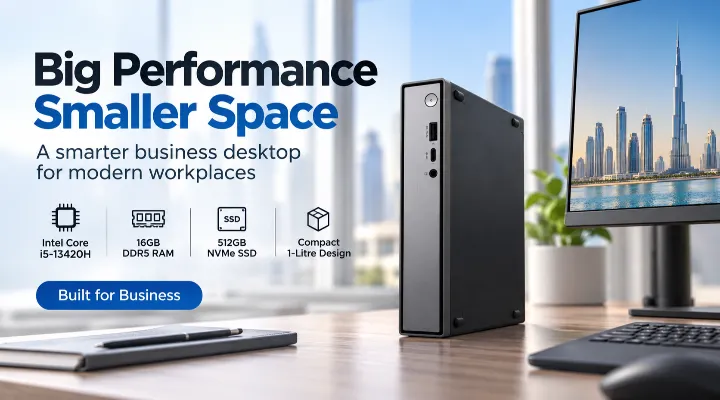
For businesses in Dubai and across the UAE, office space is valuable. A traditional desktop setup can take up considerable room, especially when multiple employees need reliable computing systems. The Lenovo ThinkCentre neo 50q Gen 5 offers a practical alternative by combining business-focused performance with a compact mini PC design.
The Lenovo ThinkCentre neo 50q Gen 5 13B9S0HT00 is powered by a 13th Gen Intel Core i5-13420H processor, 16GB RAM, and a 512GB SSD. Despite its small footprint, it is designed to handle everyday business workloads such as Microsoft Office, web applications, video meetings, accounting software, document management, and multitasking.
For offices, reception desks, retail counters, educational environments, and small businesses, this mini PC can provide the performance of a capable desktop without taking over the workspace.
What Makes the Lenovo ThinkCentre neo 50q Gen 5 Stand Out?
Mini PCs have become increasingly practical for modern workplaces. Instead of occupying a large portion of a desk, a compact computer can be positioned discreetly while still providing the connections and performance required for daily work.
The ThinkCentre neo 50q Gen 5 follows this approach with a compact 1-litre chassis and business-oriented hardware.
Its key specifications include:
- 13th Gen Intel Core i5-13420H processor
- 8 cores and 12 threads
- Up to 4.6 GHz processor speed
- 16GB DDR5 RAM
- 512GB M.2 NVMe SSD
- Compact 1-litre form factor
- HDMI and DisplayPort connectivity
- Gigabit Ethernet
- Support for multiple displays
- Business-focused ThinkCentre design
This combination makes it suitable for users who need a dependable work computer rather than a bulky tower PC.
Intel Core i5-13420H Performance for Everyday Business
At the heart of the ThinkCentre neo 50q Gen 5 is the Intel Core i5-13420H processor. It features 8 cores and 12 threads and can reach speeds of up to 4.6 GHz.
For business users, processor performance matters because employees rarely work with only one application at a time.
A typical office worker might have:
- Microsoft Word open for preparing documents.
- Excel running financial or inventory spreadsheets.
- Multiple browser tabs for research and cloud applications.
- Microsoft Teams or another communication platform for meetings.
- Email running in the background.
The Core i5-13420H gives the system the processing capability needed for this type of multitasking.
It can also be useful for more demanding office applications, including larger spreadsheets, database tools, business management software, and other productivity applications.
Suitable for Office Multitasking
The processor is particularly useful for employees who regularly switch between applications. Instead of designing the system only around basic browsing and word processing, Lenovo has equipped this mini PC with a processor capable of handling more demanding workloads.
For example, an accountant working with spreadsheets while attending a video meeting can benefit from having multiple processor cores available for simultaneous tasks.
16GB DDR5 RAM for Smooth Productivity
The ThinkCentre neo 50q Gen 5 comes with 16GB of RAM. For many business users, this provides a comfortable amount of memory for everyday multitasking.
Memory becomes especially important when users keep numerous applications and browser tabs open simultaneously.
Why 16GB Matters
Consider a Dubai-based sales employee working with a CRM platform, email, Excel, browser-based research tools, and Teams. A system with limited memory may become less responsive as applications accumulate.
With 16GB RAM, the ThinkCentre is better positioned for:
- Office productivity applications
- Web-based business platforms
- Video conferencing
- Large numbers of browser tabs
- Accounting applications
- Customer relationship management software
- Document management
- General multitasking
The use of DDR5 memory also provides the advantages of a newer memory platform.
512GB NVMe SSD for Faster Storage
Storage performance has a major effect on how responsive a computer feels. The ThinkCentre neo 50q Gen 5 includes a 512GB M.2 NVMe SSD, giving users a combination of speed and useful storage capacity.
An NVMe SSD can significantly improve everyday operations compared with older mechanical hard drives.
Users can expect benefits such as:
- Faster system startup
- Quicker application launches
- Faster file access
- More responsive document handling
- Reduced waiting when transferring data
For an office employee storing documents, presentations, spreadsheets and business files locally, 512GB provides a practical starting point.
Businesses that rely heavily on cloud storage can also use the SSD primarily for applications and frequently accessed files.
A 1-Litre Design That Saves Valuable Desk Space
One of the biggest advantages of the ThinkCentre neo 50q Gen 5 is its compact 1-litre form factor.
Traditional desktop towers can be inconvenient in smaller offices. They occupy floor or desk space and require additional cable management. A mini PC offers a cleaner alternative.
Ideal for Compact Dubai Workspaces
Space efficiency can be particularly useful in environments such as:
- Small offices
- Reception desks
- Retail counters
- Call centres
- Hotel workstations
- Schools and training centres
- Clinics
- Shared workspaces
- Home offices
For example, a reception desk may need space for a monitor, telephone, documents and other equipment. A compact PC can be positioned out of the way while still powering the workstation.
This allows businesses to make better use of their available workspace.
Multiple Display Support for More Efficient Workflows
The ThinkCentre neo 50q Gen 5 provides HDMI and DisplayPort connectivity and supports multiple displays.
A dual-monitor setup can be particularly useful for employees who work with information from multiple applications.
For example, a finance employee could use:
- One monitor for Excel and financial reports
- Another monitor for accounting software or email
Similarly, a customer service employee could keep a CRM system on one screen and communication tools on another.
This type of setup can reduce the need to repeatedly switch between windows and can make information-heavy workflows easier to manage.
Connectivity for Modern Business Environments
Despite its small size, the ThinkCentre neo 50q Gen 5 provides important connectivity for an office environment.
Its HDMI and DisplayPort outputs make it straightforward to connect compatible displays, while Gigabit Ethernet provides wired network connectivity.
Why Wired Ethernet Still Matters
Wi-Fi is convenient, but wired Ethernet remains valuable in many professional environments.
A wired network connection can be useful for workstations that regularly access:
- Company servers
- Network storage
- Business applications
- Shared printers
- Large files
- Internal databases
For example, a design or engineering office with centralized storage may prefer wired connectivity for desktop systems that frequently transfer files across the network.
Where Can Businesses Use the ThinkCentre neo 50q Gen 5?
The compact design and business-oriented hardware make this mini PC suitable for a variety of applications.
1. Corporate Offices
For administrative staff, HR teams, sales departments and management offices, the system provides enough performance for common productivity workloads.
2. Small Businesses
Small businesses often need to control both office space and technology costs. A compact desktop can provide employees with dedicated computing power without requiring large workstations.
3. Reception Areas
Receptionists typically work with booking systems, email, browsers, office applications and communication tools. The small footprint is well suited to these environments.
4. Retail Businesses
Retail counters often have limited space. A compact computer can power inventory applications, point-of-sale-related workflows and administrative tasks while leaving more room on the counter.
5. Education and Training Centres
Computer labs and training rooms can benefit from small systems that are easier to arrange across multiple desks.
6. Home Offices
For professionals working from home in Dubai or elsewhere in the UAE, the compact chassis helps create a cleaner and less crowded workspace.
Is the Lenovo ThinkCentre neo 50q Gen 5 Good for Small Businesses?
For many small businesses, the answer is yes.
The system offers a useful balance between performance, storage, memory and physical size. Instead of buying a large desktop that provides more hardware than an office worker actually needs, a mini PC can deliver the essential capabilities in a much smaller package.
A small accounting company, for example, could deploy these systems across employee desks for:
- Accounting software
- Microsoft Office
- Web applications
- Video conferencing
- Document management
The same configuration can also work well for general administrative employees.
ThinkCentre neo 50q Gen 5 vs Traditional Desktop PCs
A conventional desktop tower can offer significant expansion potential, but that does not mean it is the best choice for every office.
The ThinkCentre neo 50q Gen 5 has several advantages where compactness and simplicity are priorities.
| Feature | ThinkCentre neo 50q Gen 5 | Traditional Desktop |
|---|---|---|
| Physical size | Very compact | Usually larger |
| Desk space | Minimal | More space required |
| Processor | Core i5-13420H | Varies |
| Memory | 16GB DDR5 | Varies |
| Storage | 512GB NVMe SSD | Varies |
| Multi-display support | Yes | Depends on configuration |
| Wired networking | Gigabit Ethernet | Usually available |
| Office suitability | Excellent | Excellent |
| Expansion | More limited | Generally greater |
A traditional desktop may be preferable for users who require powerful dedicated graphics or extensive hardware expansion. For typical office workloads, however, the mini PC format can be considerably more convenient.
Practical Example: A Dubai Office Deployment
Imagine a 15-person consultancy in Dubai moving into a smaller office.
The company needs computers for employees handling documents, spreadsheets, email, CRM software and online meetings.
Instead of installing large desktop towers beneath each desk, the company could use compact mini PCs and pair them with monitors.
The result could be:
- More usable desk space
- Cleaner workstations
- Easier cable management
- Consistent hardware across employees
- Enough performance for everyday business software
- Flexible multi-monitor configurations
This is where a system like the ThinkCentre neo 50q Gen 5 makes practical sense.
Who Should Consider This Mini PC?
The Lenovo ThinkCentre neo 50q Gen 5 is a strong option for users who value compactness without wanting to compromise on everyday desktop performance.
It is particularly suitable for:
- Office professionals
- Small and medium-sized businesses
- Administrative teams
- Accountants
- Sales teams
- Reception desks
- Retail businesses
- Educational institutions
- Home-office professionals
It may be less suitable for users whose primary workloads involve high-end 3D rendering, professional video production, or demanding modern gaming, where a more powerful desktop with dedicated graphics would be a better fit.
What Should You Consider Before Buying?
Before purchasing a mini PC for your business, consider the following:
Check Your Software Requirements
Make sure your accounting, ERP, CRM or industry-specific applications are compatible with the operating system and hardware configuration you plan to use.
Consider Your Display Setup
If employees need two monitors, check the monitor inputs and ensure the required cables or adapters are available.
Plan Your Network
For offices with centralized servers or network storage, determine whether wired Gigabit Ethernet or wireless connectivity best suits the workspace.
Think About Future Requirements
A 16GB/512GB configuration is well suited to many current office workloads, but businesses with unusually large datasets or specialized applications should assess their future storage and memory requirements.
Why a Mini PC Can Be a Smart Business Investment
A business computer does not need to be physically large to be useful.
Modern mini PCs demonstrate how much computing capability can fit into a compact chassis. For organizations that primarily use productivity software and cloud-based business applications, reducing the physical size of the computer can create practical benefits without sacrificing the essentials.
The ThinkCentre neo 50q Gen 5 combines a capable 13th Gen Intel Core i5 processor with 16GB DDR5 memory and fast NVMe storage. Its compact design further makes it attractive for organizations looking to optimize workstation space.
Conclusion
The Lenovo ThinkCentre neo 50q Gen 5 13B9S0HT00 is a compact business desktop designed around the needs of modern workplaces. Its Intel Core i5-13420H processor, 16GB DDR5 RAM and 512GB NVMe SSD provide a strong foundation for everyday productivity, multitasking and business applications.
Its biggest advantage is the combination of performance and a 1-litre footprint. For offices in Dubai and across the UAE where desk space, connectivity and reliable productivity are important, this mini PC can be an efficient alternative to a conventional desktop tower.
Whether deployed across a small business, used at a reception desk or installed in a home office, the ThinkCentre neo 50q Gen 5 offers a practical balance of compact design and business-ready performance.
Frequently Asked Questions
1. What processor does the Lenovo ThinkCentre neo 50q Gen 5 use?
The ThinkCentre neo 50q Gen 5 13B9S0HT00 uses the 13th Gen Intel Core i5-13420H processor with 8 cores, 12 threads and speeds of up to 4.6 GHz.
2. How much RAM and storage does it have?
This configuration comes with 16GB of DDR5 RAM and a 512GB M.2 NVMe SSD.
3. Is the ThinkCentre neo 50q Gen 5 suitable for office work?
Yes. It is well suited to office applications, web-based business platforms, spreadsheets, email, video conferencing and general multitasking.
4. Can the ThinkCentre neo 50q Gen 5 support multiple monitors?
Yes. The system provides HDMI and DisplayPort connectivity and supports multiple displays, making it suitable for multi-screen office workflows.
5. Why choose a mini PC instead of a desktop tower?
A mini PC takes significantly less space while providing the core computing capabilities needed for many business applications. It can be particularly useful for compact offices, reception areas and home workspaces.
