
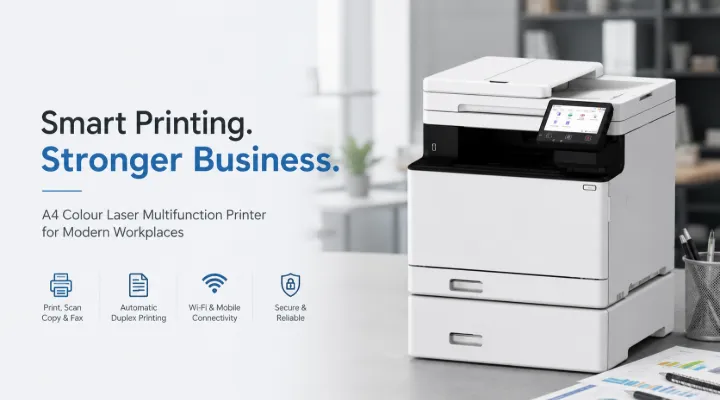
Modern businesses need office equipment that can handle multiple tasks efficiently without taking up unnecessary space or adding complexity to daily workflows. Printing, scanning, copying, and faxing are still essential functions for many organisations, especially those handling customer documents, contracts, invoices, reports, and internal paperwork.
The Canon i-SENSYS MF754Cdw 7185C010 A4 Colour Laser Multifunction Printer is designed to bring these essential functions together in one professional device. Built for small and medium-sized businesses, it combines colour laser printing, scanning, copying, faxing, automatic duplex printing, and flexible connectivity.
For businesses that want to improve document workflows, the MF754Cdw offers a practical balance between speed, convenience, print quality, and security. Its user-friendly touchscreen, automatic document feeder, mobile printing support, and network connectivity make it suitable for busy office environments where multiple employees need access to a reliable multifunction printer.
This article takes a closer look at the Canon i-SENSYS MF754Cdw, its key features, practical business applications, and the type of users who can benefit most from this A4 colour laser multifunction printer.
An All-in-One Printer for Modern Workplaces
Print, Scan, Copy and Fax from One Device
One of the main advantages of the Canon i-SENSYS MF754Cdw is its multifunction capability. Instead of purchasing separate devices for printing, scanning, copying, and faxing, businesses can manage these tasks through a single machine.
The core functions include:
- Colour and monochrome printing
- Document scanning
- Copying
- Fax functionality
- Automatic duplex printing
- Duplex document scanning through the automatic document feeder
This setup can be particularly useful for businesses with limited office space. A small accounting department, for example, may need to print invoices, scan supplier documents, copy financial records, and send paperwork by fax. The MF754Cdw allows these tasks to be completed from one central device.
By combining several office functions, businesses can simplify their document infrastructure and make everyday workflows easier for employees.
Fast and Efficient Document Handling
Designed for Busy Office Workflows
Office productivity often depends on how quickly employees can process documents. Waiting for slow printing or manually turning pages during scanning can become frustrating when there are multiple tasks to complete.
The Canon i-SENSYS MF754Cdw is designed to support faster document handling. It is suitable for organisations that regularly print business documents, presentations, reports, marketing materials, and customer communications.
A useful feature is automatic duplex printing, which enables printing on both sides of the paper. This can help reduce paper usage and is especially practical when producing longer reports, proposals, employee manuals, or internal documents.
For example, a consulting company preparing a 40-page client report can use duplex printing to create a more professional document while potentially reducing the amount of paper required.
50-Sheet Single Pass Duplex Automatic Document Feeder
Scanning multiple pages manually can take time. The MF754Cdw includes a 50-sheet Single Pass Duplex Automatic Document Feeder, allowing businesses to process multi-page documents more efficiently.
This feature is useful when scanning:
- Contracts
- Employee records
- Invoices
- Purchase orders
- Customer application forms
- Legal documents
- Double-sided reports
A single-pass duplex document feeder can process both sides of a document efficiently, helping reduce manual work when handling large document sets.
For a company digitising paper records, this can make a noticeable difference. Instead of placing each page individually on the scanner, employees can load a stack of documents and allow the machine to process them automatically.
Professional Colour Printing for Business Documents
Clear Documents and Strong Visual Presentation
Colour printing is important for more than marketing materials. Many businesses use colour in presentations, charts, reports, proposals, training documents, and internal communication.
The Canon i-SENSYS MF754Cdw is designed to deliver professional-quality colour laser output suitable for everyday business use.
This can be particularly useful for:
- Sales teams printing client presentations
- Marketing departments producing promotional documents
- Finance teams creating colour-coded reports
- Training departments preparing educational materials
- Management teams printing business proposals and reports
For example, a sales executive presenting a proposal to a potential client may need clear charts, graphs, and branded visual materials. Professional colour output can help documents appear more polished and easier to understand.
Laser printing is also well suited to offices that require consistent output across a large number of business documents.
Flexible Connectivity for Modern Offices
Print from Computers, Mobile Devices and Networks
Today's workplaces are more connected than ever. Employees may work from desktop computers, laptops, smartphones, tablets, or cloud-based platforms. A modern office printer needs to fit into this environment.
The Canon i-SENSYS MF754Cdw offers several connectivity options, including:
- Dual-band Wi-Fi
- Gigabit Ethernet
- USB connectivity
- Mobile printing support
This flexibility allows businesses to choose the connection method that best suits their office infrastructure.
Support for Mobile Printing
Mobile printing is increasingly useful for employees who need to print without transferring files to a desktop computer first.
The printer supports solutions such as:
- Canon PRINT Business
- Apple AirPrint
- Mopria
This can be helpful in practical situations. For example, a manager attending a meeting may receive an updated presentation by email. Instead of returning to a workstation, the file may be printed directly from a compatible mobile device.
Mobile printing can also be useful for employees who frequently move between meeting rooms, departments, or office locations.
Easy-to-Use Controls and Workflow Management
Intuitive Touchscreen Operation
Advanced technology should not necessarily mean complicated operation. The Canon i-SENSYS MF754Cdw includes an intuitive touchscreen interface designed to make common functions easier to access.
Employees can use the display to manage printing, scanning, copying, and other functions without needing extensive technical knowledge.
This is particularly useful in offices where several employees share the same printer. A user-friendly interface can reduce the time spent asking IT staff for help with basic tasks.
For example, an employee who needs to scan a signed contract can use the touchscreen to select the required scanning function and complete the process quickly.
A simple interface can also make the device easier to adopt across different departments.
Better Support for Digital and Cloud-Based Workflows
Integration with Microsoft Universal Print
The Canon i-SENSYS MF754Cdw supports Microsoft Universal Print, providing additional flexibility for organisations working with Microsoft cloud environments.
As businesses increasingly adopt cloud-based systems, print management is becoming part of a wider digital workflow. Cloud printing solutions can help organisations manage printing more effectively without relying entirely on traditional local print infrastructure.
This may be particularly relevant for businesses with hybrid working environments or distributed teams.
For example, a company with employees working both in the office and remotely may benefit from cloud-based print management when handling compatible business workflows.
Security Features for Business Documents
Protecting Sensitive Information
Document security is an important consideration for businesses of all sizes. Printers often process confidential information, including:
- Financial records
- Employee documents
- Customer information
- Contracts
- Business proposals
- Internal reports
The Canon i-SENSYS MF754Cdw includes security features designed to help businesses maintain greater control over their printing environment.
This is particularly important when the printer is connected to an office network and accessed by multiple users.
For example, an accounting company handling sensitive financial information needs to consider not only computer security but also how printed and scanned documents are managed. A business printer with modern security capabilities can become an important part of the overall office infrastructure.
Energy Efficiency for Everyday Office Use
Supporting Responsible Business Operations
Office equipment is often used throughout the working day. Choosing efficient devices can help businesses manage energy consumption while maintaining productivity.
The Canon i-SENSYS MF754Cdw is designed with energy efficiency in mind, making it suitable for organisations that want dependable performance without unnecessary power usage.
This can be relevant for businesses operating multiple office devices or aiming to improve the efficiency of their workplace infrastructure.
While a printer may seem like a small part of an organisation's overall operations, efficient equipment choices can contribute to better resource management over time.
Who Should Consider the Canon i-SENSYS MF754Cdw?
The MF754Cdw is particularly suitable for small and medium-sized businesses that need a reliable multifunction printer with professional colour capabilities.
Small Businesses
Small companies can benefit from having one device capable of handling printing, scanning, copying, and faxing.
This reduces the need for multiple machines and simplifies office equipment management.
Medium-Sized Businesses
Departments with several employees can benefit from network connectivity, automatic document feeding, duplex printing, and mobile printing capabilities.
Professional Service Providers
Businesses such as consultancies, accounting firms, real estate agencies, and legal offices often handle a large number of documents.
The ability to scan, copy, print, and fax from one device can support smoother daily operations.
Sales and Marketing Teams
Colour printing makes the printer useful for presentations, proposals, brochures, reports, and other customer-facing documents.
Hybrid Workplaces
Businesses with employees using laptops, smartphones, and cloud platforms can benefit from flexible connectivity and mobile printing options.
Practical Example: A Growing Business Office
Imagine a growing company with 20 employees. The business regularly handles quotations, invoices, purchase orders, contracts, presentations, and customer documents.
Before installing a multifunction printer, employees may use different devices for printing and scanning. This can create unnecessary delays.
With the Canon i-SENSYS MF754Cdw, the company can centralise several document tasks.
A typical day might include:
- The finance team printing invoices.
- The sales department producing colour proposals.
- HR scanning employee documents.
- The operations team copying purchase orders.
- A manager printing a document directly from a mobile device.
- Employees scanning double-sided contracts through the automatic document feeder.
Having these capabilities available through one device can simplify the working environment and improve convenience for employees.
Why Buy from ICTECH Distribution?
Choosing the right printer involves more than comparing features. Businesses also need access to a reliable supplier that understands professional IT and office technology requirements.
ICTECH Distribution supplies a wide range of IT products and business technology solutions. For organisations looking for printers, computing equipment, networking products, servers, storage solutions, and other technology, working with a specialist IT supplier can help simplify procurement.
The Canon i-SENSYS MF754Cdw is a strong option for businesses looking to upgrade their office printing and document management capabilities.
Before purchasing, businesses should consider factors such as:
- Expected print volume
- Number of users
- Colour printing requirements
- Network infrastructure
- Scanning requirements
- Available office space
- Ongoing consumable requirements
Reviewing these factors can help ensure that the selected printer matches the needs of the organisation.
Conclusion
The Canon i-SENSYS MF754Cdw 7185C010 A4 Colour Laser Multifunction Printer is designed for businesses that need more than basic printing. By combining colour laser printing, scanning, copying, faxing, automatic duplex printing, a 50-sheet Single Pass Duplex Automatic Document Feeder, and flexible connectivity, it provides a comprehensive solution for everyday office document management.
Its support for Wi-Fi, Gigabit Ethernet, USB, mobile printing, and Microsoft Universal Print makes it suitable for modern connected workplaces. The intuitive touchscreen and document automation features also help employees complete tasks more efficiently.
Whether used in a small office, a growing business, or a busy professional department, the Canon i-SENSYS MF754Cdw can help streamline document workflows while delivering professional colour output.
For businesses looking for a reliable office printing solution, ICTECH Distribution can help you explore the Canon i-SENSYS MF754Cdw and other business technology products suitable for your requirements.
Frequently Asked Questions
1. Is the Canon i-SENSYS MF754Cdw suitable for small businesses?
Yes. The printer is well suited to small businesses that need printing, scanning, copying, and faxing in one device. Its multifunction capabilities can help reduce the need for separate office machines.
2. Does the Canon i-SENSYS MF754Cdw support automatic duplex printing?
Yes. The MF754Cdw supports automatic duplex printing, allowing documents to be printed on both sides of the paper.
3. Can I print from a smartphone or tablet?
Yes. The printer supports mobile printing solutions, including Canon PRINT Business, Apple AirPrint, and Mopria, allowing compatible devices to print conveniently.
4. Does the Canon i-SENSYS MF754Cdw scan double-sided documents?
Yes. It includes a 50-sheet Single Pass Duplex Automatic Document Feeder designed to process double-sided documents efficiently.
5. What type of businesses should consider the MF754Cdw?
The printer is suitable for small and medium-sized businesses, professional service providers, sales teams, administrative departments, and offices that require professional colour printing and efficient document management.
