
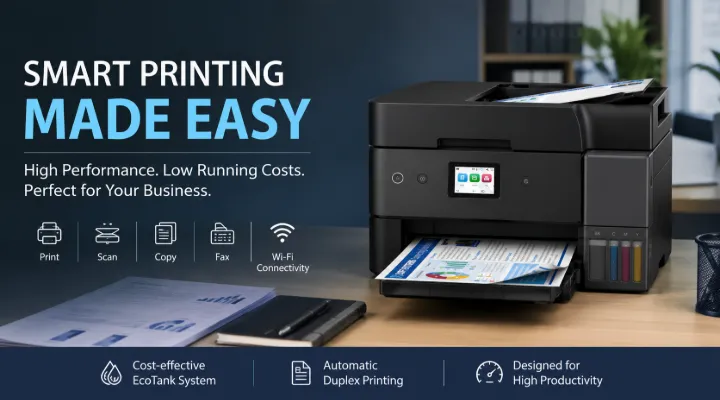
Printing remains an essential part of daily business operations, even as many organizations move toward digital workflows. Invoices, contracts, reports, presentations, application forms, marketing materials, and other documents still need to be printed, copied, scanned, or shared. For businesses and home offices, choosing the right printer can make a noticeable difference in productivity and running costs.
The Epson L6390 EcoTank A4 Duplex Wi-Fi MFP Printer is designed for users who need more than a basic printer. It combines printing, scanning, copying, and faxing in one compact multifunction device. With automatic duplex printing, wireless connectivity, Ethernet support, and Epson's EcoTank ink system, it is built to support regular printing requirements while helping users manage long-term printing expenses.
This printer can be a practical option for small and medium-sized businesses, busy home offices, schools, retail operations, and professional users who regularly handle documents. Instead of purchasing separate devices for printing and scanning, users can manage several everyday tasks from a single machine.
ICTECH Distribution offers a wide range of IT and office technology solutions, including printers and multifunction devices for businesses looking to build efficient and reliable workspaces.
Who Is the Epson L6390 Designed For?
The Epson L6390 is suitable for users who require regular printing and document management without the complexity of a large office printing system.
Small and Medium-Sized Businesses
Small businesses often need to print invoices, quotations, purchase orders, reports, and customer documents every day. The multifunction capabilities of the L6390 allow one device to support several of these requirements.
For example, a trading company can use the printer to:
- Print quotations and invoices
- Scan supplier documents
- Copy signed paperwork
- Send or receive fax documents where required
- Print reports for meetings
Having these functions in one device can simplify office operations.
Home Offices and Remote Professionals
Professionals working from home may need to print contracts, proposals, study materials, or client documents. Wi-Fi connectivity makes it easier to place the printer in a convenient location without depending entirely on a wired connection.
A consultant, accountant, designer, or remote employee can print from a laptop or compatible mobile device while keeping the workspace organized.
Educational and Administrative Environments
Schools, training centers, and administrative departments regularly manage forms, worksheets, reports, and other printed materials. A multifunction printer with high-capacity ink capabilities can be useful for environments with ongoing document requirements.
The EcoTank System and Its Practical Benefits
One of the main features of the Epson L6390 is the EcoTank ink system. Unlike traditional cartridge-based printers that require frequent cartridge replacements, EcoTank printers use refillable ink tanks and high-yield ink bottles.
This approach can be particularly useful for users with consistent printing requirements.
Lower Interruption During Regular Printing
Running out of ink can interrupt an important task, especially when preparing documents for customers or meetings. A high-capacity ink system is designed to support more printing before refilling is required.
This can be beneficial for offices that print regularly throughout the week.
Better Cost Management
Printing costs are an important consideration for businesses. While the initial purchase price of a printer is important, the ongoing cost of ink can have a significant effect over time.
For a business printing hundreds or thousands of pages, a high-yield ink system can offer a more economical approach compared with frequently replacing standard cartridges.
Easier Planning for Office Supplies
Businesses can also simplify supply planning by monitoring ink usage and keeping the appropriate refill bottles available when needed.
This is particularly useful for companies trying to reduce unexpected office expenses.
Automatic Duplex Printing Helps Save Paper
The Epson L6390 supports automatic duplex printing, allowing users to print on both sides of the paper without manually turning pages.
This feature can be useful in many everyday situations.
For example:
- A company preparing a 40-page internal report can reduce the amount of paper used.
- A school can print double-sided learning materials.
- A professional can prepare more compact proposal documents.
- Administrative departments can reduce paper storage requirements.
Automatic duplex printing also improves convenience. Users do not need to manually reload or flip paper for every double-sided document.
Over time, reducing unnecessary paper usage can contribute to lower office supply costs and more efficient document management.
Print, Scan, Copy and Fax from One Device
The Epson L6390 is a multifunction printer, meaning it combines several important office functions.
Printing
The printer is suitable for everyday documents, business reports, presentations, forms, and other A4 printing requirements. It is designed to produce clear text and quality color output for a variety of office tasks.
Scanning
Scanning is essential in modern offices where paper documents often need to be converted into digital files.
For example, a business can scan:
- Signed contracts
- Purchase orders
- Identity documents
- Supplier invoices
- Application forms
Digital copies can then be stored, emailed, or added to internal document management systems.
Copying
Quick copying is useful for offices that need duplicate documents without using a separate photocopier.
Faxing
Although digital communication has replaced faxing in many organizations, some industries and businesses still use fax for specific document workflows. Having fax functionality built into the same device can be useful for companies that continue to rely on this method.
Flexible Connectivity for Modern Workspaces
Modern offices use multiple devices, including desktop computers, laptops, tablets, and smartphones. The Epson L6390 offers different connectivity options to help the printer fit into various working environments.
Wi-Fi Connectivity
Wi-Fi allows compatible devices to connect to the printer without requiring every user to have a direct cable connection.
This can make printer placement more flexible and reduce unnecessary cables around the office.
Wi-Fi Direct
Wi-Fi Direct can provide a convenient option for connecting compatible devices directly to the printer when needed.
This can be useful in small offices, temporary workspaces, or situations where users need a direct wireless printing connection.
Ethernet
For businesses with an existing wired network, Ethernet connectivity can help integrate the printer into the office infrastructure.
A wired network connection may be particularly useful in offices where the printer is shared by multiple employees.
A Good Fit for Shared Office Environments
A shared printer needs to be accessible, reliable, and easy to use. The Epson L6390 can support multiple office functions without requiring separate equipment for printing, scanning, copying, and faxing.
Consider a small office with 10 employees. During a typical day, the team may need to:
- Print sales quotations
- Scan signed customer documents
- Copy internal forms
- Print marketing materials
- Prepare reports for management
A multifunction device can bring these activities together in one location.
This can also help businesses save space compared with installing several separate machines.
How the Epson L6390 Can Support Daily Productivity
The value of a printer is not based only on its technical specifications. It is also important to consider how it fits into real working routines.
The L6390 is designed to reduce common printing inconveniences through features such as wireless connectivity, multifunction capability, automatic duplex printing, and a high-capacity ink system.
A practical workflow could look like this:
- An employee receives a signed document.
- The document is scanned into a digital format.
- A copy is printed for internal records.
- A double-sided report is printed for a customer meeting.
- The documents are shared through the office network.
Instead of moving between different devices, these tasks can be handled through one multifunction printer.
Things to Consider Before Buying
Before choosing any office printer, businesses should evaluate their actual requirements.
Monthly Printing Volume
Consider how many pages the business prints each month. A company printing only occasionally may have different requirements from an office with continuous daily printing.
Required Functions
If the business only needs printing, a single-function printer may be enough. However, organizations that regularly scan, copy, and fax documents may benefit from a multifunction device.
Connectivity Requirements
Consider whether the printer will be used through:
- Wi-Fi
- Ethernet
- Direct wireless connections
- Multiple computers and devices
The existing office network can influence which connectivity method is most practical.
Available Space
A multifunction printer can help reduce the need for multiple devices, but businesses should still ensure there is enough space for the printer, paper handling, and easy access for employees.
Why Choose the Epson L6390 from ICTECH Distribution?
Choosing the right technology supplier is important when purchasing business equipment. In addition to selecting the correct model, businesses often need help sourcing suitable products for their office requirements.
ICTECH Distribution supplies a broad range of IT and office technology products for businesses and professional users. The Epson L6390 can be considered by organizations looking for a multifunction printing solution that combines everyday document handling with economical high-volume printing.
Whether you are setting up a new office, upgrading an existing printing environment, or looking for equipment for a growing team, choosing a printer based on your actual workload and connectivity requirements can help you make a better long-term investment.
Conclusion
The Epson L6390 EcoTank A4 Duplex Wi-Fi MFP Printer is a versatile solution for businesses and professional users who need reliable printing along with scanning, copying, and faxing capabilities.
Its EcoTank ink system is designed to support cost-effective printing, while automatic duplex printing can help reduce paper usage. Wi-Fi, Wi-Fi Direct, and Ethernet connectivity provide flexibility for different office environments, and the multifunction design helps bring several document-handling tasks into one device.
For small and medium-sized businesses, home offices, educational environments, and administrative teams, the Epson L6390 offers a practical combination of productivity, convenience, and efficient printing.
If your organization regularly handles documents and needs a single device for printing, scanning, copying, and faxing, the Epson L6390 is worth considering as part of a modern office setup.
Frequently Asked Questions
1. Is the Epson L6390 suitable for small businesses?
Yes. The Epson L6390 is suitable for small and medium-sized businesses that need regular printing, scanning, copying, and faxing from a single multifunction device.
2. Does the Epson L6390 support automatic double-sided printing?
Yes. The printer supports automatic duplex printing, allowing users to print on both sides of the paper without manually turning the pages.
3. Can multiple users connect to the Epson L6390?
The printer offers Wi-Fi and Ethernet connectivity, making it suitable for shared office environments where multiple compatible devices need access to the printer.
4. What is the advantage of the EcoTank ink system?
The EcoTank system uses high-yield refillable ink tanks instead of traditional cartridges. This can help users manage long-term printing costs and reduce the frequency of ink replacement.
5. Can the Epson L6390 be used for scanning and copying?
Yes. In addition to printing, the Epson L6390 supports scanning and copying, making it suitable for everyday document management requirements.
