
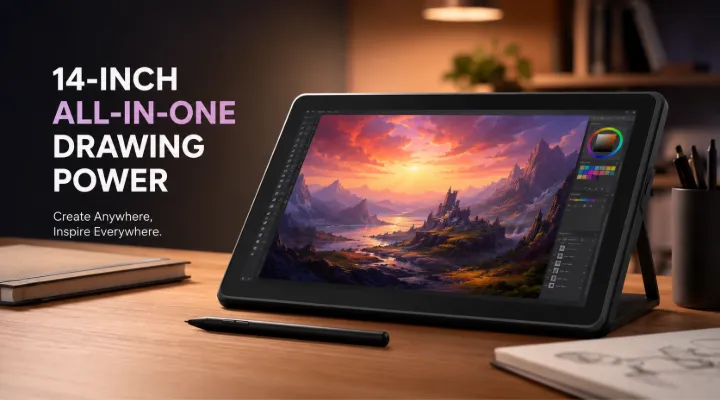
Digital artists, illustrators, designers, and creative professionals need tools that can keep up with their imagination. Traditional drawing tablets often require connection to a computer, which can limit flexibility when working on the move. The Wacom 14-inch MovinkPad Pro All-in-One Mobile Drawing Tablet DTHA140L0Z addresses this challenge by combining a high-quality drawing display with standalone computing capabilities.
Designed for creators who want professional-grade performance in a portable format, the MovinkPad Pro allows artists to sketch, illustrate, edit, and create from virtually anywhere. Whether you are working on concept art, digital painting, graphic design, or content creation, this device offers a complete creative workspace in a compact package.
Businesses, educational institutions, creative agencies, and professional artists can source Wacom products through trusted technology distributors such as ICTECH Distribution, which supplies a wide range of professional IT and creative solutions across the UAE and international markets.
Who Is the Wacom MovinkPad Pro Designed For?
The Wacom MovinkPad Pro is ideal for:
- Professional digital artists
- Illustrators and comic creators
- Graphic designers
- Animation professionals
- Architecture and design students
- Creative agencies
- Content creators
- Photography editors
- Art educators
Its combination of portability, display quality, and pen precision makes it suitable for both experienced professionals and aspiring creators.
Key Features of the Wacom MovinkPad Pro
1. 14-inch Professional Drawing Display
The centerpiece of the MovinkPad Pro is its 14-inch display.
Benefits include:
- Large working area
- Comfortable drawing experience
- Accurate visual representation
- Easy multitasking
- Better detail visibility
The screen size strikes an excellent balance between portability and workspace efficiency.
For example, a digital illustrator creating a detailed character design can comfortably zoom in and work on facial features without feeling restricted by screen size.
2. Standalone All-in-One Design
Unlike traditional pen displays that require a separate computer, the MovinkPad Pro functions as a complete mobile workstation.
Advantages include:
- No external PC required
- Portable creative workflow
- Reduced cable clutter
- Work from anywhere
- Faster setup
This makes it particularly useful for artists who travel frequently or work remotely.
Practical Example
A freelance illustrator meeting clients outside the office can sketch concepts, make revisions, and finalize artwork directly on the device without carrying additional hardware.
3. Wacom Pen Technology
Wacom is widely recognized for its industry-leading pen technology.
The MovinkPad Pro delivers:
- Natural drawing experience
- High pressure sensitivity
- Tilt recognition
- Precise cursor control
- Low latency input
Artists can create lines ranging from extremely thin strokes to bold brush marks depending on pen pressure.
This mimics traditional drawing techniques, making the transition from paper to digital much easier.
4. Portable Creative Workspace
Portability is one of the biggest strengths of the device.
Key benefits:
- Lightweight construction
- Easy transportation
- Suitable for travel
- Convenient for field work
- Flexible work environments
Whether you are sketching at a coffee shop, client office, classroom, or studio, the MovinkPad Pro allows creativity to continue uninterrupted.
Display Quality for Professional Work
Accurate Color Reproduction
Professional artists require displays that accurately represent colors.
The MovinkPad Pro is designed to support:
- Color-critical projects
- Digital illustrations
- Photo editing
- Graphic design
- Creative production workflows
Accurate colors help ensure consistency between the screen and final output.
For designers preparing marketing materials, product packaging, or brand assets, color precision is especially important.
Enhanced Visual Experience
The display provides:
- Sharp image quality
- Smooth visuals
- Excellent contrast
- Better viewing angles
- Comfortable drawing surface
These characteristics contribute to a more immersive and productive creative experience.
Productivity Benefits for Creative Professionals
Faster Workflow
Having computing power and a drawing display in one device helps streamline creative workflows.
Benefits include:
- Immediate project access
- Reduced setup time
- Faster revisions
- Simplified file management
- Greater mobility
This can significantly improve productivity for busy professionals working on multiple projects.
Ideal for Remote Collaboration
Creative teams increasingly collaborate remotely.
The MovinkPad Pro supports:
- Online meetings
- Live sketching sessions
- Client presentations
- Collaborative design reviews
- Remote educational activities
Designers can quickly share ideas and make edits during discussions.
Applications Across Different Industries
Digital Illustration
Illustrators can use the device for:
- Character design
- Storyboarding
- Children's book illustrations
- Comic creation
- Concept artwork
The responsive pen technology helps artists create expressive and detailed artwork.
Graphic Design
Graphic designers benefit from:
- Direct screen interaction
- Accurate editing
- Better precision
- Improved layout creation
- Natural drawing input
This is especially useful for logo design, branding projects, and marketing materials.
Animation and Storyboarding
Animation professionals often require a portable drawing platform.
The MovinkPad Pro can support:
- Storyboard creation
- Character development
- Scene planning
- Animation concepts
- Visual storytelling
Its portability allows creators to work wherever inspiration strikes.
Education and Training
Art schools and educational institutions can integrate the device into creative learning environments.
Students can use it for:
- Digital art training
- Design coursework
- Illustration practice
- Portfolio development
- Interactive learning
The familiar pen-on-screen experience helps students develop digital skills more naturally.
Advantages Over Traditional Drawing Setups
Reduced Equipment Requirements
Traditional creative setups often involve:
- Desktop computer
- External drawing tablet
- Monitor
- Multiple cables
- Dedicated workspace
The MovinkPad Pro combines many of these functions into a single device.
Benefits
- Less clutter
- Greater portability
- Easier transportation
- Faster setup
- Improved convenience
Flexible Creative Freedom
Artists are no longer limited to a fixed workstation.
They can create:
- At home
- In studios
- During travel
- In classrooms
- At client locations
This flexibility helps maximize productivity and creative output.
Why Wacom Remains a Trusted Brand
For decades, Wacom has been a preferred choice among professional artists.
Reasons include:
- Industry-leading pen technology
- Reliable hardware
- Professional-grade performance
- Strong software compatibility
- Trusted reputation
Many creative studios, animation companies, and educational institutions rely on Wacom products as part of their professional workflows.
The MovinkPad Pro continues this tradition by bringing Wacom's expertise into a modern mobile platform.
Choosing the Right Mobile Drawing Device
When evaluating a professional drawing tablet, consider the following:
Display Quality
Look for:
- Accurate colors
- Good brightness
- Sharp resolution
- Comfortable viewing experience
Pen Performance
Consider:
- Pressure sensitivity
- Tilt support
- Responsiveness
- Natural drawing feel
Portability
Ask yourself:
- Will you travel frequently?
- Do you work remotely?
- Do you need mobile creativity?
If the answer is yes, a device like the MovinkPad Pro offers significant advantages.
Workflow Compatibility
Ensure the device supports your preferred creative processes and professional requirements.
The MovinkPad Pro is designed to fit a wide range of creative workflows, making it suitable for freelancers, agencies, educational institutions, and enterprise creative teams.
Availability Through ICTECH Distribution
Organizations looking to equip creative professionals with high-quality digital art solutions can source Wacom products through ICTECH Distribution.
ICTECH Distribution supplies professional technology products for businesses, educational institutions, resellers, and creative industries. Their portfolio includes advanced computing, display, and creative technology solutions that help organizations stay productive and innovative.
Whether you are purchasing a single device for an artist or deploying multiple units across a creative department, ICTECH Distribution can support your requirements.
Conclusion
The Wacom 14-inch MovinkPad Pro All-in-One Mobile Drawing Tablet DTHA140L0Z is an impressive solution for modern digital creators. By combining a professional drawing display, advanced pen technology, and standalone functionality into a portable device, it delivers the flexibility and performance that today's artists demand.
From digital illustration and graphic design to animation and educational use, the MovinkPad Pro supports a wide variety of creative workflows. Its portability allows creators to work anywhere, while Wacom's trusted pen technology ensures precision and control.
For professionals, students, creative agencies, and businesses seeking a reliable mobile drawing solution, the Wacom MovinkPad Pro represents a powerful investment in creativity and productivity.
Frequently Asked Questions (FAQ)
1. What is the Wacom MovinkPad Pro used for?
The Wacom MovinkPad Pro is designed for digital drawing, illustration, graphic design, animation, photo editing, and other creative workflows.
2. Does the MovinkPad Pro require a separate computer?
No. It is an all-in-one mobile drawing tablet designed to operate as a standalone creative device.
3. Who should buy the Wacom MovinkPad Pro?
Professional artists, designers, students, illustrators, creative agencies, and content creators can all benefit from its capabilities.
4. Is the Wacom pen suitable for professional artwork?
Yes. Wacom's pen technology is widely recognized for its precision, pressure sensitivity, and natural drawing experience.
5. Can businesses purchase Wacom products through ICTECH Distribution?
Yes. ICTECH Distribution supplies professional technology solutions, including creative devices suitable for business, education, and creative industry applications.
